Configuring BGP Neighbor Between NSX-T and VyOS Router is an article that shows how to configure BGP to exchange routes between NSX-T T0 and VyOS Router.
So, below we have our lab topology:
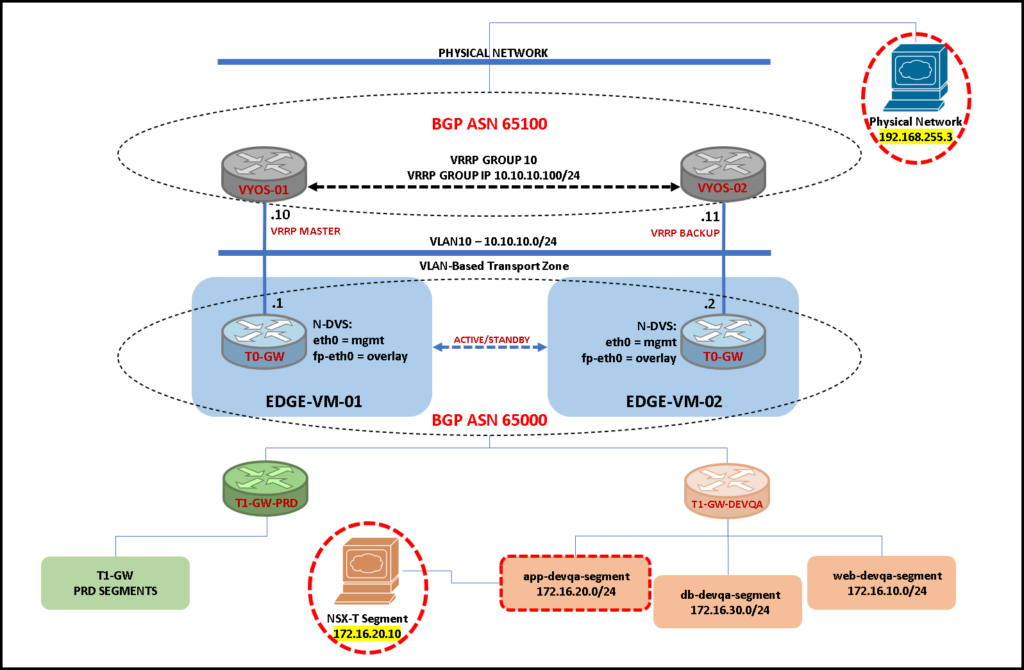
As we can see in the above picture, our environment has an NSX-T with T0 and T1 Gateways and our NSX-T has an integration with both VyOS routers using the Border Gateway Protocol (BGP) for routing exchanges.
We will show the VyOS configuration and the NSX-T configuration for providing the source device located in an NSX-T Segment to be able to communicate with the destination device located on a physical network:
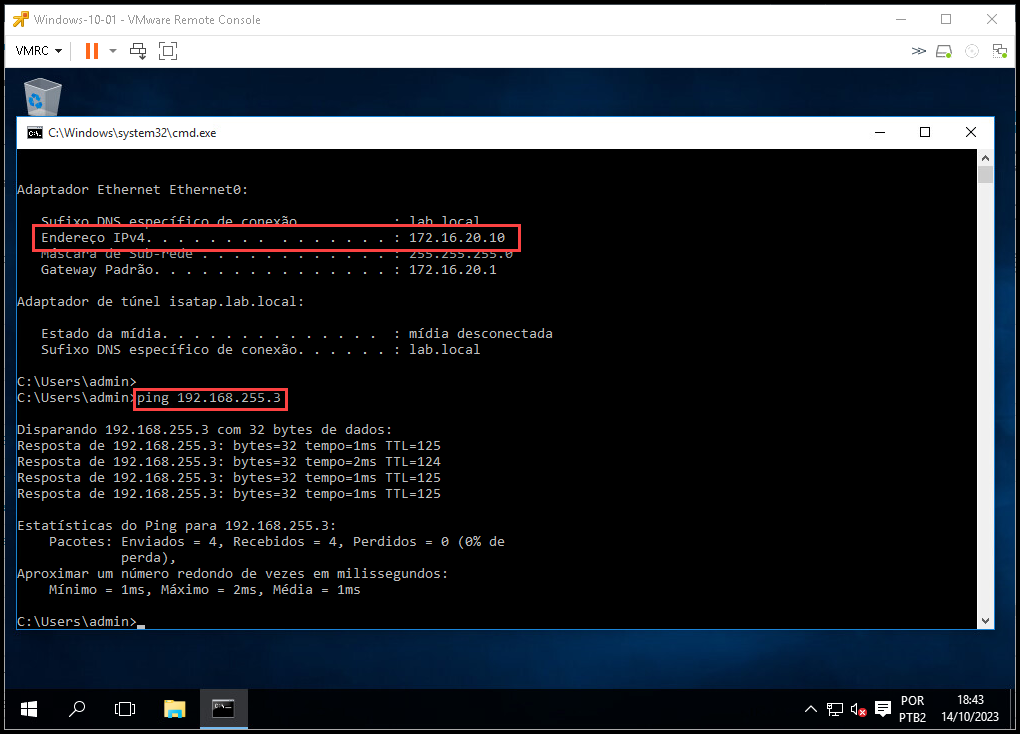
- Source: 172.16.20.10 –> NSX-T Segment
- Destination: 192.168.255.3 –> Physical Network
BGP configuration for the vyos-01
So, here we have the BGP configuration for the VyOS router called “vyos-01”:
configure
set protocols bgp address-family ipv4-unicast network 10.10.10.0/24
set protocols bgp neighbor 10.10.10.1 address-family ipv4-unicast
set protocols bgp neighbor 10.10.10.1 remote-as '65000'
set protocols bgp neighbor 10.10.10.2 address-family ipv4-unicast
set protocols bgp neighbor 10.10.10.2 remote-as '65000'
set protocols bgp neighbor 10.10.10.170 address-family ipv4-unicast
set protocols bgp neighbor 10.10.10.170 remote-as '65100'
set protocols bgp parameters log-neighbor-changes
set protocols bgp system-as '65100'
commit
save
BGP configuration for the vyos-02
Here, we have the BGP configuration for the VyOS router called “vyos-02”:
configure
set protocols bgp address-family ipv4-unicast network 10.10.10.0/24
set protocols bgp neighbor 10.10.10.1 address-family ipv4-unicast
set protocols bgp neighbor 10.10.10.1 remote-as '65000'
set protocols bgp neighbor 10.10.10.2 address-family ipv4-unicast
set protocols bgp neighbor 10.10.10.2 remote-as '65000'
set protocols bgp neighbor 10.10.10.170 address-family ipv4-unicast
set protocols bgp neighbor 10.10.10.170 remote-as '65100'
set protocols bgp parameters log-neighbor-changes
set protocols bgp system-as '65100'
commit
save
BGP configuration for the NSX-T T0 GW
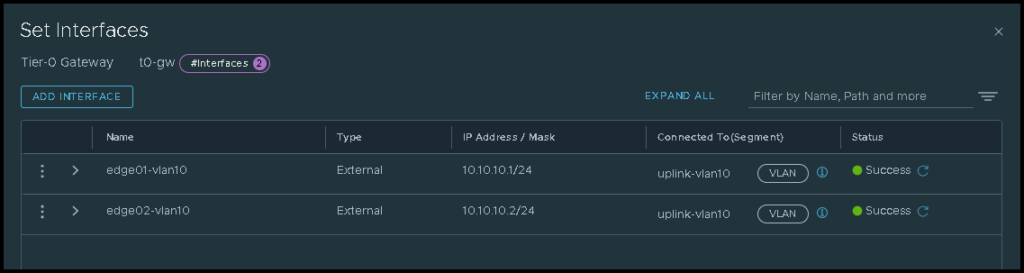
On the T0 gateway, we have two interfaces placed on the VLAN10. Both interfaces are using an NSX-T Segment called “uplink-vlan10”. This NSX-T Segment is a VLAN-Backed Segment using the VLAN ID 10:
The BGP is enabled with default options:

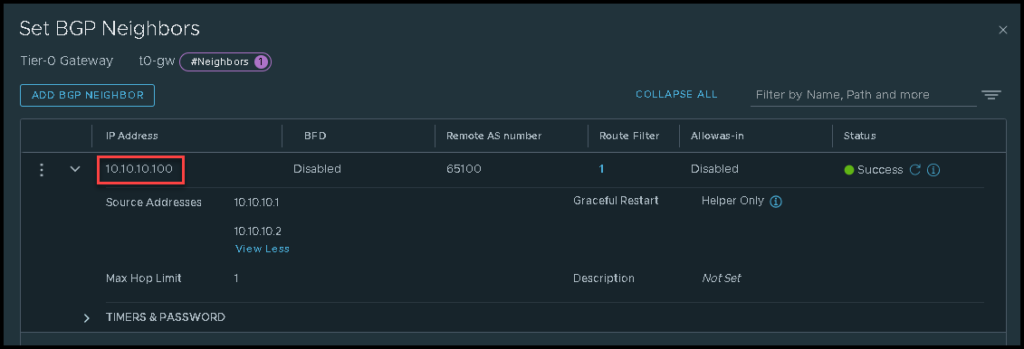
And we have a BGP neighbor for the VyOS router. In this case, we are using the IP 10.10.10.100 for the neighbor – this is a VRRP Virtual IP provided by the VRRP configuration on the VyOS routers:
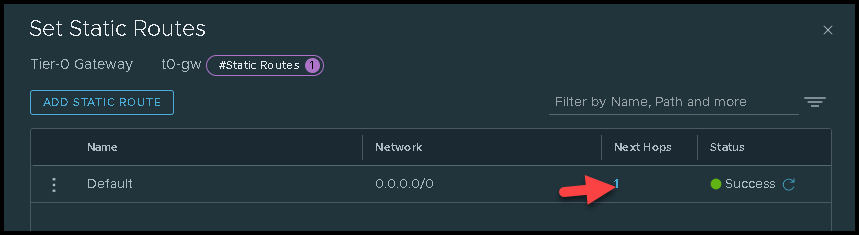
Additionally, we have a default route on the TO gateway using the VyOS VRRP Virtual IP as a next hop:

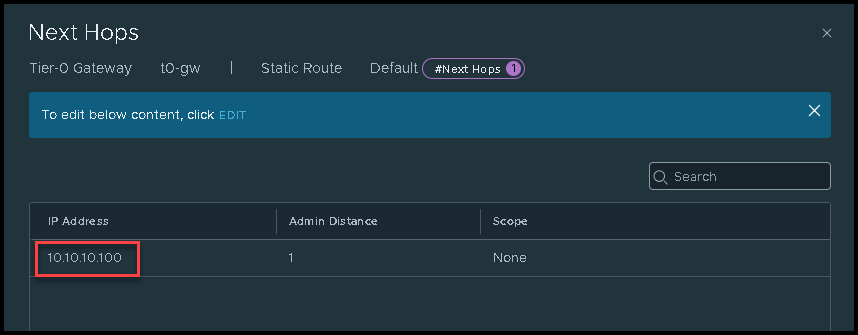
Checking the BGP status on the vyos-01
As we can see in the below output, the vyos-01 router has both instances of the T0 gateways (one provided by one NSX-T Edge VM and another provided by another NSX-T Edge VM).
In this example, the vyos-01 is the BACKUP router on the VRRP environment. So, in this case, this router is not used primarily to flow the network traffic – this is the reason for the BGP session has the status “Active” for each BGP neighbor (in this case, this behavior is expected):
vyos@vyos-01:~$ show ip bgp summary

IPv4 Unicast Summary (VRF default):
BGP router identifier 192.168.255.8, local AS number 65100 vrf-id 0
BGP table version 1
RIB entries 1, using 192 bytes of memory
Peers 3, using 61 KiB of memory

Neighbor        V         AS   MsgRcvd   MsgSent   TblVer  InQ OutQ  Up/Down State/PfxRcd   PfxSnt Desc
10.10.10.1      4      65000         0       231        0    0    0    never       Active        0 N/A
10.10.10.2      4      65000         0       231        0    0    0    never       Active        0 N/A
10.10.10.170    4      65100         0       200        0    0    0    never       Active        0 N/A

Total number of neighbors 3
Checking the BGP status on the vyos-02
So, here, we can see both BGP sessions up for the NSX-T T0 gateways – This router is the MASTER on the VRRP environment and all traffic flows through this router:
vyos@vyos-02:~$ show ip bgp summary

IPv4 Unicast Summary (VRF default):
BGP router identifier 192.168.255.9, local AS number 65100 vrf-id 0
BGP table version 25
RIB entries 13, using 2496 bytes of memory
Peers 3, using 61 KiB of memory

Neighbor        V         AS   MsgRcvd   MsgSent   TblVer  InQ OutQ  Up/Down State/PfxRcd   PfxSnt Desc
10.10.10.1      4      65000       474       497       25    0    0 07:45:07            6        7 N/A
10.10.10.2      4      65000       472       497       25    0    0 07:45:06            6        7 N/A
10.10.10.170    4      65100       469       493       25    0    0 07:45:34            1        7 N/A

Total number of neighbors 3
Checking the BGP status on the NSX Manager
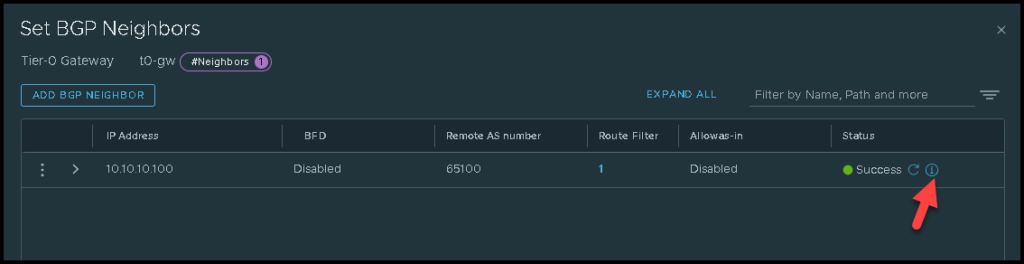
We can see the BGP neighbor status by clicking on the “i” icon, as we can see in the below picture:
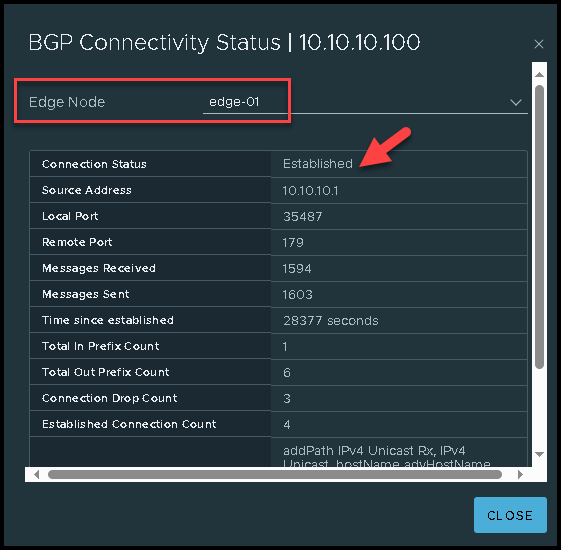
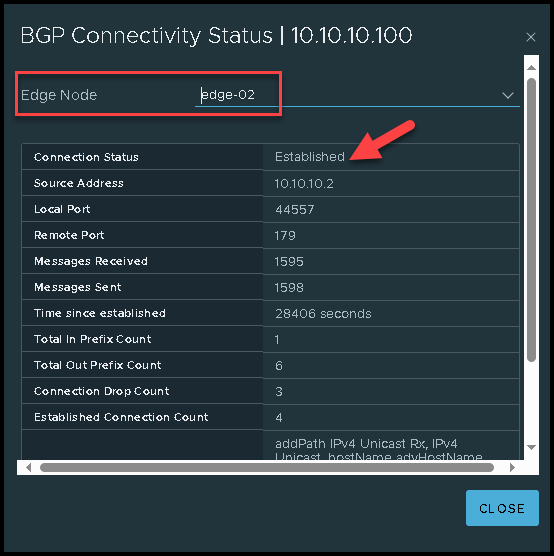
Additionally, we can access each NSX-T Edge VM and check the BGP neighbor status.
For the first Edge VM “edge-01” – in this example, the Service Router Instance for the T0 gateway is the VRF 2:
edge-01> vrf 2
edge-01(tier0_sr[2])>
edge-01(tier0_sr[2])> get bgp neighbor summary
BFD States: NC - Not configured, DC - Disconnected
            AD - Admin down, DW - Down, IN - Init, UP - Up
BGP summary information for VRF default for address-family: ipv4Unicast
Router ID: 10.10.10.1  Local AS: 65000

Neighbor                            AS          State Up/DownTime  BFD InMsgs  OutMsgs InPfx  OutPfx

10.10.10.100                        65100       Estab 07:57:51     NC  1599    1608    1      6

Sat Oct 14 2023 UTC 21:36:57.339
edge-01(tier0_sr[2])>
For the second Edge VM “edge-02” – in this example, the Service Router Instance for the T0 gateway is the VRF 5:
edge-02> vrf 5
edge-02(tier0_sr[5])>
edge-02(tier0_sr[5])> get bgp neighbor summary
BFD States: NC - Not configured, DC - Disconnected
            AD - Admin down, DW - Down, IN - Init, UP - Up
BGP summary information for VRF default for address-family: ipv4Unicast
Router ID: 10.10.10.2  Local AS: 65000

Neighbor                            AS          State Up/DownTime  BFD InMsgs  OutMsgs InPfx  OutPfx

10.10.10.100                        65100       Estab 08:01:13     NC  1603    1606    1      6

Sat Oct 14 2023 UTC 21:40:21.078
edge-02(tier0_sr[5])>
Testing the communication from the source VM to the destination VM
As we said before, the source VM is using an NSX-T Segment and the destination VM is using our physical network.
As we can see in the below picture, the ICMP test (ping) has executed successfully:
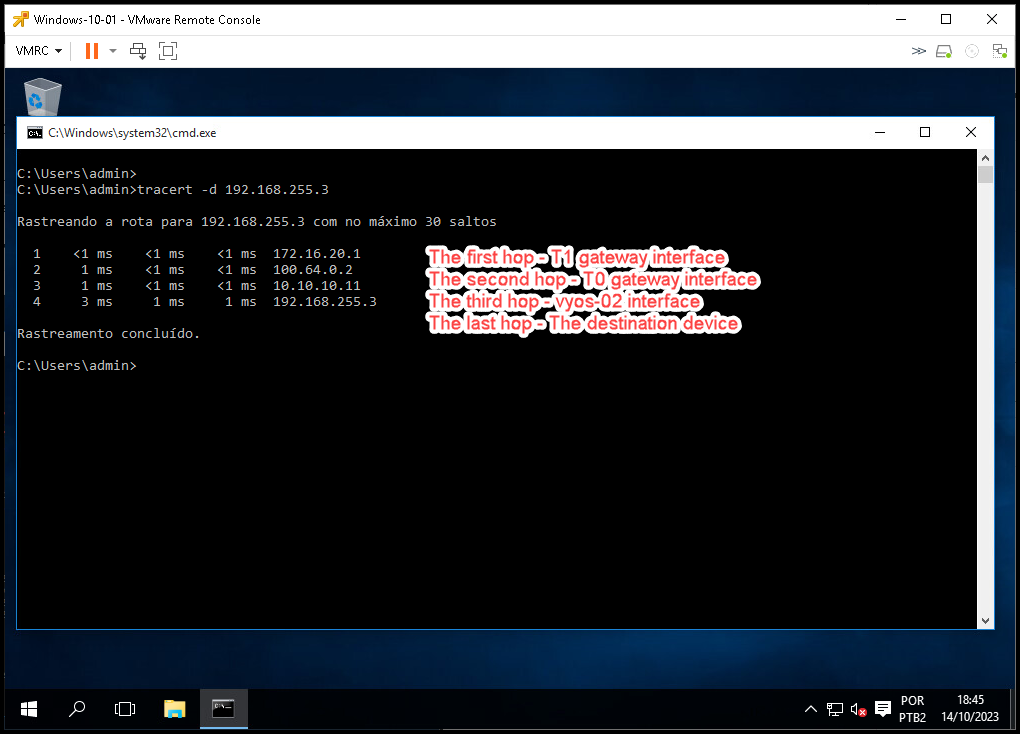
The tracert command on the source device has executed successfully as well:
We have written some articles about NSX-T and VyOS. You can check these articles on the below links:
https://dpcvirtualtips.com/category/virtualization/nsx-t/
https://dpcvirtualtips.com/category/operating-systems/