

When SlurmDBD is down in a Slurm HPC cluster, the impact can look more serious than it actually is. SlurmDBD is central to persistent accounting and account-management data, but it is not the daemon that directly schedules jobs or controls compute nodes during normal cluster operation.
That distinction matters during an outage. If slurmctld was already running and had previously synchronized with SlurmDBD, the controller can usually continue operating from cached association, limit, and fair-share information while accounting messages accumulate locally for later delivery.
The situation becomes more critical when SlurmDBD remains unavailable for an extended period, administrators need database-backed tools, or slurmctld must start without usable cached information. Understanding these boundaries helps avoid unnecessary cluster-wide disruption while the accounting service is being restored.
Where SlurmDBD Fits in the Architecture
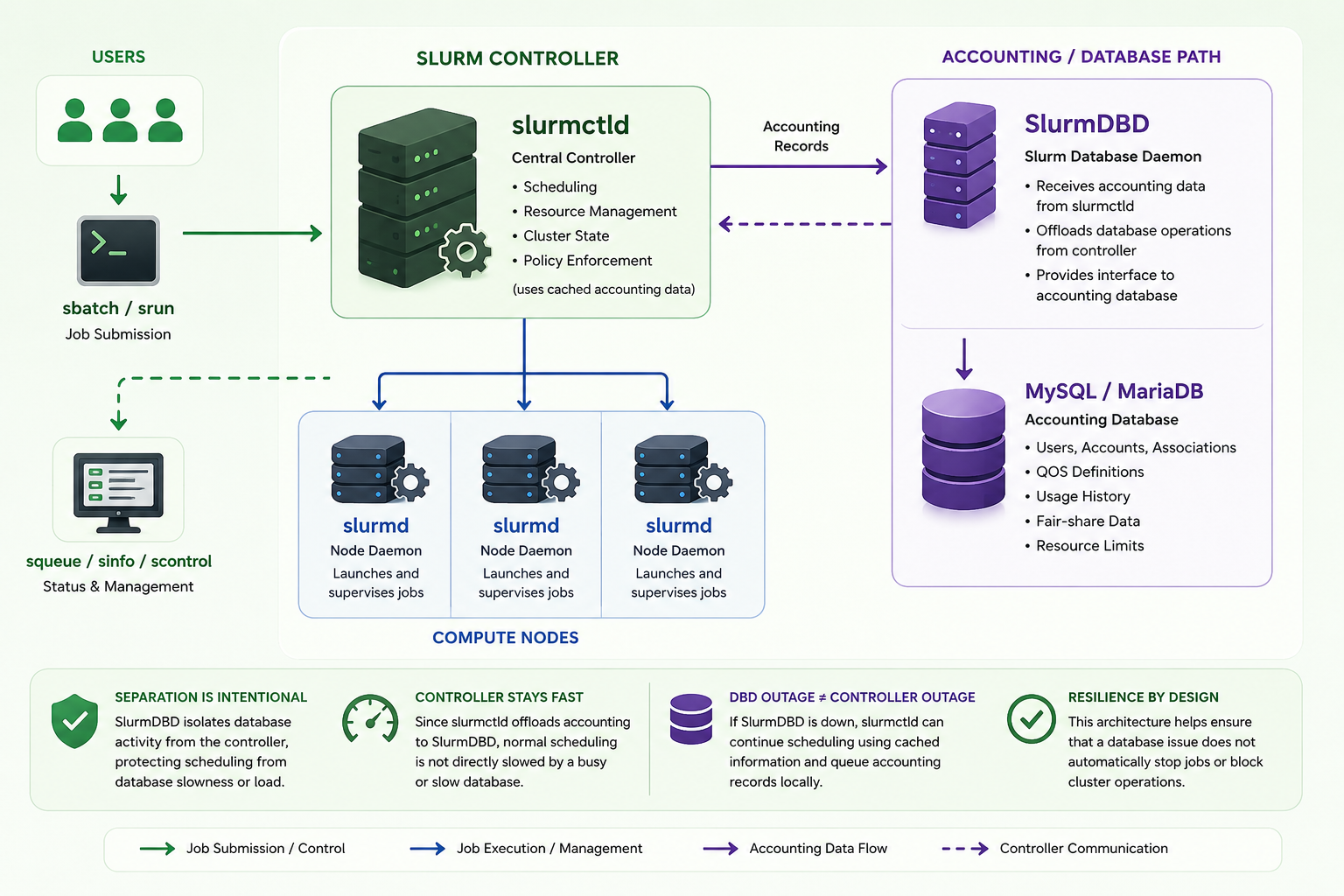
A typical Slurm deployment has several independent components. slurmctld is the central controller responsible for scheduling jobs and managing cluster state, while slurmd runs on compute nodes and launches or supervises workloads. SlurmDBD sits beside this execution path and provides the interface between Slurm and its accounting database.
When AccountingStorageType=accounting_storage/slurmdbd is configured, accounting records are sent through SlurmDBD to the underlying MySQL or MariaDB database. The same database commonly stores users, accounts, associations, QOS definitions, usage history, and information needed for fair-share and resource-limit policies.
This separation is intentional. SchedMD notes that SlurmDBD offloads database processing from the controller, helping prevent a slow or overloaded database from directly slowing normal controller operations. Therefore, a SlurmDBD outage is not automatically equivalent to a Slurm controller outage.
If you want to reproduce this architecture in a test environment, see “Setting Up a Slurm Cluster in a Lab: Practical Deployment Guide“.
What Continues Working
The most important operational point is that an already-running slurmctld can normally continue scheduling during a temporary SlurmDBD outage.
Existing jobs continue running on their compute nodes. Slurm does not terminate healthy workloads simply because the accounting daemon becomes unreachable. The slurmd daemons continue managing job execution, and the controller (slurmctld) continues maintaining the active cluster state.
New jobs can also generally continue to be submitted and scheduled because the controller retains the accounting-related information it already received. SchedMD specifically documents that slurmctld caches user limits and fair-share information, allowing a short SlurmDBD outage to be tolerated.
Commands that obtain live scheduling information from slurmctld also remain useful. For example:
squeuestill queries jobs managed by the controller, while:
sinfocontinues showing partition and node information.
Administrative commands such as:
scontrol show job <jobid>
scontrol show node <node>
also depend primarily on the controller rather than the accounting database.
This is why users may continue submitting jobs, checking queues, and running workloads even while administrators are receiving SlurmDBD connection errors in the logs.
What Happens to Accounting Records
The next concern can be: if SlurmDBD cannot accept accounting updates, are job records immediately lost?
For a short outage, normally no.
When SlurmDBD becomes unavailable, slurmctld queues accounting messages instead of requiring every database operation to complete synchronously. Once communication is restored, the queued records are transferred to SlurmDBD. Slurm also documents that cached controller information is written to local storage during shutdown and recovered when possible at startup.
This behavior provides an important buffer between scheduling operations and the accounting database.
An administrator can inspect the queue with:
sdiagLook for:
DBD Agent queue size
According to the sdiag documentation, this value grows when messages intended for SlurmDBD cannot be processed because SlurmDBD or the database is unavailable. A small temporary increase is expected during an outage. A continuously growing queue requires attention.
The MaxDBDMsgs Limit Matters
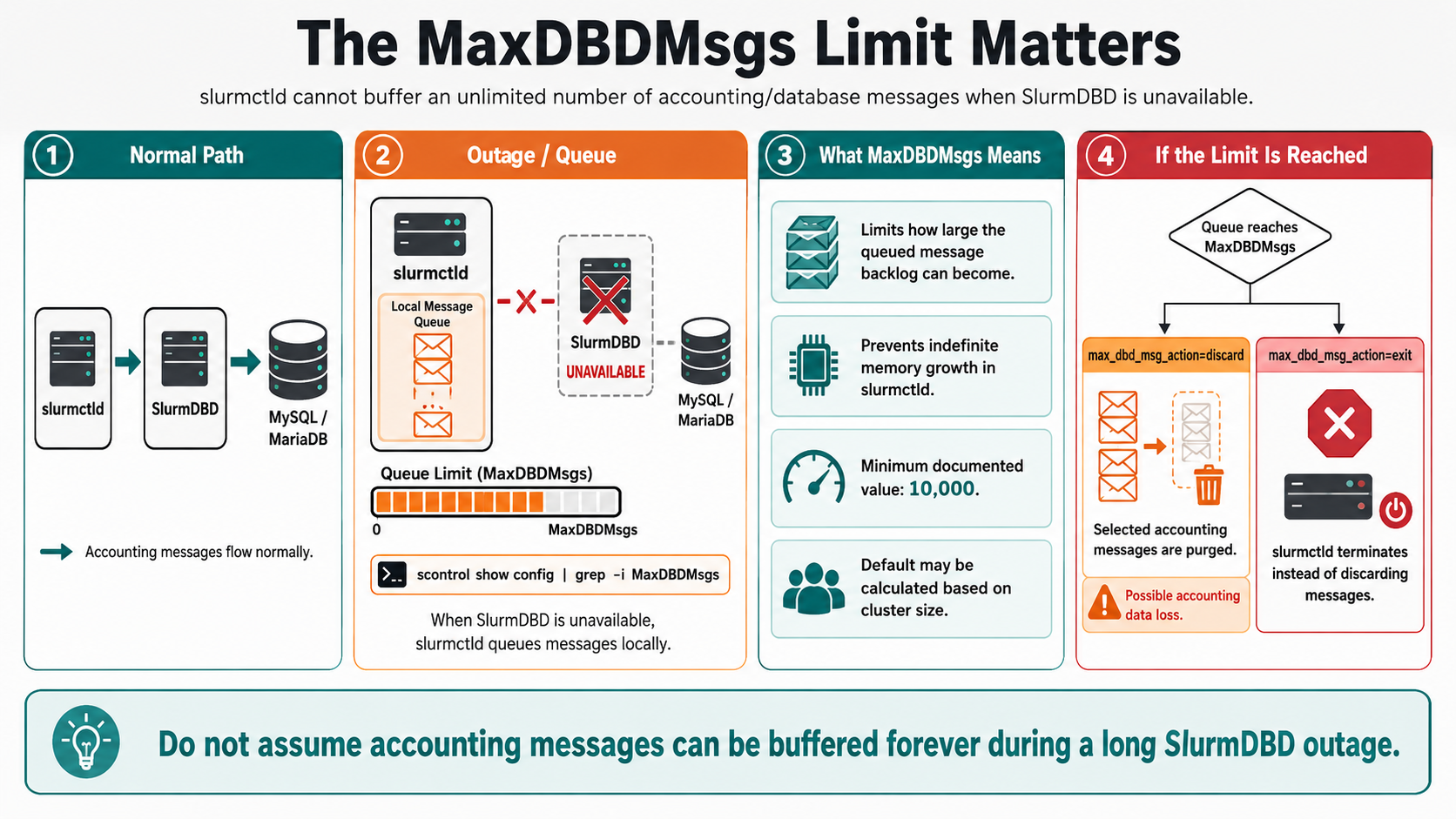
MaxDBDMsgs defines how many messages slurmctld can queue while SlurmDBD is unavailable.
Check it with:
scontrol show config | grep -i MaxDBDMsgs
The current default is 10000, or MaxJobCount * 2 + Node Count * 4, whichever is greater. The value cannot be configured below 10,000.
The action taken when the queue reaches this limit is controlled by the max_dbd_msg_action option inside SlurmctldParameters.
Example:
SlurmctldParameters=max_dbd_msg_action=discarddiscard is the default. Slurm progressively purges selected accounting messages to free queue space. If the queue repeatedly reaches the limit, accounting data can eventually be lost.
Or:
SlurmctldParameters=max_dbd_msg_action=exitWith exit, slurmctld terminates when the maximum queue size is reached instead of discarding accounting messages. This behavior must be understood carefully before being enabled because an accounting outage can then become a controller outage.
When communication with SlurmDBD is unavailable, slurmctld queues messages, but MaxDBDMsgs limits how large that queue can become so the controller does not consume memory indefinitely. Current Slurm documentation defines a minimum of 10,000 messages and calculates the default using cluster size when that results in a higher value.
This changes the severity of a long outage.
If the queue reaches its limit, behavior depends on max_dbd_msg_action. With the default discard behavior, Slurm starts purging selected accounting messages and can eventually stop tracking new ones, creating accounting data loss. With exit, slurmctld terminates instead of discarding the messages.
For that reason, do not assume accounting information can be buffered forever.
What Stops Working or Becomes Unreliable
Database-oriented tools are where the outage becomes immediately visible.
sacct normally retrieves job and job-step accounting information from Slurm accounting storage. Historical queries may therefore fail or become unavailable while SlurmDBD cannot be reached. Even after service returns, very recent records may temporarily appear incomplete until queued updates have been processed.
The impact is even clearer with:
sacctmgrsacctmgr uses the database interface provided by SlurmDBD to view and modify accounts, users, associations, and related accounting objects. If SlurmDBD is unavailable, normal database-backed account-management operations should not be expected to work.
The same applies to reporting tools such as:
sreportbecause these reports are generated from accounting data and database rollups.
So while:
squeuemay look completely normal, commands such as the following will not work as expected:
sacct
sacctmgr
sreport
Associations, QOS, and Fair Share During the Outage
Resource policies require a little more attention. If the controller already has associations, QOS definitions, user limits, and fair-share information in its internal cache, it can continue using that information while SlurmDBD is unavailable. SchedMD explicitly documents caching of user limits and fair-share information by slurmctld.
To inspect the associations and QOS information currently known by the controller:
scontrol show assoc_mgrThe assoc_mgr output displays the controller’s internal cache for users, associations, and QOS records.
This means existing policies do not simply disappear when SlurmDBD goes offline. However, the cache represents information already known to the controller. Database changes are a different matter. Adding a new account, creating a new association, or modifying a QOS through sacctmgr requires access to SlurmDBD.
Operationally, the distinction can be summarized as:
Existing cached policy --> Continues to be enforced

New accounting database change --> Unavailable until SlurmDBD returns
That is especially important in clusters using AccountingStorageEnforce, associations, QOS limits, or fair-share scheduling.
Example:

Be Careful with slurmctld Restarts
A running controller surviving a SlurmDBD outage is not the same situation as a controller starting for the first time.
Slurm can persist cached account, association, and limit information locally so that an existing controller installation can recover it across restarts. However, SchedMD also warns that SlurmDBD must be available when slurmctld is initially started without such cached information, because the controller has no authoritative local copy yet.
⚠️ This is an important troubleshooting detail!
If SlurmDBD is down but slurmctld is healthy and jobs are scheduling normally, restarting the controller without a specific reason can introduce additional risk.
Before restarting slurmctld, determine which component has actually failed:
- the
slurmdbdservice; - network connectivity between
slurmctldand SlurmDBD; - MUNGE authentication;
- MySQL or MariaDB availability;
- database storage;
- or a configuration mismatch.
⚠️ Do not turn an accounting outage into a controller outage unnecessarily!
A Practical SlurmDBD Outage Check
We can start on the SlurmDBD server. Access it from the command line and check the slurmdbd service status:
systemctl status slurmdbdConfirm That SlurmDBD Is Listening
On the SlurmDBD server:
ss -ltnp | grep 6819If your environment uses a custom port, verify the configured values:
grep -E 'DbdPort|DbdHost' /etc/slurm/slurmdbd.confOn the controller:
scontrol show config | grep -E 'AccountingStorageHost|AccountingStoragePort'Then test TCP connectivity from the controller:
nc -vz <slurmdbd-host> 6819The default SlurmDBD listening port is TCP 6819. DbdPort in slurmdbd.conf must match AccountingStoragePort in slurm.conf.
If the service is running locally but the controller cannot establish the TCP connection, investigate routing, firewall rules, DNS, or the configured host/port before changing Slurm itself.
Inspect Recente Logs
Then inspect recent log messages:
journalctl -u slurmdbd --since "-30 min"On the controller (slurmctld), look for database communication errors:
journalctl -u slurmctld --since "-30 min"Then check the database-message backlog:
sdiagPay particular attention to:
DBD Agent queue size
Check the Core Scheduling Status
Next, confirm that the core scheduling path is healthy:
scontrol ping
squeue
sinfo
These commands help establish whether you have only an accounting-service failure or a broader Slurm control-plane problem.
We can then test database-backed functionality separately, using the following commands:
sacct -S today
sacctmgr show cluster
If squeue and sinfo work while sacctmgr fails, the evidence strongly points toward the accounting path rather than the scheduler itself.
If SlurmDBD is running but still cannot operate correctly, inspect the database service and connectivity as well:
systemctl status mariadbor:
systemctl status mysqlddepending on the platform.
Also check authentication, available disk space, database logs, firewall rules, and DNS or hostname resolution where applicable.
Consider a Backup SlurmDBD
For environments where accounting availability is critical, a backup SlurmDBD can reduce the impact of a failure of the primary SlurmDBD host.
Relevant settings include:
AccountingStorageBackupHostin slurm.conf, and:
DbdBackupHostin slurmdbd.conf.
SchedMD states that the backup SlurmDBD must have access to the same underlying database as the primary daemon. The primary and backup instances also need compatible authentication and database access.
This can protect against the failure of the SlurmDBD host itself, although it does not remove the database backend from the overall failure domain.
What to Expect After SlurmDBD Returns
Once SlurmDBD becomes reachable again, slurmctld begins forwarding the accounting records accumulated during the outage.
Important: Do not assume that every accounting query will be complete immediately after the service starts. Depending on the amount of data in the controller cache, it may take some time to commit to SlurmDBD.
SchedMD recommends investigating immediately when the DBD Agent queue size grows beyond approximately half of the configured MaxDBDMsgs value.
We can use the following command to check the value on DBD Agent queue size:
sdiag | grep -i "DBD Agent queue size"The value should move back toward its normal level as the backlog is processed.
Then compare current scheduler state with accounting information:
squeueand:
sacct -S todayRecent completed jobs should gradually appear correctly in the accounting database.
For a broader day-to-day command reference, see “Essential Slurm Administration Commands Every HPC Administrator Should Know“.
What a SlurmDBD Outage Really Means
A temporary SlurmDBD outage is normally an accounting-service incident, not an immediate scheduling outage. An already-initialized slurmctld can continue scheduling workloads, enforcing cached associations and limits, and buffering accounting messages while the database path is restored.
The main operational risk is the growing DBD message queue. sdiag should therefore be monitored throughout the outage together with MaxDBDMsgs, controller memory usage, and the health of the SlurmDBD and database services.
The safest response is usually to preserve a healthy controller, identify whether the failure is in SlurmDBD, authentication, networking, or the database backend, and restore the accounting path before the queue approaches its configured limit.
Once SlurmDBD returns, continue monitoring the DBD Agent queue until the backlog has been processed and confirm that recent jobs appear correctly in the accounting database.
External References
- Slurm Accounting and Resource Limits Official SchedMD documentation explaining SlurmDBD, controller caching during database outages, persistence of association and limit information, and delayed delivery of job and step accounting records.
-
Slurm sdiag Documentation
Official reference for controller diagnostic statistics,
including the
DBD Agent queue sizeused to monitor messages waiting for SlurmDBD. -
slurm.conf Configuration Reference
SchedMD reference for
MaxDBDMsgs,AccountingStorageHost,AccountingStorageBackupHost, andSlurmctldParameters=max_dbd_msg_action. -
slurmdbd.conf Configuration Reference
Official configuration reference for SlurmDBD,
including
DbdHost,DbdBackupHost,DbdPort, authentication, database storage, and logging. -
Slurm scontrol Documentation
Official reference for controller-based cluster operations
and
scontrol show assoc_mgr, which displays users, associations, and QOS records cached byslurmctld. - Slurm Quick Start Administrator Guide SchedMD administrator guidance covering Slurm daemon architecture and high-availability options, including primary and backup SlurmDBD deployments.
