

High-performance computing (HPC) brings together compute resources to solve demanding problems that are too large or time-consuming for a single computer. Many HPC environments use clusters: networked nodes that run parallel workloads, supported by storage systems and a workload manager such as Slurm. Parallel execution can reduce the time needed to solve a problem when the work can be divided effectively; communication and synchronization between tasks also affect performance.
This introduction explains how nodes and the compute, network, and storage layers fit into an HPC environment, then introduces Slurm’s role in allocating resources and managing jobs. It is a conceptual overview rather than a production design guide: architectures vary according to workload, scale, and operational requirements.
What’s an HPC Cluster?
In an HPC cluster, each computer/server is a node. So, an HPC cluster is a set of nodes.
HPC clusters run batches of computations. The core of any HPC cluster is the scheduler (Slurm, for example), which tracks available resources and efficiently assigns job requests to compute resources (CPU and GPU) over a fast network.
We can consider a typical HPC solution with three main components or layers. They are:
- Compute, Network, and Storage
In the same context, the term “supercomputer” can refer to an HPC cluster. A supercomputer is composed of thousands of compute nodes that work together to complete tasks. So, there is a possibility of running parallel tasks to get the result faster.
While historically supercomputers were single super-fast machines, current high-performance computers are built using massive clusters of servers with one or more central processing units (CPUs).
Each node in an HPC cluster requires an operating system (OS). According to the TOP500 list, which continues to track the world’s most powerful computer systems, the majority of operating systems for high-performance computing are Linux. To access the TOP500 lists, click here.
To see how these components fit together in a working lab, read Setting Up a Slurm Cluster in a Lab: Practical Deployment Guide. The walkthrough covers controller and compute nodes, authentication, accounting, and shared storage, while distinguishing a learning lab from a production architecture.
Storage is a key part of many HPC environments because applications may need to read and write large datasets across multiple compute nodes. For an example of a parallel filesystem used in HPC, see Getting Started with Lustre File System, which introduces Lustre’s server and client roles.
Why HPC? What can we do with HPC?
Nowadays, organizations generate large volumes of data and need to process and use it more quickly in real time. So, with HPC clusters, organizations can easily align their goals.
HPC is now running from the cloud to the edge and can be applied to a wide range of problems – across industries such as science, oil and gas, healthcare, and engineering – due to its ability to solve large-scale computational problems within reasonable time and cost parameters. HPC can also be applied in other industries and use cases, such as government and academic research, high-performance graphics, biosciences, genomics, manufacturing, financial services and banking, geoscience, and media.
To power increasingly sophisticated algorithms, high-performance data analysis (HPDA) has emerged as a new segment that leverages HPC resources for big data. In addition, supercomputing is enabling deep learning and neural networks to advance artificial intelligence (AI).
What’s Slurm?
As we told you, HPC clusters run batches of computations, and the core is the scheduler. So, let’s talk about Slurm.
Slurm is an open source, fault-tolerant, and highly scalable cluster management and job scheduling system for large and small Linux clusters. Slurm requires no kernel modifications to operate and is relatively self-contained. As a cluster workload manager, Slurm has three key functions:
1- It allocates exclusive and/or non-exclusive access to resources (compute nodes) to users for some duration of time so they can perform work.
2- It provides a framework for starting, executing, and monitoring work (usually a parallel job) on the set of allocated nodes.
3- It arbitrates contention for resources by managing a queue of pending work.
To move from the architecture to practical job submission, see Slurm Job Submission: Practical Guide to srun, sbatch, and salloc. It demonstrates how these commands request resources, launch work, and support interactive or batch workflows.
Slurm Architecture
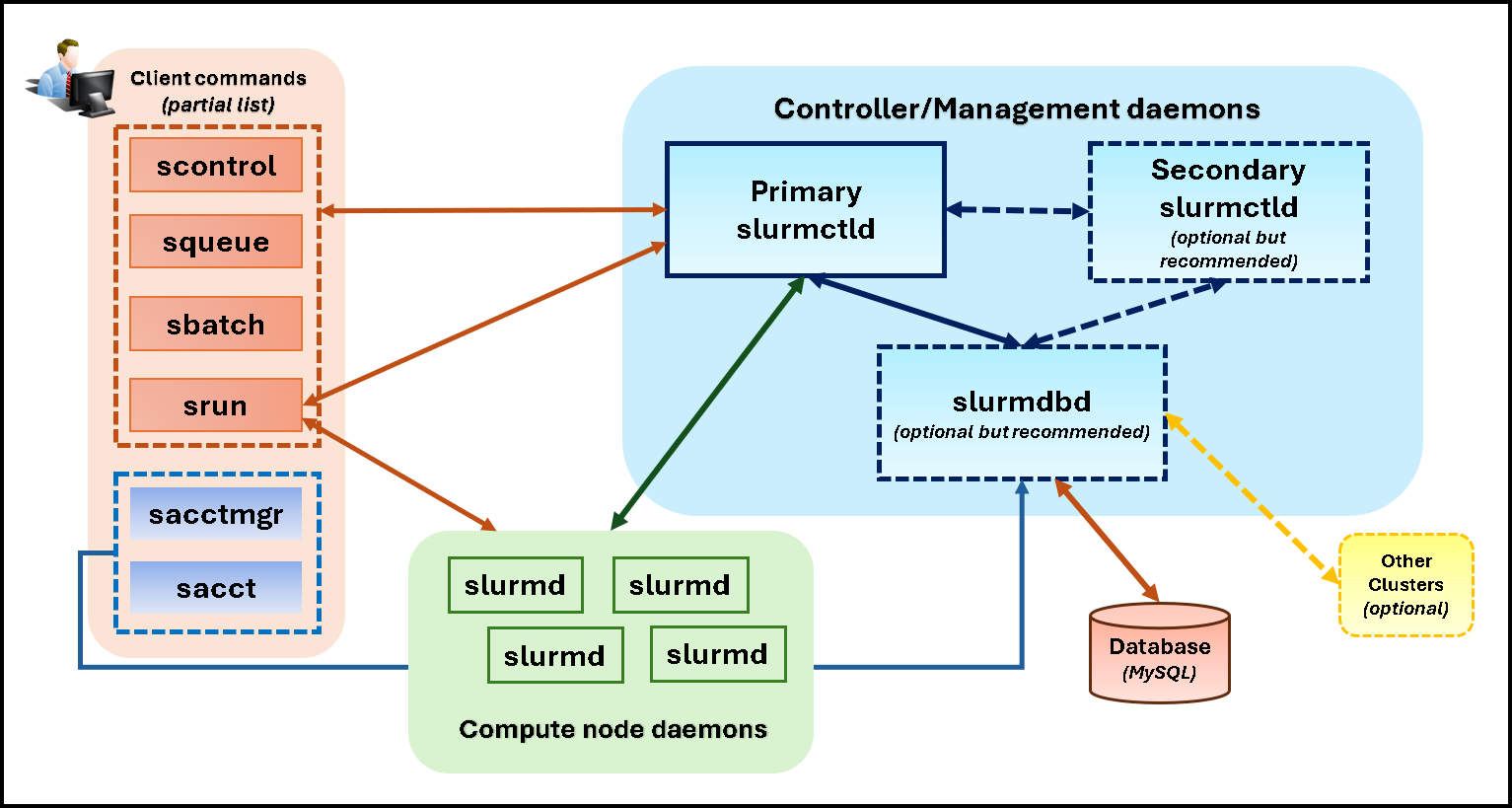
Slurm has a centralized manager, slurmctld, that monitors resources and workloads. There may also be a backup manager to assume those responsibilities in the event of a failure (it is known as the primary slurmctld and the secondary slurmctld).
Each compute server (node) has a slurmd daemon, which can be compared to a remote shell: it waits for work, executes it, returns its status, and waits for more work.
There is an optional Slurmdbd (Slurm Database Daemon), which can be used to record accounting information for multiple Slurm-managed clusters in a single database.
Users or clients have many commands to interact with the Slurm architecture. Some users’ Slurm commands/tools are (these are some commands, but there are more commands):
- srun: command used to initiate jobs. The job is sent to the cluster and queue for execution.
- scancel: command used to terminate a queued or a running job.
- sinfo: used to report system status, like node status.
- squeue: used to report the status of each job.
- sacct: used to get information about jobs and job steps that are running or have completed. This information is stored on a database and managed by the Slurmdbd daemon.
- scontrol: It is an administrative tool for monitoring and/or modifying configuration and state information on the cluster.
- sacctmgr: Another administrative tool used to manage database-related configurations.
The following picture shows each Slurm component and how each interacts with the others:
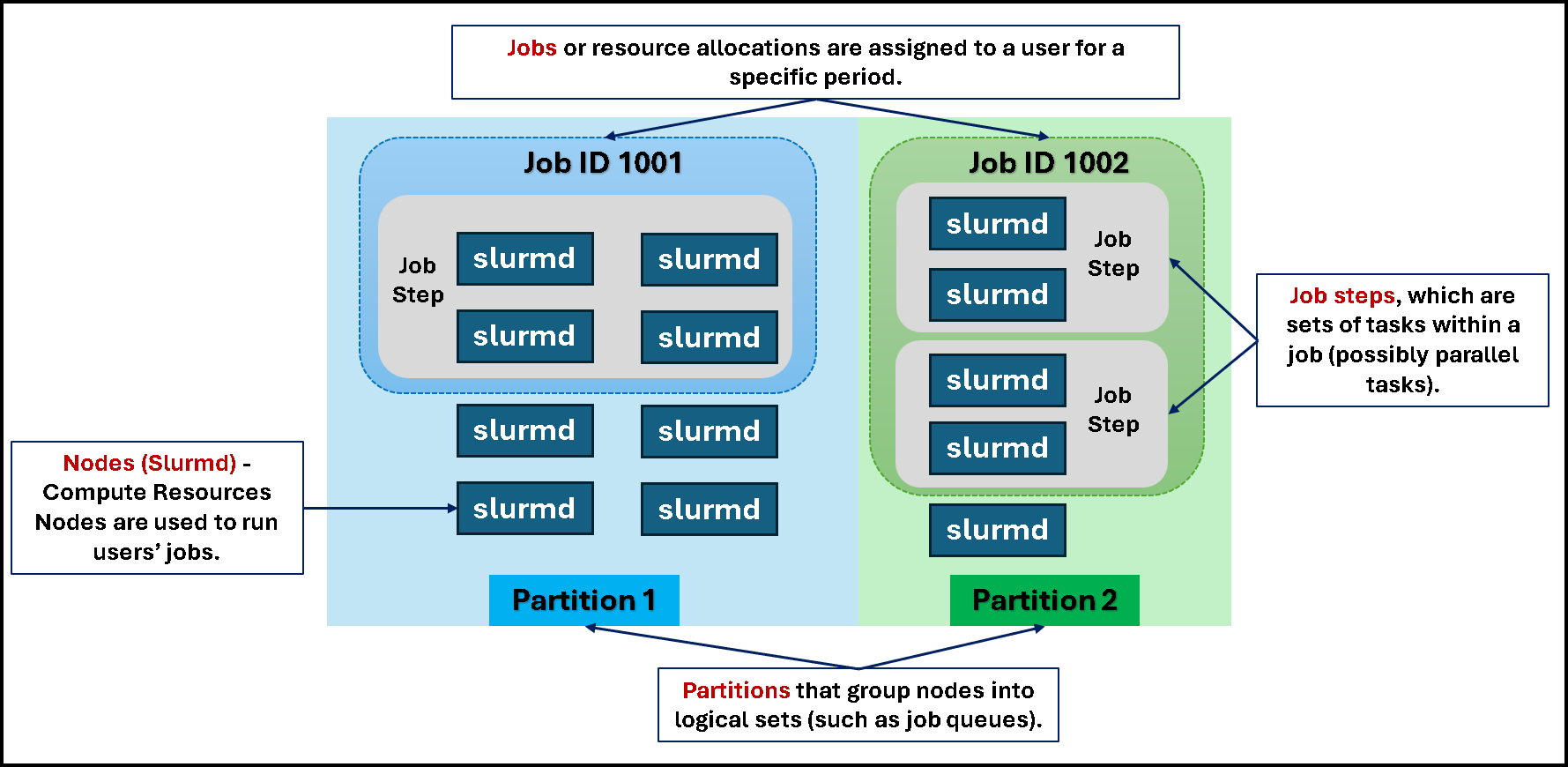
Each task executed by the user is called a “job”. A single job can execute one or more tasks (known as parallel tasks). The following picture shows an example of two jobs (job IDs 1001 and 1002). As we can see, a job can use more than one node (slurmd); the user can set it up before submitting the job to the HPC cluster.
The partitions can be considered job queues, each with a set of constraints, such as a job size limit, a job time limit, the users permitted to use it, etc. Priority-ordered jobs are allocated nodes within a partition until the resources (nodes, processors, memory, etc.) within that partition are exhausted. Once a job is assigned a set of nodes, the user can initiate parallel work in the form of job steps across any configuration within the allocation:
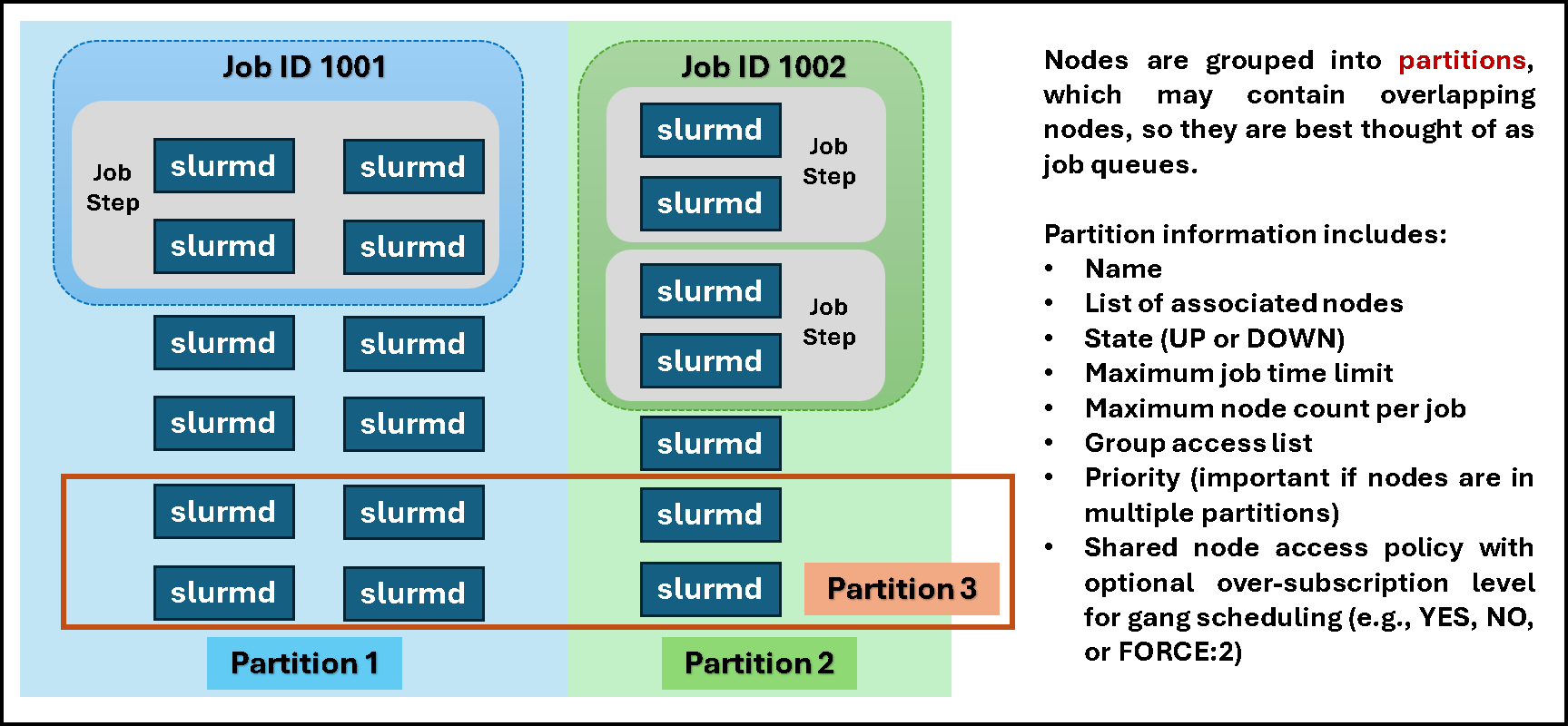
Nodes are grouped into partitions, which may contain overlapping nodes, so they are best thought of as job queues. As we can see in the following picture, a node can be part of more than one Slurm partition at the same time:
From HPC Concepts to Slurm Jobs
An HPC cluster combines compute nodes, networking, and storage to run workloads that can benefit from parallel execution. Slurm coordinates access to those resources by managing allocations, job execution, and queued work.
The next step is to explore how the cluster is assembled and how users submit jobs, keeping in mind that the right architecture depends on the workload and the site’s requirements.
External References
- Lawrence Livermore National Laboratory — Introduction to Parallel Computing An introductory tutorial explaining parallel computing, nodes, distributed-memory systems, and how networked computers can form larger parallel clusters.
- SchedMD — Slurm Overview and Architecture Official Slurm documentation describing the scheduler’s core functions, slurmctld and slurmd roles, optional SlurmDBD accounting, jobs, job steps, partitions, and user commands.
- SchedMD — Slurm Quick Start User Guide Official guide to Slurm’s components and common commands, with explanations of nodes, partitions, job allocations, job steps, and submitting work.
- TOP500 — The List of the World’s Most Powerful Supercomputers The official TOP500 project site, which publishes rankings and information about the world’s fastest reported computer systems. Use a specific dated edition when making claims about its operating-system statistics; TOP500 does not represent every HPC cluster.
