
Close Menu
DPC Virtual Tips
    Read More

    How to Troubleshoot Packet Drops on an ESXi Host

    August 16, 2026

    SlurmDBD Is Down: What Continues Working and What Does Not

    August 15, 2026

    How to Investigate Jobs Stuck in COMPLETING State on Slurm

    August 14, 2026
    • Home
    • About Us
    • Contact
    • Cookie Policy
    • Comment Policy
    • Privacy Policy
    • Terms of Use
    • Disclaimer
    Tuesday, August 25
    DPC Virtual Tips
    • Home
    • Operating Systems
    • PowerFlex
    • HPC
    • Virtualization
    • About the Author
    • About Us
    • Contact
    DPC Virtual Tips
    Home » Working on MySQL Server on Debian 11
    Operating Systems

    Working on MySQL Server on Debian 11

    DaniloBy DaniloDecember 6, 2023Updated:July 30, 2026No Comments3 Mins Read
    Facebook Twitter Pinterest LinkedIn Tumblr Email
    Working with MySQL Server on Debian 11
    Share
    Facebook Twitter LinkedIn Pinterest Email

    Working on MySQL Server on Debian 11 is a practical guide that shows basic database administration tasks after installing the MySQL service. In this article, we will demonstrate how to access the MySQL command line, create a database, create tables, and insert sample data.

    Before anything, I would like to share some articles that we have written:

    — Installing Linux Debian 11:
    https://dpcvirtualtips.com/installing-linux-debian-11/

    — Installing MySQL Server on Debian 11:
    https://dpcvirtualtips.com/installing-mysql-db-on-debian-11/

    First and Foremost, How can I access the MySQL Server?

    In this case, for instance, we are considering you already installed the MySQL server in your OS.
    So, access the MySQL server command line locally, using the following command:

    mysql -u root -p

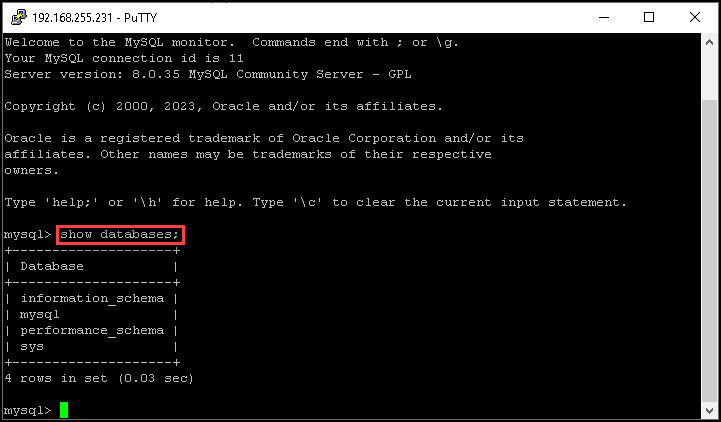
    After that, we can type a command to see all available databases inside the MySQL server.
    Here, we can see all the databases that were installed during the MySQL server installation:

    show databases;
    Creating a Database

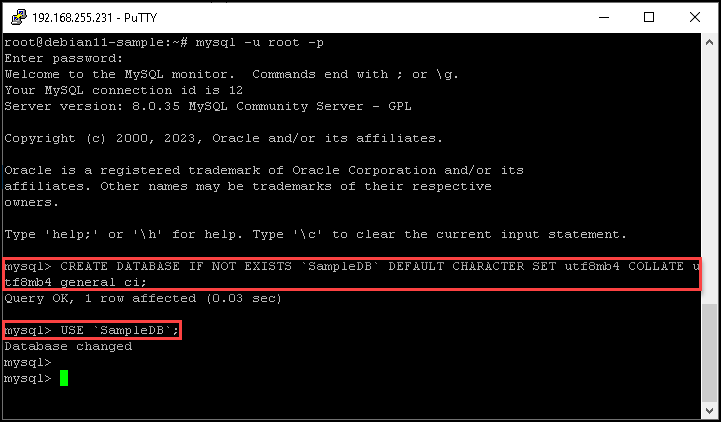
    Our aim here is just to create a simple database. In this case, the database name is “SampleDB”.
    We can create and use this database by executing the following commands:

    CREATE DATABASE IF NOT EXISTS `SampleDB` DEFAULT CHARACTER SET utf8mb4 COLLATE utf8mb4_general_ci;
    
    USE `SampleDB`;
    This image has an empty alt attribute; its file name is image-138.png

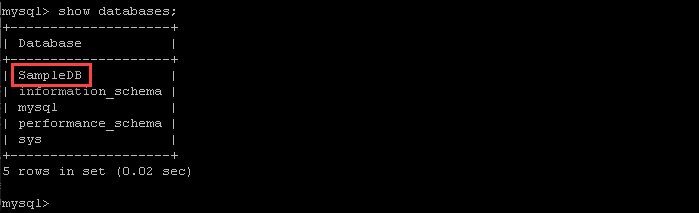
    Now we can see the database “SampleDB”:
    Creating a Table Inside the Database

    So, now we will create a simple table under the database that we already created in the above step.
    In this case, for instance, the table name is “SampleTable”:

    CREATE TABLE `SampleTable` (
      `first_name` varchar(255) NOT NULL,
      `last_name` varchar(255) NOT NULL,
      `gender` varchar(255) NOT NULL,
      `address` varchar(255) NOT NULL,
      `email` varchar(255) NOT NULL
    ) ENGINE=InnoDB DEFAULT CHARSET=utf8mb4 COLLATE=utf8mb4_general_ci;
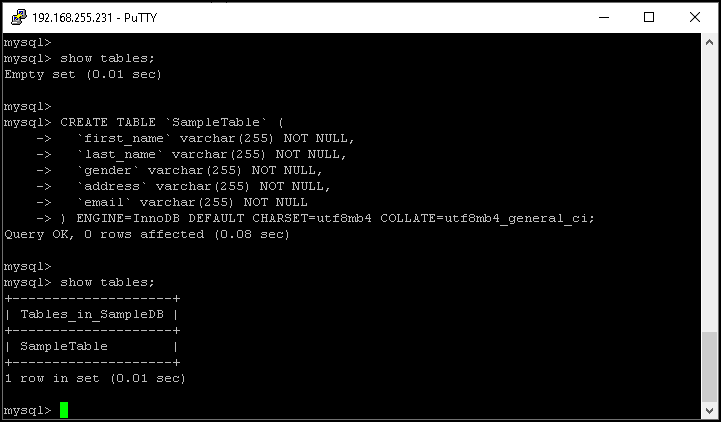
    The command “show tables” can be used to show all available tables inside a specific database!

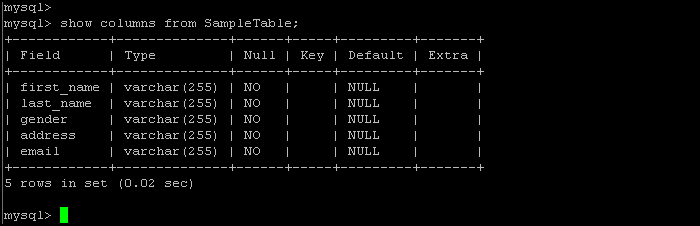
    If you need to see the column details, you can use the command:

    show columns from SampleTable;
    Inserting Data into a Table

    At this moment, the table “SampleTable” is clear because we created it a few moments ago.
    We can use the SQL command “input” just to input some data into this table.

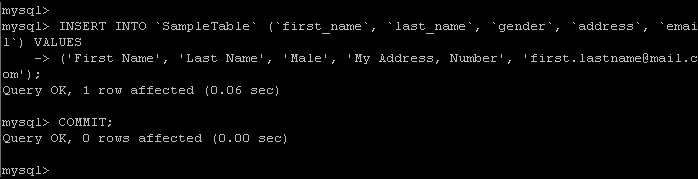
    In the following command, we will input data into the table “SampleTable”:

    INSERT INTO `SampleTable` (`first_name`, `last_name`, `gender`, `address`, `email`) VALUES
    ('First Name', 'Last Name', 'Male', 'My Address, Number', 'first.lastname@mail.com');
    
    COMMIT;
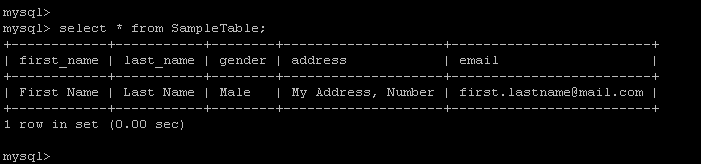
    We can use the SQL command “select” just to see the data inside a table. In this case, for instance, we are executing a command to see all data inside the table “SampleTable”:

    select * from SampleTable;
    Wrapping This Up

    So, this is not a SQL course or something like that 🙂
    But the main aim here is to provide the basic knowledge to create your database and table, just to perform some tests without depending on the DEV team or something like that 🙂

    Feel free to reach me in case of additional things or questions!


    Share. Facebook Twitter Pinterest LinkedIn Tumblr Email
    Previous ArticleInstalling MySQL DB on Debian 11
    Next Article Running a 3-Tier Application in the NSX
    Danilo

    Infrastructure Engineer with experience in Virtualization, Linux, Windows Server and learning automation using Python. DPC Virtual Tips was created to share practical tutorials, lab experiences and troubleshooting guides focused on enterprise infrastructure technologies.

    Related Posts

    Linux Server Has Free Memory but Is Swapping: Why?

    August 13, 2026

    How to Determine Whether Packet Loss Is Local or Network Related on Linux

    August 12, 2026

    How to Investigate TCP Retransmissions on Linux

    August 11, 2026

    Comments are closed.

    Search
    Categories
    • HPC (12)
    • Operating Systems (85)
    • PowerFlex (22)
    • Virtualization (130)
    Read More
    Virtualization

    How to Troubleshoot Packet Drops on an ESXi Host

    By DaniloAugust 16, 20260
    HPC

    SlurmDBD Is Down: What Continues Working and What Does Not

    By DaniloAugust 15, 20260
    HPC

    How to Investigate Jobs Stuck in COMPLETING State on Slurm

    By DaniloAugust 14, 20260
    Operating Systems

    Linux Server Has Free Memory but Is Swapping: Why?

    By DaniloAugust 13, 20260
    Operating Systems

    How to Determine Whether Packet Loss Is Local or Network Related on Linux

    By DaniloAugust 12, 20260
    Latest Posts

    How to Troubleshoot Packet Drops on an ESXi Host

    August 16, 2026

    SlurmDBD Is Down: What Continues Working and What Does Not

    August 15, 2026

    How to Investigate Jobs Stuck in COMPLETING State on Slurm

    August 14, 2026
    Images from Gallery
    hpc main commands
    linux commands
    install rock linux
    lustre fs
    shell scripting
    vSAN Trace Files
    Categories
    • HPC
    • Operating Systems
    • PowerFlex
    • Virtualization
    • Home
    • About Us
    • Contact
    • Cookie Policy
    • Comment Policy
    • Privacy Policy
    • Terms of Use
    • Disclaimer
    Copyright © 2026, DPC Virtual Tips. All rights reserved.

    Type above and press Enter to search. Press Esc to cancel.

    We use cookies to ensure your best experience on our website. If you continue using our website, we'll assume you agree to our cookie policy