

Close Menu
DPC Virtual Tips
    Read More

    How to Investigate TCP Retransmissions on Linux

    August 11, 2026

    Slurm Node Is DRAINED: How to Find the Exact Reason

    August 10, 2026

    Why Is My Slurm Job Pending? How to Decode Every Common Reason

    August 9, 2026
    • Home
    • About Us
    • Contact
    • Cookie Policy
    • Comment Policy
    • Privacy Policy
    • Terms of Use
    • Disclaimer
    Tuesday, August 11
    DPC Virtual Tips
    • Home
    • Operating Systems
    • PowerFlex
    • HPC
    • Virtualization
    • About the Author
    • About Us
    • Contact
    DPC Virtual Tips
    Home » Creating an Edge Cluster
    Virtualization

    Creating an Edge Cluster

    DaniloBy DaniloNovember 14, 2023Updated:July 30, 2026No Comments3 Mins Read
    Facebook Twitter Pinterest LinkedIn Tumblr Email
    create NSX Edge Cluster
    Share
    Facebook Twitter LinkedIn Pinterest Email

    Creating an Edge Cluster shows how we can create an Edge Cluster to use in the NSX environment.

    Creating an NSX Edge Cluster is an important step when building an NSX environment because it allows multiple Edge Transport Nodes to work together. This article demonstrates how to create an Edge Cluster after deploying the required Edge Transport Nodes.

    Before we start, I would like to share an article that we have written about all the steps necessary to deploy an Edge Transport Node:
    https://dpcvirtualtips.com/deploying-an-edge-transport-node/

    What is an Edge Cluster?

    First and foremost, an Edge Transport Node is a component that resides on the NSX Data Plane and is used to host the Tier-0 and Tier-1 gateways. Additionally, some services that cannot be distributed on all Host Transport Node devices are running into this Edge Transport Node device (such as NAT, VPN, Load Balancing, Gateway firewalling, etc).

    In this context, an Edge Cluster is a group of one or more Edge Transport Node Devices.

    Inside an Edge Cluster, we can have a maximum of 10 Edge Transport Node Devices.

    Also, we cannot have a “mix” of Edge Transport node types in the same Edge Cluster. In other words:

    • All Edge Transport Nodes can be an Edge VM
    • All Edge Transport Node can be an Edge Bare Metal
    • We cannot “mix” an Edge VM with an Edge Bare Metal inside of the same Edge Cluster

    What is the purpose of an Edge Cluster?

    Basically, an Edge Cluster can be used to provide High Availability. If one Edge Transport Node fails, the remaining Edge Transport Node inside the cluster can handle all functions and maintain the environment work.

    Important: During the Tier-0 and Tier-1 creating process, we should to specify what is the Edge Cluster that will be used!

    Creating an Edge Cluster

    After deploying all Transport Node Devices, we need to create an Edge Cluster.

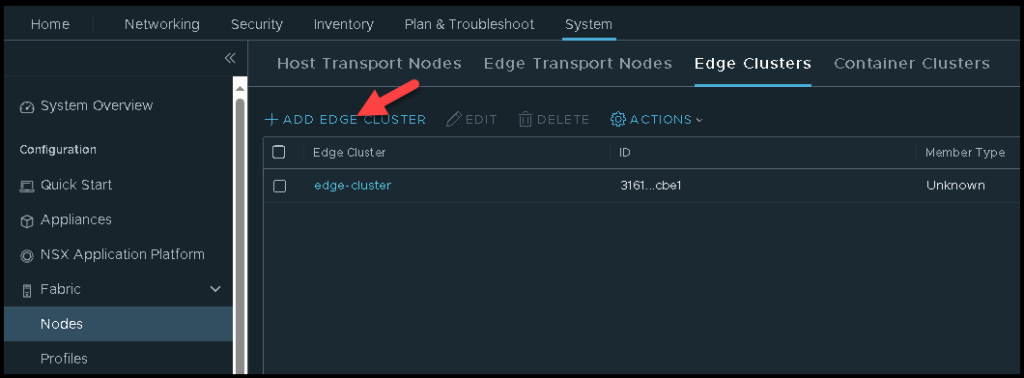
    Access the menu System –> Fabric –> Nodes –> Edge Cluster –> ADD HOST NODE
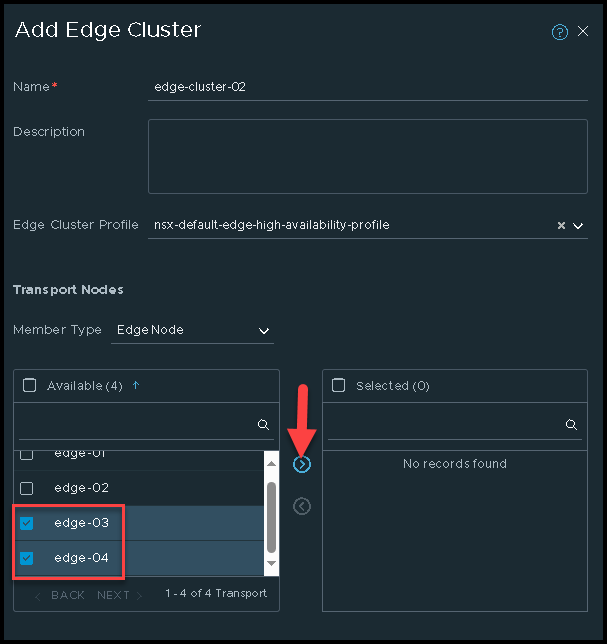
    Type the cluster name and select the Edge Cluster Profile.
    In this example, the cluster name is “edge-cluster-02”.

    Under Available, we need to select the desired Edges and click on > to add these Edge VMs:
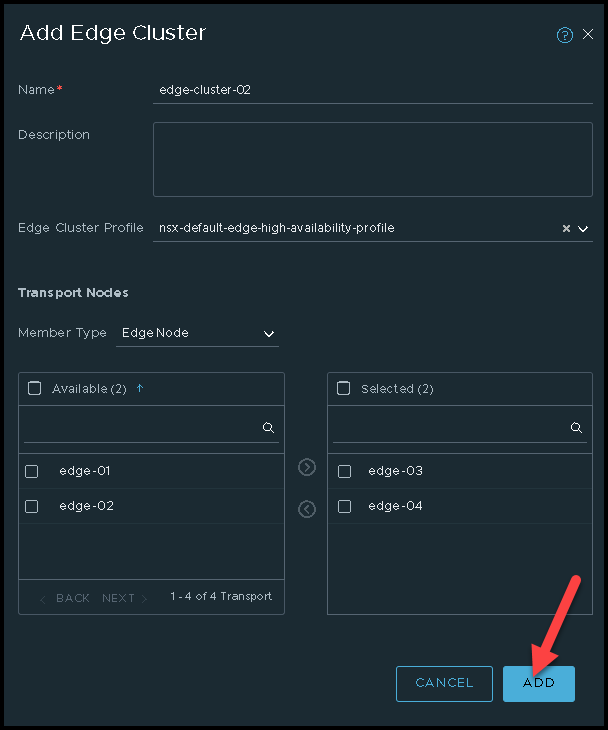
    After that, we can see the Edge VMs under the Selected section. Click on “ADD” to create the Edge Cluster:
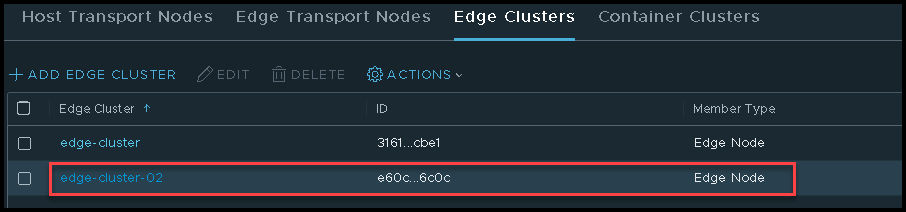
    So, now, we have our new Edge Cluster created 🙂

    We can use this Edge Cluster in our configurations:
    Share. Facebook Twitter Pinterest LinkedIn Tumblr Email
    Previous ArticleDeploying an Edge Transport Node
    Next Article Some Examples of NSX Topologies
    Danilo

    Infrastructure Engineer with experience in Virtualization, Linux, Windows Server and learning automation using Python. DPC Virtual Tips was created to share practical tutorials, lab experiences and troubleshooting guides focused on enterprise infrastructure technologies.

    Related Posts

    VM Replication with vSphere Replication and Site Recovery Manager

    June 16, 2025

    Changing DNS Settings on ESXi Hosts

    May 20, 2025

    Changing NTP Settings on ESXi Hosts

    May 19, 2025

    Comments are closed.

    Search
    Categories
    • HPC (10)
    • Operating Systems (83)
    • PowerFlex (22)
    • Virtualization (129)
    Read More
    Operating Systems

    How to Investigate TCP Retransmissions on Linux

    By DaniloAugust 11, 20260
    HPC

    Slurm Node Is DRAINED: How to Find the Exact Reason

    By DaniloAugust 10, 20260
    HPC

    Why Is My Slurm Job Pending? How to Decode Every Common Reason

    By DaniloAugust 9, 20260
    Operating Systems

    Linux Process Resource Usage: How to Find Heavy Processes

    By DaniloAugust 6, 20260
    HPC

    Lustre Filesystem Commands: A Practical Admin Guide

    By DaniloAugust 5, 20260
    Latest Posts

    How to Investigate TCP Retransmissions on Linux

    August 11, 2026

    Slurm Node Is DRAINED: How to Find the Exact Reason

    August 10, 2026

    Why Is My Slurm Job Pending? How to Decode Every Common Reason

    August 9, 2026
    Images from Gallery
    hpc main commands
    linux commands
    install rock linux
    lustre fs
    shell scripting
    vSAN Trace Files
    Categories
    • HPC
    • Operating Systems
    • PowerFlex
    • Virtualization
    • Home
    • About Us
    • Contact
    • Cookie Policy
    • Comment Policy
    • Privacy Policy
    • Terms of Use
    • Disclaimer
    Copyright © 2026, DPC Virtual Tips. All rights reserved.

    Type above and press Enter to search. Press Esc to cancel.

    We use cookies to ensure your best experience on our website. If you continue using our website, we'll assume you agree to our cookie policy