


Getting the SSH RSA Key Fingerprint and SSL Thumbprint of an ESXi host is an important preparation step for VMware Cloud Foundation (VCF) deployments. These values are required during the management domain bring-up process to establish trusted communication between components.
In this article, we will explain how to collect both the SSH RSA Key Fingerprint and SSL Thumbprint from ESXi hosts using command-line tools such as ssh-keyscan, ssh-keygen, and OpenSSL. These values can then be added to the Cloud Builder Deployment Parameter Workbook before starting the VCF bring-up process.
What is the SSH RSA Key Fingerprint?
It is like a unique identifier for an SSH public key. A fingerprint is also generated when you create an SSH key pair (which includes a private key and a public key). This fingerprint is a shorter and more manageable representation of the public key. It is used to verify that you are connecting to the correct server, not an imposter.
What is the SSL Thumbprint?
Also known as a certificate fingerprint, an SSL thumbprint is a unique value associated with an SSL certificate. It is created by applying a hash function to the certificate’s data. Like the SSH RSA Key Fingerprint, the SSL Thumbprint verifies the certificate’s authenticity. When you connect to a server over HTTPS, your browser checks the server’s SSL certificate thumbprint to ensure it connects to the right server and is secure.
In both cases, these details help to ensure secure connections by verifying the identities of the entities involved. They are a bit like digital signatures, helping to prevent man-in-the-middle attacks where an attacker might try to impersonate a server.
Why do I need to know these values?
The plan and prep step is among the most important in bringing up the VCF management domain. The Cloud Builder Deployment Parameter Guide must include all the information used during the bring-up process. This is an Excel file available on the Broadcom support page, and there are several “tabs” with details that need to be added.
One of the values that we need to type is the SSH RSA Key Fingerprint and the SSL Thumbprint of each ESXi host:
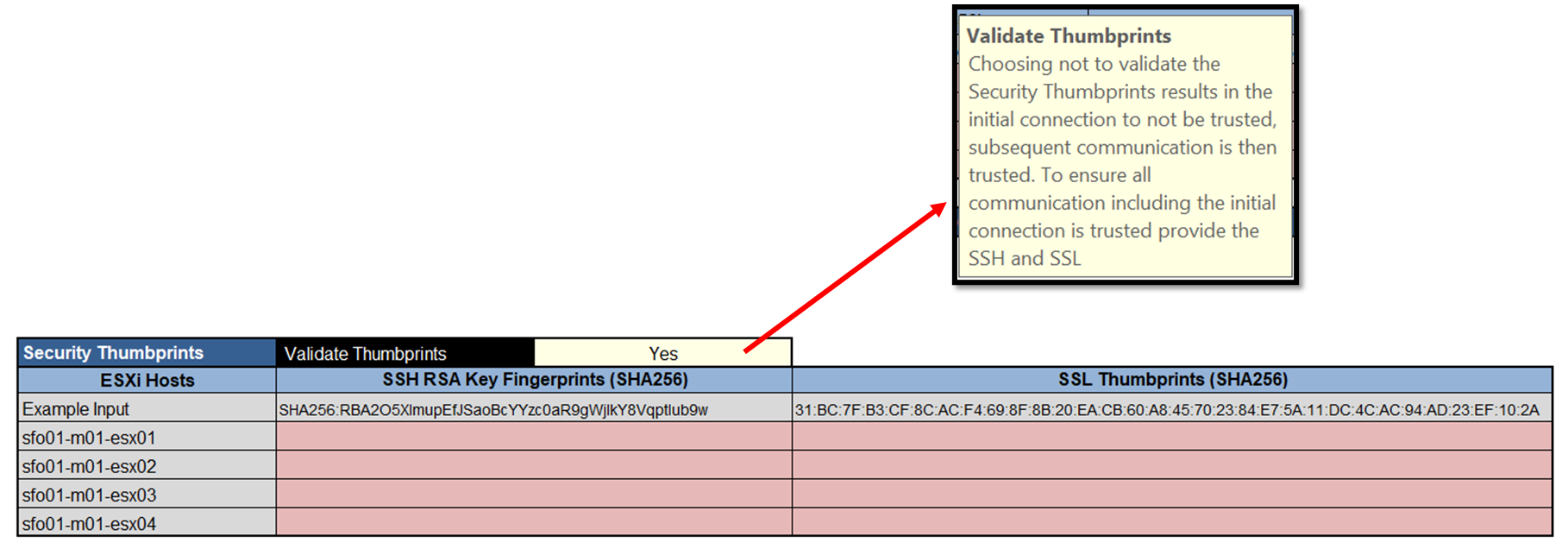
As we can see in the above picture, this information is used to establish a secure and trusting communication channel for each ESXi host, avoiding certificate warning messages or related issues. Getting and typing these details in the Cloud Build Parameters Workbook is good practice before starting the bring-up process.
Getting the SSH RSA Key Fingerprint (SHA256)
We can use the “ssh-keyscan” and “ssh-keygen” applications to get the SSH RSA Key Fingerprint. In this case, for instance, we will apply these commands from the Cloud Build Appliance command line:
ssh-keyscan vcf-mgmt-esxi-1.lab.local > /tmp/keyscan-host1.pub

ssh-keygen -lf /tmp/keyscan-host1.pub
Replace the “vcf-mgmt-esxi-1.lab.local” for your host’s FQDN.
Replace the “/tmp/keyscan-host1.pub” for your file name.
After applying the “ssh-keygen” command, we can see both SSH RSA Key Fingerprints (one ECDSA and one RSA). Choose what you need!
Example:
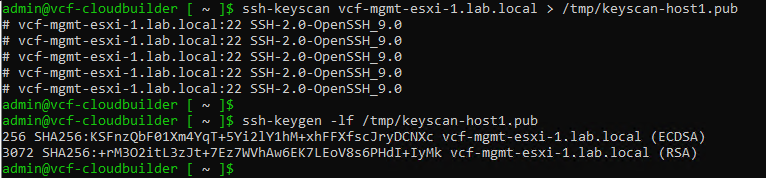
Getting the SSH Thumbprint
To grab the SSL Thumbprint, we can use the OpenSSL from the Cloud Builder Appliance command line too:
echo | openssl s_client vcf-mgmt-esxi-1.lab.local:443 2> /dev/null | openssl x509 -noout -fingerprint -sha256Replace the “vcf-mgmt-esxi-1.lab.local” for your host’s FQDN.
Example:

To Wrapping This Up
As we can see, there are good ways to get the SSH RSA Key Fingerprint and SSL Thumbprint for the ESXi hosts. Use these techniques to get these details and properly prepare your Cloud Build Parameter Guide Workbook to avoid errors or failures during the management domain bring-up process!
We used the Cloud Builder Appliance to run these commands. However, you can use other Linux “flavors” to run these commands (of course, your Linux needs to have these commands :-)).
