

NSX-T Data Plane Introduction is an article that explains some details about the NSX-T Data Plane layer in the NSX-T Data Center solution.
The NSX-T Data Plane is a fundamental layer of the NSX-T Data Center architecture responsible for handling network traffic processing and forwarding. This article explains the main components of the Data Plane and how Transport Nodes operate inside the NSX-T environment.
Within NSX-T Data Center, the architecture is divided into three main layers: Management Plane, Control Plane, and Data Plane. While the Management and Control Plane components run on the NSX Manager Cluster, the Data Plane is composed of Transport Node devices that perform packet forwarding operations.
Both the Management and Control planes are in the NSX Manager Cluster, and the Data plane is where we have the Transport Node Devices.
The primary function of this layer or plane is to encapsulate, remove encapsulate, and forward packages based on tables present on the Control Plane layer.
Inside this layer (Data Plane), we have:
–> Logical Switching
–> Distributed and Centralized Routing
–> Distributed and Centralized Packet Filtering
What device type do we have in this layer?
When we talk about Transport Nodes Devices, we are talking about the below device types:
- Host Transport Nodes: Hypervisor (ESXi or KVM)
- Edge Transport Nodes: Edge/Tier Gateway (Bare Metal or VM).
The Transport Node Devices is responsible for handling all network and security questions.
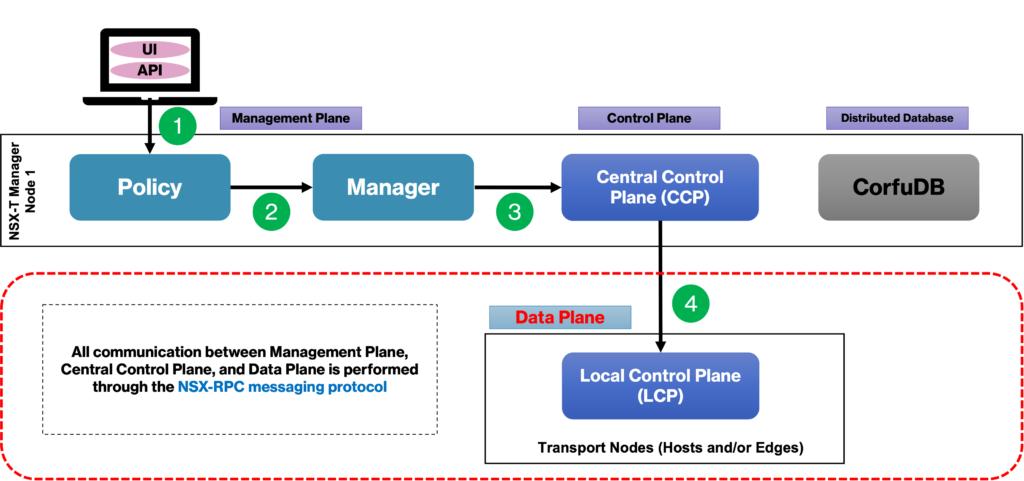
The picture below shows the Management Cluster communicating with the Data Plane layer. All communications are performed through the NSX-RPC messaging protocol:
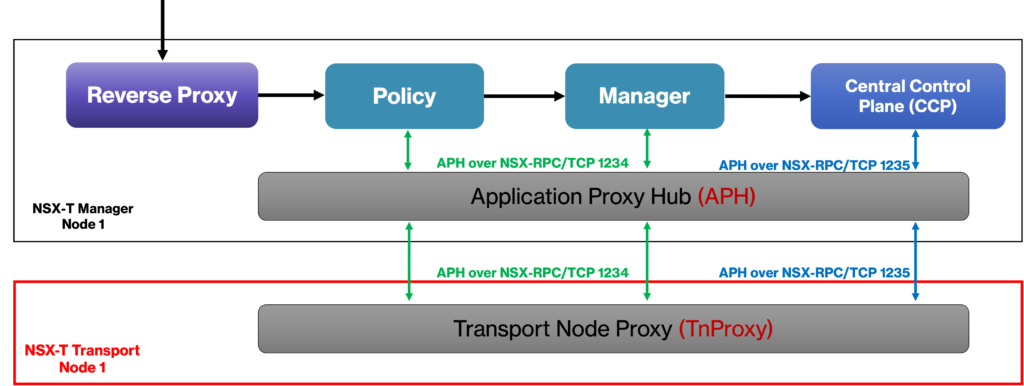
For the NSX Management Cluster, we have the Application Proxy Hub (APH) service and for the Data Plane side, we have the Transport Node Proxy (TnProxy). Both services are responsible to establish the communication between both NSX layers, as shown in the picture below:
Transport Node Device Overview
As we said, when we are talking about Transport Node Devices, we are talking about Host Transport Node and Edge Transport Node.
All packets send and receive by Virtual Machines (VMs), Containers, or Applications executed in Bare Metal servers are responsible by the Transport Node Devices.
Each Transport Node Device has a DVS (Distributed Virtual Switch). In the NSX-T architecture, we can have two types of Distributed Switches:
- VDS = vSphere Distributed Switch (from vSphere 7, this type of switch can be used)
- N-VDS = NSX Virtual Distributed Switch
On each Transport Node Device we have the NSX Proxy. That is an agent that is executed responsible for handling all communications from the CCP – Central Control Plane (from NSX Manager).
In the picture below, we have an example of Host Transport Node’s switch. Look that we can have N-VDS or DVS type for ESXi hosts and only N-DVS type for the KVM host:
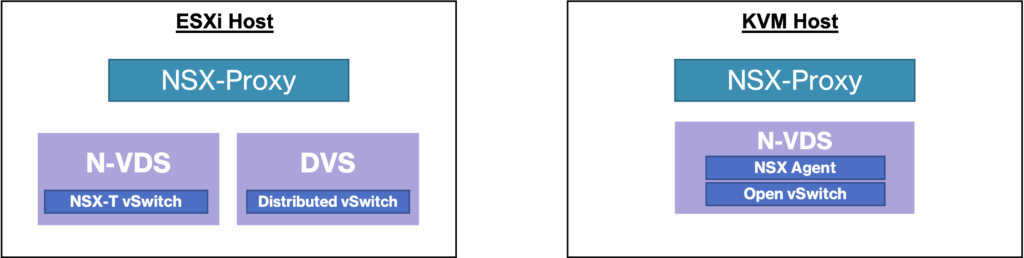
Note: For the Edge Transport Node (responsible to host the Tier’s Gateway), they have the N-DVS.
Transport Node Device Physical Connectivity
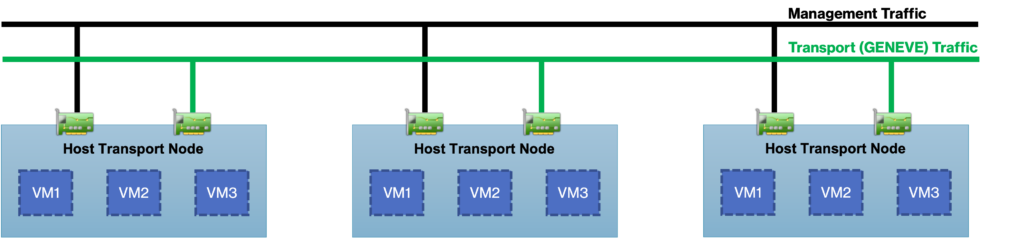
When the Host Transport Node Device is connected to the network, we have the possibility to segregate the Overlay Traffic (Geneve) to the others traffic types.
We can achieve it by using dedicated physical interfaces for the NSX-T. But if the physical host does not have physical interfaces available for it, we can share the existing interfaces for the Overlay Traffic utilizing VLAN.
Important: Sharing physical interfaces for all traffic types is not a good practice. In this case, it is highly recommended to use dedicated interfaces for the NSX-T.
In the below picture we can see this physical separation when we have one physical interface dedicated for the NSX-T traffic:
To get more detail about NSX-T Host Transport Nodes:
And to get more detail about NSX-T Edge Transport Nodes:
