Close Menu
DPC Virtual Tips
    Read More

    How to Troubleshoot Packet Drops on an ESXi Host

    August 16, 2026

    SlurmDBD Is Down: What Continues Working and What Does Not

    August 15, 2026

    How to Investigate Jobs Stuck in COMPLETING State on Slurm

    August 14, 2026
    • Home
    • About Us
    • Contact
    • Cookie Policy
    • Comment Policy
    • Privacy Policy
    • Terms of Use
    • Disclaimer
    Tuesday, August 25
    DPC Virtual Tips
    • Home
    • Operating Systems
    • PowerFlex
    • HPC
    • Virtualization
    • About the Author
    • About Us
    • Contact
    DPC Virtual Tips
    Home » Integrating a Nutanix Cluster with Active Directory
    Virtualization

    Integrating a Nutanix Cluster with Active Directory

    DaniloBy DaniloOctober 13, 2024Updated:July 31, 2026No Comments3 Mins Read
    Facebook Twitter Pinterest LinkedIn Tumblr Email
    Nutanix Active Directory integration
    Share
    Facebook Twitter LinkedIn Pinterest Email

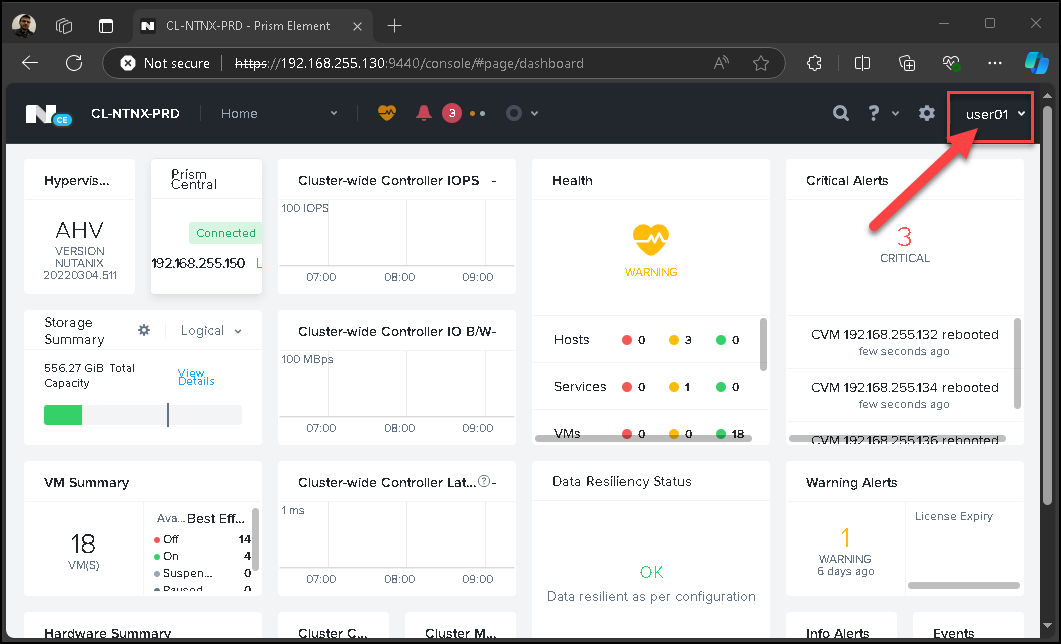
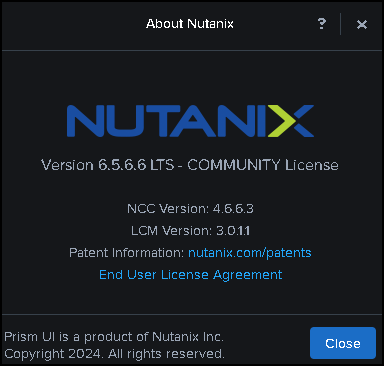
    Integrating a Nutanix Cluster with Active Directory shows how to integrate Nutanix Cluster with AD for authentication purposes. In this article, we are using a Nutanix Community Edition (CE) version:
    First and foremost, why integrate your cluster with Active Directory?

    The answer can be simple: The Microsoft Active Directory is a directory service used by many customers worldwide.

    Configuration Steps – Preparing the AD domain

    Since your Active Directory domain was installed, creating organization units (OUs) to segment the domain objects is an option. In our case, for instance, our domain name is “lab.local,” and we have created some OUs to organize our domain objects, as we can see in the following picture:
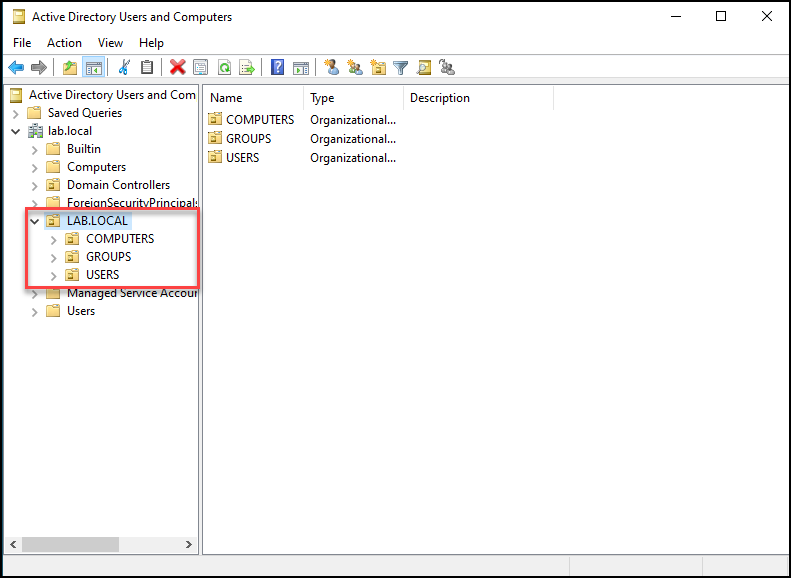
    Note: This is an optional step; you do not have to create it if you can not!

    Inside the “USERS” OU, we have created a user “nutanix_srv”. This is a service user and will be used for the Nutanix Cluster to read all directory objects into the Active Directory domain:
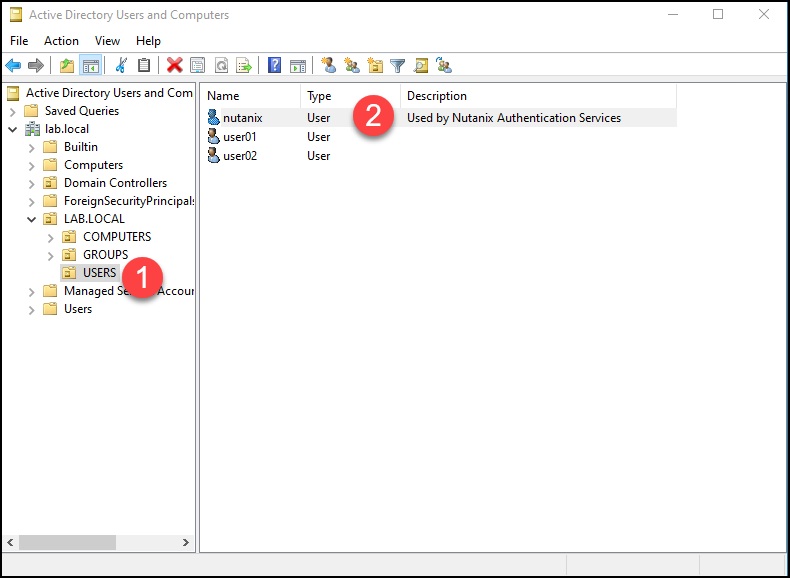
    Note: This user does not have admin rights to the ad domain. It is a regular user (this user only needs permission to read all directory objects).

    Afterward, we have created two additional users (user01 and user02) and two additional groups (NTNX_ADMINS and NTNX_READ_ONLY):
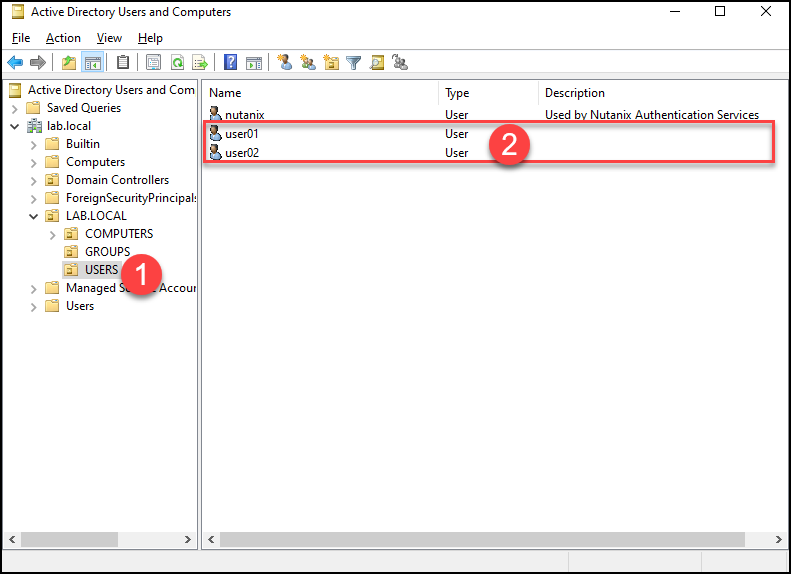
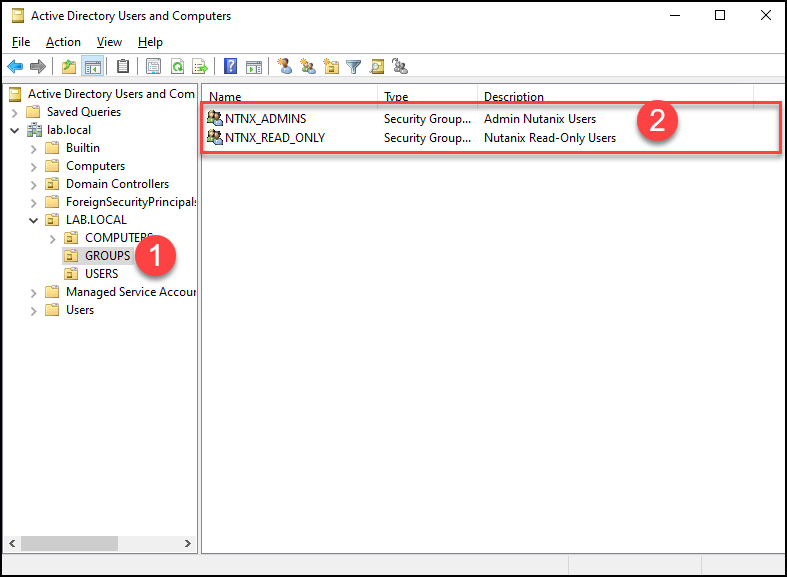
    The “user01” was placed into the group “NTNX_ADMINS”.

    The “user02” was placed into the group “NTNX_READ_ONLY”.

    Adding a New Directory on Nutanix Cluster

    The following configuration step is to add a directory service on Nutanix Cluster.
    Access the Menu –> Settings –> Under Users and Roles on the Prism Element interface, select Authentication –> Directory List –> “+ New Directory”:
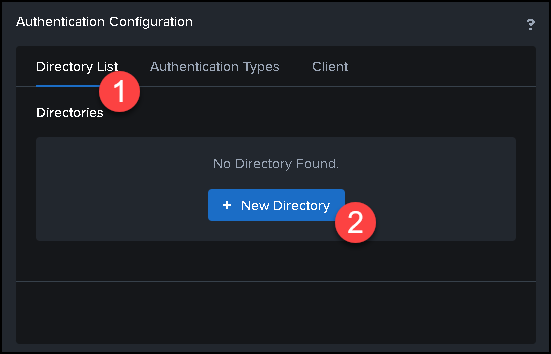
    Under the tab “Directory List”, type all information like the following pictures:
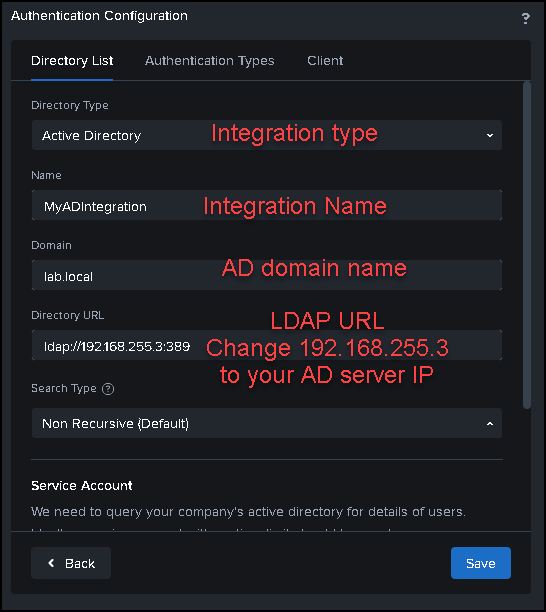
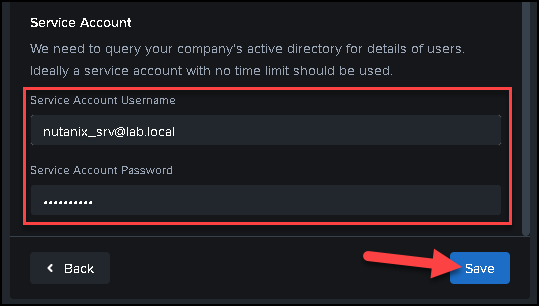
    Scroll down the configuration page and type the service account credentials. In this case, for instance, we are typing the domain user that we have created before:
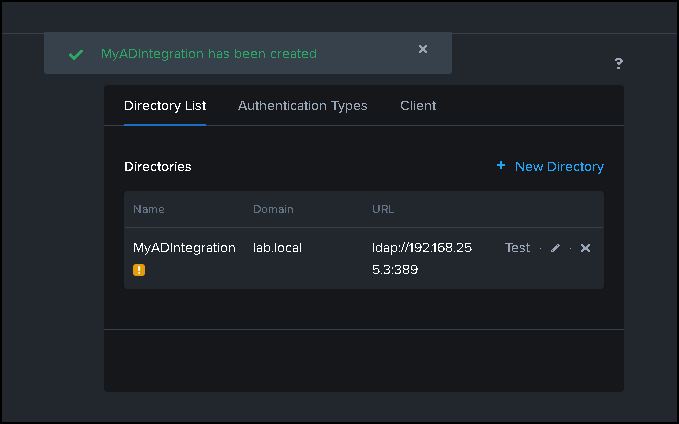
    After saving, our directory is been added successfully:
    Creating Role Mappings

    After adding a directory service, we must create role mappings. Role mapping is a configuration that matches a user or group from the directory service to a specific role or authorization in the Nutanix environment. Simply put, we will configure a user or group’s permission.

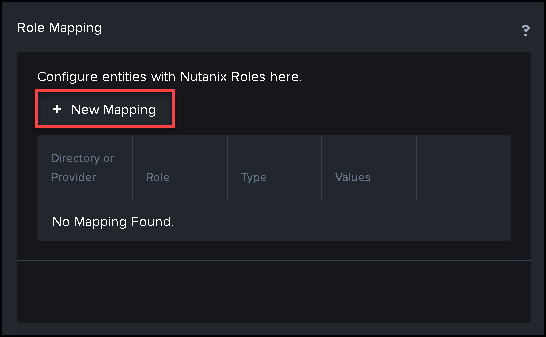
    Under the “Users and Roles” menu, click on Role Mapping –> New Mapping:
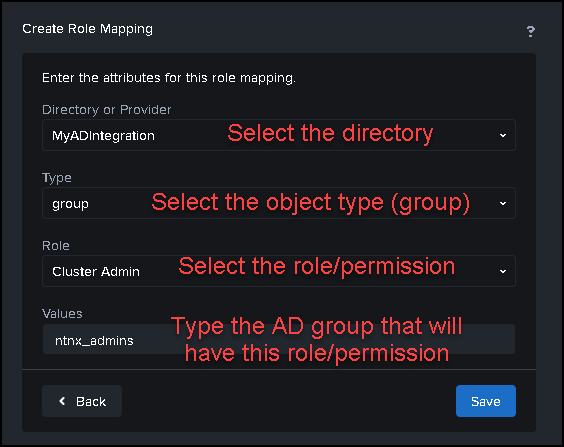
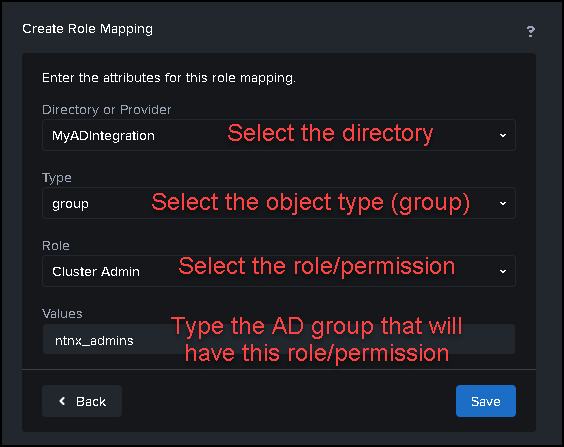
    The first role mapping is to provide “Cluster Admin” permission to the “NTNX_ADMINS” Active Directory Group:
    The second role mapping is to provide “Viewer” permission to the “NTNX_READ_ONLY” Active Directory Group:
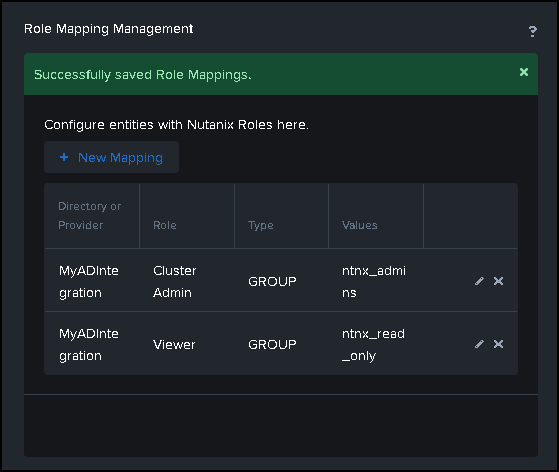
    Afterward, we have created our role mappings 🙂
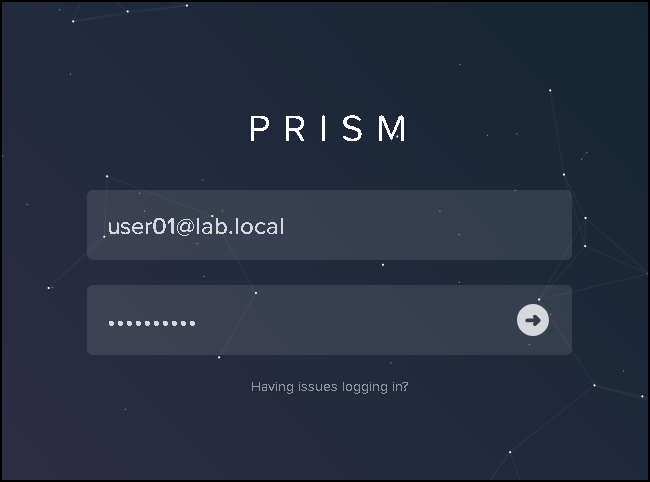
    Accessing the Prism Element with AD credential

    To access the Prism Element UI with an AD credential, we must type the username in the following way:

    ad_username@ad_domain
    That’s it 😉

    Share. Facebook Twitter Pinterest LinkedIn Tumblr Email
    Previous ArticleMigrating a vDisk to Another Storage Container
    Next Article A small explanation about an AHV host
    Danilo

    Infrastructure Engineer with experience in Virtualization, Linux, Windows Server and learning automation using Python. DPC Virtual Tips was created to share practical tutorials, lab experiences and troubleshooting guides focused on enterprise infrastructure technologies.

    Related Posts

    How to Troubleshoot Packet Drops on an ESXi Host

    August 16, 2026

    VM Replication with vSphere Replication and Site Recovery Manager

    June 16, 2025

    Changing DNS Settings on ESXi Hosts

    May 20, 2025

    Comments are closed.

    Search
    Categories
    • HPC (12)
    • Operating Systems (85)
    • PowerFlex (22)
    • Virtualization (130)
    Read More
    Virtualization

    How to Troubleshoot Packet Drops on an ESXi Host

    By DaniloAugust 16, 20260
    HPC

    SlurmDBD Is Down: What Continues Working and What Does Not

    By DaniloAugust 15, 20260
    HPC

    How to Investigate Jobs Stuck in COMPLETING State on Slurm

    By DaniloAugust 14, 20260
    Operating Systems

    Linux Server Has Free Memory but Is Swapping: Why?

    By DaniloAugust 13, 20260
    Operating Systems

    How to Determine Whether Packet Loss Is Local or Network Related on Linux

    By DaniloAugust 12, 20260
    Latest Posts

    How to Troubleshoot Packet Drops on an ESXi Host

    August 16, 2026

    SlurmDBD Is Down: What Continues Working and What Does Not

    August 15, 2026

    How to Investigate Jobs Stuck in COMPLETING State on Slurm

    August 14, 2026
    Images from Gallery
    hpc main commands
    linux commands
    install rock linux
    lustre fs
    shell scripting
    vSAN Trace Files
    Categories
    • HPC
    • Operating Systems
    • PowerFlex
    • Virtualization
    • Home
    • About Us
    • Contact
    • Cookie Policy
    • Comment Policy
    • Privacy Policy
    • Terms of Use
    • Disclaimer
    Copyright © 2026, DPC Virtual Tips. All rights reserved.

    Type above and press Enter to search. Press Esc to cancel.

    We use cookies to ensure your best experience on our website. If you continue using our website, we'll assume you agree to our cookie policy