
Close Menu
DPC Virtual Tips
    Read More

    How to Investigate TCP Retransmissions on Linux

    August 11, 2026

    Slurm Node Is DRAINED: How to Find the Exact Reason

    August 10, 2026

    Why Is My Slurm Job Pending? How to Decode Every Common Reason

    August 9, 2026
    • Home
    • About Us
    • Contact
    • Cookie Policy
    • Comment Policy
    • Privacy Policy
    • Terms of Use
    • Disclaimer
    Tuesday, August 11
    DPC Virtual Tips
    • Home
    • Operating Systems
    • PowerFlex
    • HPC
    • Virtualization
    • About the Author
    • About Us
    • Contact
    DPC Virtual Tips
    Home » Setting Up a DHCP Relay on VyOS
    Operating Systems

    Setting Up a DHCP Relay on VyOS

    DaniloBy DaniloJune 2, 2025Updated:July 31, 2026No Comments2 Mins Read
    Facebook Twitter Pinterest LinkedIn Tumblr Email
    DHCP Relay on VyOS
    Share
    Facebook Twitter LinkedIn Pinterest Email

    Setting Up a DHCP Relay on VyOS shows how to configure a DHCP Relay on the VyOS router.

    We have written some articles about VyOS, and we’d like to share them if you:

    How to Install VyOS Router in a Lab Environment:
    https://dpcvirtualtips.com/how-to-install-vyos-router-in-a-lab-environment/

    Performing Basic Configurations on the VyOS:
    https://dpcvirtualtips.com/performing-basic-configurations-on-the-vyos/

    First and foremost: What is DHCP Relay?

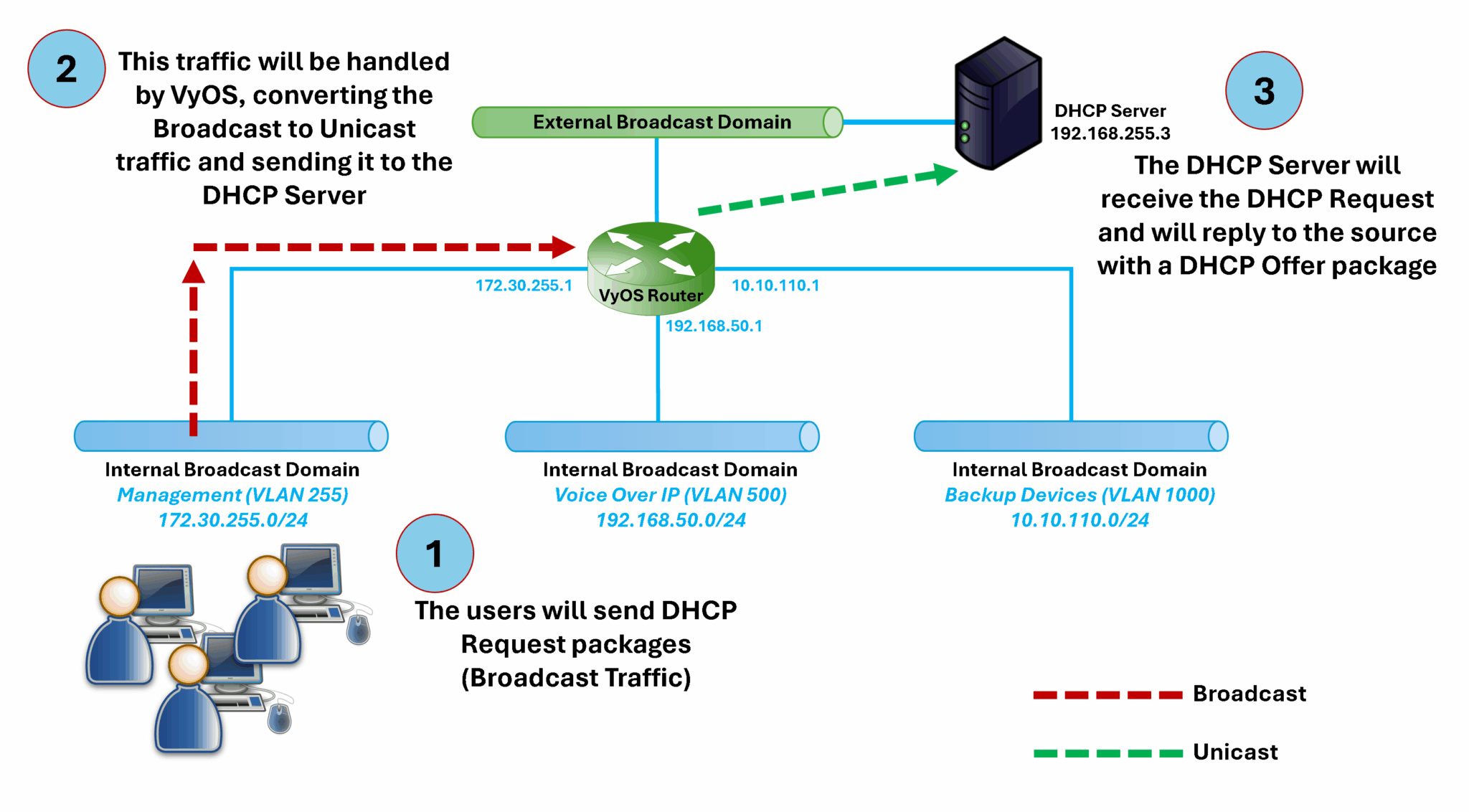
    A DHCP Relay is a network service that forwards DHCP requests from clients on one network to a DHCP server on another network (different broadcast domains).

    Since DHCP uses broadcast messages that don’t cross routers, a DHCP relay listens for these broadcasts and relays them to a DHCP server using unicast – allowing clients to get IP addresses even if the server is not on the same subnet.

    How does it work?

    In the following picture, we can see an example topology illustrating how a DHCP Relay works:
    How can I configure DHCP Relay on the VyOS?

    The DHCP Relay configuration is pretty straightforward on the VyOS:

    1- The first step is to identify all VyOS interfaces related to the DHCP Relay process.
    Using the provided topology, users or clients are connected to VyOS via the interface “eth1.255”.
    The exit interface to reach the DHCP Server is the interface “eth0”.

    2- The next step is to connect to the VyOS router and apply the following configuration:

    set service dhcp-relay listen-interface 'eth1.255'
    set service dhcp-relay server '192.168.255.3'
    set service dhcp-relay upstream-interface 'eth0'

    3- Commit the configuration, save, and exit:

    commit
    save
    exit

    That’s it 🙂

    Share. Facebook Twitter Pinterest LinkedIn Tumblr Email
    Previous ArticleChanging DNS Settings on ESXi Hosts
    Next Article IPSEC VPN on VyOS
    Danilo

    Infrastructure Engineer with experience in Virtualization, Linux, Windows Server and learning automation using Python. DPC Virtual Tips was created to share practical tutorials, lab experiences and troubleshooting guides focused on enterprise infrastructure technologies.

    Related Posts

    How to Investigate TCP Retransmissions on Linux

    August 11, 2026

    Linux Process Resource Usage: How to Find Heavy Processes

    August 6, 2026

    Linux ss, lsof, and fuser Commands: A Practical Guide

    August 4, 2026

    Comments are closed.

    Search
    Categories
    • HPC (10)
    • Operating Systems (83)
    • PowerFlex (22)
    • Virtualization (129)
    Read More
    Operating Systems

    How to Investigate TCP Retransmissions on Linux

    By DaniloAugust 11, 20260
    HPC

    Slurm Node Is DRAINED: How to Find the Exact Reason

    By DaniloAugust 10, 20260
    HPC

    Why Is My Slurm Job Pending? How to Decode Every Common Reason

    By DaniloAugust 9, 20260
    Operating Systems

    Linux Process Resource Usage: How to Find Heavy Processes

    By DaniloAugust 6, 20260
    HPC

    Lustre Filesystem Commands: A Practical Admin Guide

    By DaniloAugust 5, 20260
    Latest Posts

    How to Investigate TCP Retransmissions on Linux

    August 11, 2026

    Slurm Node Is DRAINED: How to Find the Exact Reason

    August 10, 2026

    Why Is My Slurm Job Pending? How to Decode Every Common Reason

    August 9, 2026
    Images from Gallery
    hpc main commands
    linux commands
    install rock linux
    lustre fs
    shell scripting
    vSAN Trace Files
    Categories
    • HPC
    • Operating Systems
    • PowerFlex
    • Virtualization
    • Home
    • About Us
    • Contact
    • Cookie Policy
    • Comment Policy
    • Privacy Policy
    • Terms of Use
    • Disclaimer
    Copyright © 2026, DPC Virtual Tips. All rights reserved.

    Type above and press Enter to search. Press Esc to cancel.

    We use cookies to ensure your best experience on our website. If you continue using our website, we'll assume you agree to our cookie policy