

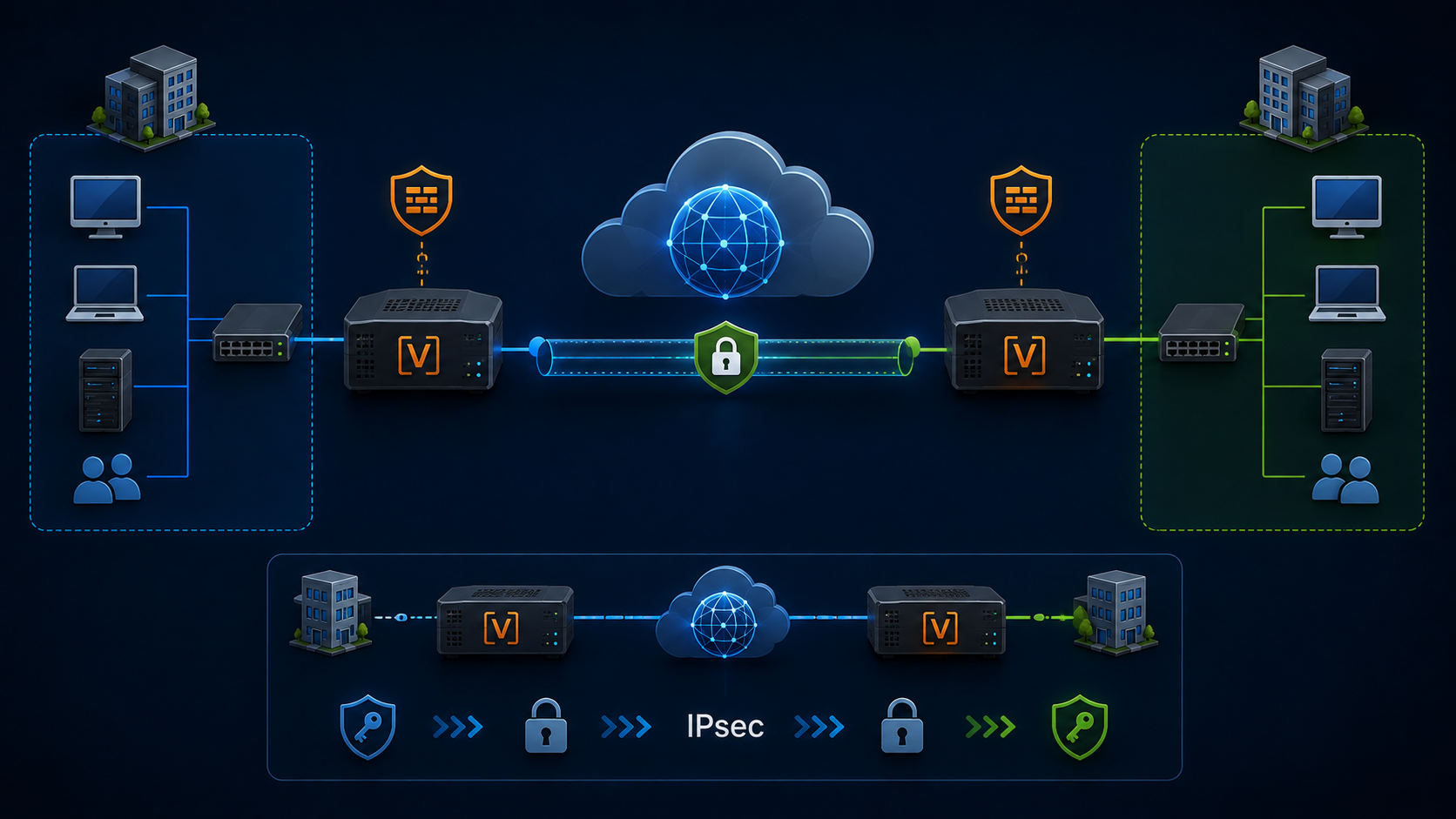
IPsec VPN on VyOS demonstrates how to establish a secure tunnel between two sites over the Internet.
I have written some articles about VyOS. If you want to check the articles, you can read them by accessing the following links:
- How to Install VyOS Router in a lab environment:
- Performing basic configurations on the VyOS:
I have started working on a new network topology, simulating a company with a Main site and replicating some virtual machines to a disaster recovery (DR) site. It is a complex scenario that involves numerous technologies and configurations. We can see the topology in the following picture:
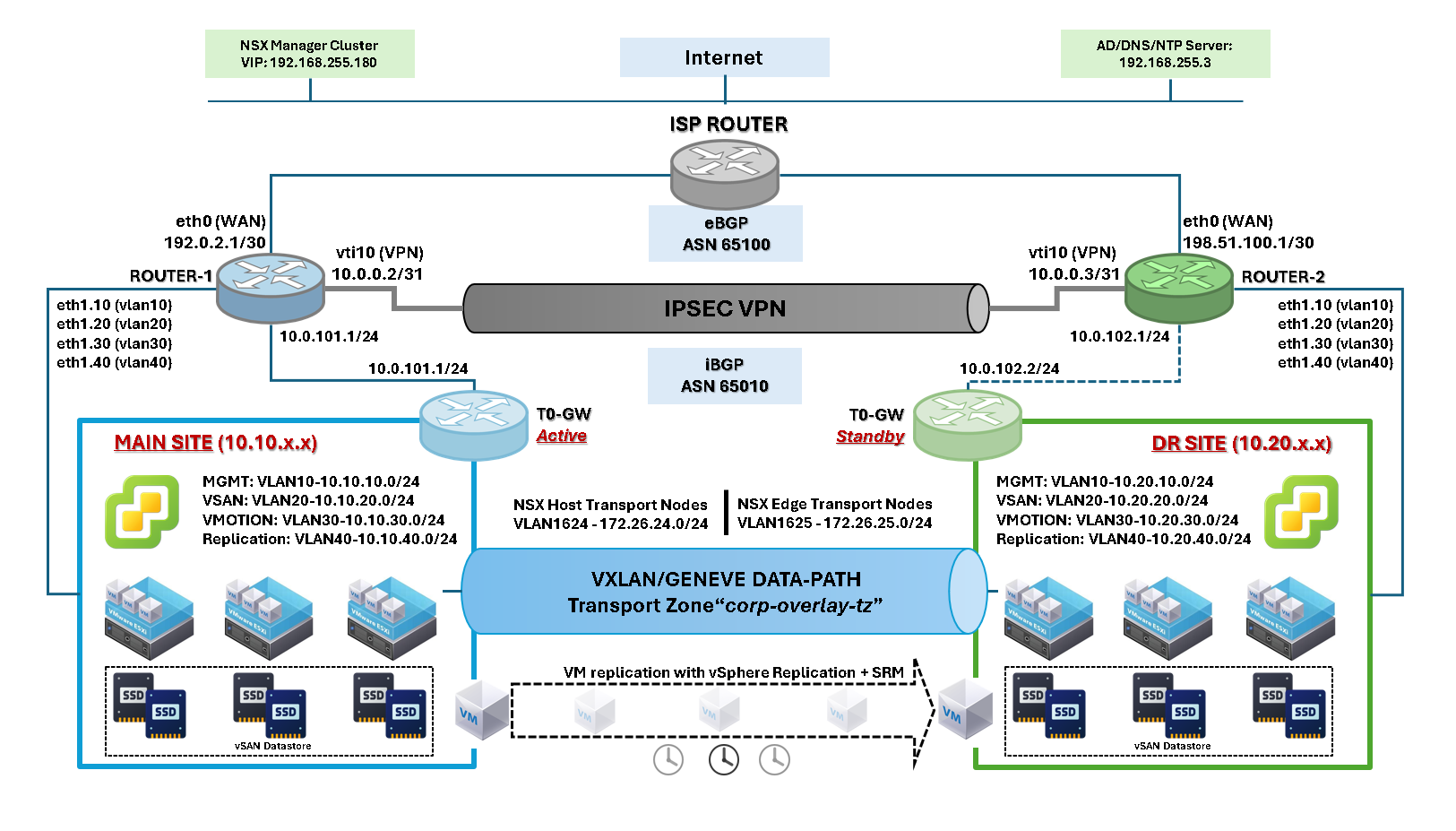
The primary goal is to establish a secure communication channel between the sites, utilizing a low-cost communication link. Since both sites have an Internet connection, we can use this link to connect both sites using a virtual private network (VPN).
As shown in the network topology, each site has a VyOS router at its edge. The internet connection is established on the VyOS router, which is used to create a secure tunnel between the sites.
The VPN is “route-based”. It means that we have a virtual interface (vti10) on each VyOS that will be used to route the traffic between the sites.
Both VyOS routers (Main and DR) exchange router information using the internal Border Gateway Protocol (iBGP). Additionally, each VyOS router exchanges router information with the ISP router using External Border Gateway Protocol (eBGP).
Since our goal is to provide VPN configuration, let’s proceed with that.
VyOS configuration for the Main Site:
# WAN interface configuration:
set interfaces ethernet eth0 address '192.0.2.1/30'
set interfaces ethernet eth0 description 'Uplink - WAN'

# VPN IPSEC interface configuration:
set interfaces vti vti10 address '10.0.0.2/31'
set interfaces vti vti10 description 'VPN Virtual Tunnel Interface'

# VPN IPSEC configuration
# 192.0.2.1 is the local IP (Main Site)
# 198.51.100.1 is the remote IP (DR Site)
set vpn ipsec authentication psk peer_198-51-100-1 id '192.0.2.1'
set vpn ipsec authentication psk peer_198-51-100-1 id '198.51.100.1'
set vpn ipsec authentication psk peer_198-51-100-1 secret 'S$cretK$y11'
set vpn ipsec esp-group ESP_DEFAULT lifetime '3600'
set vpn ipsec esp-group ESP_DEFAULT mode 'tunnel'
set vpn ipsec esp-group ESP_DEFAULT pfs 'dh-group19'
set vpn ipsec esp-group ESP_DEFAULT proposal 10 encryption 'aes256gcm128'
set vpn ipsec esp-group ESP_DEFAULT proposal 10 hash 'sha256'
set vpn ipsec ike-group IKEv2_DEFAULT close-action 'none'
set vpn ipsec ike-group IKEv2_DEFAULT dead-peer-detection action 'restart'
set vpn ipsec ike-group IKEv2_DEFAULT dead-peer-detection interval '30'
set vpn ipsec ike-group IKEv2_DEFAULT dead-peer-detection timeout '120'
set vpn ipsec ike-group IKEv2_DEFAULT disable-mobike
set vpn ipsec ike-group IKEv2_DEFAULT key-exchange 'ikev2'
set vpn ipsec ike-group IKEv2_DEFAULT lifetime '10800'
set vpn ipsec ike-group IKEv2_DEFAULT proposal 10 dh-group '19'
set vpn ipsec ike-group IKEv2_DEFAULT proposal 10 encryption 'aes256gcm128'
set vpn ipsec ike-group IKEv2_DEFAULT proposal 10 hash 'sha256'
set vpn ipsec interface 'eth0'
set vpn ipsec options disable-route-autoinstall
set vpn ipsec site-to-site peer peer_198-51-100-1 authentication local-id '192.0.2.1'
set vpn ipsec site-to-site peer peer_198-51-100-1 authentication mode 'pre-shared-secret'
set vpn ipsec site-to-site peer peer_198-51-100-1 authentication remote-id '198.51.100.1'
set vpn ipsec site-to-site peer peer_198-51-100-1 connection-type 'initiate'
set vpn ipsec site-to-site peer peer_198-51-100-1 ike-group 'IKEv2_DEFAULT'
set vpn ipsec site-to-site peer peer_198-51-100-1 ikev2-reauth 'inherit'
set vpn ipsec site-to-site peer peer_198-51-100-1 local-address '192.0.2.1'
set vpn ipsec site-to-site peer peer_198-51-100-1 remote-address '198.51.100.1'
set vpn ipsec site-to-site peer peer_198-51-100-1 vti bind 'vti10'
set vpn ipsec site-to-site peer peer_198-51-100-1 vti esp-group 'ESP_DEFAULT

# BGP configuration (AS and Router ID):
set protocols bgp parameters router-id '10.0.0.2'
set protocols bgp system-as '65010'

# BGP ISP peer configuration:
set protocols bgp neighbor 192.0.2.2 address-family ipv4-unicast
set protocols bgp neighbor 192.0.2.2 bfd
set protocols bgp neighbor 192.0.2.2 remote-as '65100'
set protocols bgp neighbor 192.0.2.2 update-source 'eth0'

# BGP VyOS (DR Site) peer configuration:
set protocols bgp neighbor 10.0.0.3 address-family ipv4-unicast
set protocols bgp neighbor 10.0.0.3 ebgp-multihop '2'
set protocols bgp neighbor 10.0.0.3 remote-as '65010'
set protocols bgp neighbor 10.0.0.3 update-source 'vti10'

# Networks annouced by BGP:
set protocols bgp address-family ipv4-unicast network 10.10.10.0/24
set protocols bgp address-family ipv4-unicast network 10.10.20.0/24
set protocols bgp address-family ipv4-unicast network 10.10.30.0/24
set protocols bgp address-family ipv4-unicast network 10.10.40.0/24
VyOS configuration for the DR Site:
# WAN interface configuration:
set interfaces ethernet eth0 address '198.51.100.1/30'
set interfaces ethernet eth0 description 'Uplink - WAN'

# VPN IPSEC interface configuration:
set interfaces vti vti10 address '10.0.0.3/31'
set interfaces vti vti10 description 'VPN Virtual Tunnel Interface'

# VPN IPSEC configuration
# 198.51.100.1 is the local IP (DR Site)
# 192.0.2.1 is the remote IP (Main Site)
set vpn ipsec authentication psk peer_192-0-2-1 id '192.0.2.1'
set vpn ipsec authentication psk peer_192-0-2-1 id '198.51.100.1'
set vpn ipsec authentication psk peer_192-0-2-1 secret 'S$cretK$y11'
set vpn ipsec esp-group ESP_DEFAULT lifetime '3600'
set vpn ipsec esp-group ESP_DEFAULT mode 'tunnel'
set vpn ipsec esp-group ESP_DEFAULT pfs 'dh-group19'
set vpn ipsec esp-group ESP_DEFAULT proposal 10 encryption 'aes256gcm128'
set vpn ipsec esp-group ESP_DEFAULT proposal 10 hash 'sha256'
set vpn ipsec ike-group IKEv2_DEFAULT close-action 'none'
set vpn ipsec ike-group IKEv2_DEFAULT dead-peer-detection action 'restart'
set vpn ipsec ike-group IKEv2_DEFAULT dead-peer-detection interval '30'
set vpn ipsec ike-group IKEv2_DEFAULT dead-peer-detection timeout '120'
set vpn ipsec ike-group IKEv2_DEFAULT disable-mobike
set vpn ipsec ike-group IKEv2_DEFAULT key-exchange 'ikev2'
set vpn ipsec ike-group IKEv2_DEFAULT lifetime '10800'
set vpn ipsec ike-group IKEv2_DEFAULT proposal 10 dh-group '19'
set vpn ipsec ike-group IKEv2_DEFAULT proposal 10 encryption 'aes256gcm128'
set vpn ipsec ike-group IKEv2_DEFAULT proposal 10 hash 'sha256'
set vpn ipsec interface 'eth0'
set vpn ipsec options disable-route-autoinstall
set vpn ipsec site-to-site peer peer_192-0-2-1 authentication local-id '198.51.100.1'
set vpn ipsec site-to-site peer peer_192-0-2-1 authentication mode 'pre-shared-secret'
set vpn ipsec site-to-site peer peer_192-0-2-1 authentication remote-id '192.0.2.1'
set vpn ipsec site-to-site peer peer_192-0-2-1 connection-type 'initiate'
set vpn ipsec site-to-site peer peer_192-0-2-1 ike-group 'IKEv2_DEFAULT'
set vpn ipsec site-to-site peer peer_192-0-2-1 ikev2-reauth 'inherit'
set vpn ipsec site-to-site peer peer_192-0-2-1 local-address '198.51.100.1'
set vpn ipsec site-to-site peer peer_192-0-2-1 remote-address '192.0.2.1'
set vpn ipsec site-to-site peer peer_192-0-2-1 vti bind 'vti10'
set vpn ipsec site-to-site peer peer_192-0-2-1 vti esp-group 'ESP_DEFAULT'

# BGP configuration (AS and Router ID):
set protocols bgp parameters router-id '10.0.0.3'
set protocols bgp system-as '65010'

# BGP AS path prepending configuration:
# AS path prepending is a BGP routing technique used to manipulate path selection by making a route look longer or less attractive to other BGP peers.
set policy route-map PREPEND rule 10 action 'permit'
set policy route-map PREPEND rule 10 set as-path prepend '65010'

# In this case, from the ISP router, the best path to internal networks is through the Main site and not through the DR site - The DR site will only be used when the Main site becomes unavailable:
set protocols bgp neighbor 198.51.100.2 address-family ipv4-unicast route-map export 'PREPEND'
set protocols bgp neighbor 198.51.100.2 bfd
set protocols bgp neighbor 198.51.100.2 remote-as '65100'
set protocols bgp neighbor 198.51.100.2 update-source 'eth0'

# BGP VyOS (Main Site) peer configuration:
set protocols bgp neighbor 10.0.0.2 address-family ipv4-unicast
set protocols bgp neighbor 10.0.0.2 ebgp-multihop '2'
set protocols bgp neighbor 10.0.0.2 remote-as '65010'
set protocols bgp neighbor 10.0.0.2 update-source 'vti10'

# Networks annouced by BGP:
set protocols bgp address-family ipv4-unicast network 10.20.10.0/24
set protocols bgp address-family ipv4-unicast network 10.20.20.0/24
set protocols bgp address-family ipv4-unicast network 10.20.30.0/24
set protocols bgp address-family ipv4-unicast network 10.20.40.0/24
To debug the VPN IPSEC, we can use the following commands:
show vpn ike sa
show vpn ipsec sa
From the VyOS on the Main Site:
vyos@router-1:~$ show vpn ike sa
Peer ID / IP                            Local ID / IP
------------                            -------------
198.51.100.1 198.51.100.1               192.0.2.1 192.0.2.1

    State  IKEVer  Encrypt      Hash          D-H Group      NAT-T  A-Time  L-Time
    -----  ------  -------      ----          ---------      -----  ------  ------
    up     IKEv2   AES_GCM_16_256 n/a           ECP_256        no     3423    0


vyos@router-1:~$ show vpn ipsec sa
Connection             State    Uptime    Bytes In/Out    Packets In/Out    Remote address    Remote ID     Proposal
---------------------  -------  --------  --------------  ----------------  ----------------  ------------  ----------------------
peer_198-51-100-1-vti  up       4m55s     329K/3M         1K/4K             198.51.100.1      198.51.100.1  AES_GCM_16_256/ECP_256
From the VyOS on the DR Site:
vyos@router-2:~$ show vpn ike sa
Peer ID / IP                            Local ID / IP
------------                            -------------
192.0.2.1 192.0.2.1                     198.51.100.1 198.51.100.1

    State  IKEVer  Encrypt      Hash          D-H Group      NAT-T  A-Time  L-Time
    -----  ------  -------      ----          ---------      -----  ------  ------
    up     IKEv2   AES_GCM_16_256 n/a           ECP_256        no     3543    0


vyos@router-2:~$ show vpn ipsec sa
Connection          State    Uptime    Bytes In/Out    Packets In/Out    Remote address    Remote ID    Proposal
------------------  -------  --------  --------------  ----------------  ----------------  -----------  ----------------------
peer_192-0-2-1-vti  up       6m53s     4M/452K         6K/1K             192.0.2.1         192.0.2.1    AES_GCM_16_256/ECP_256
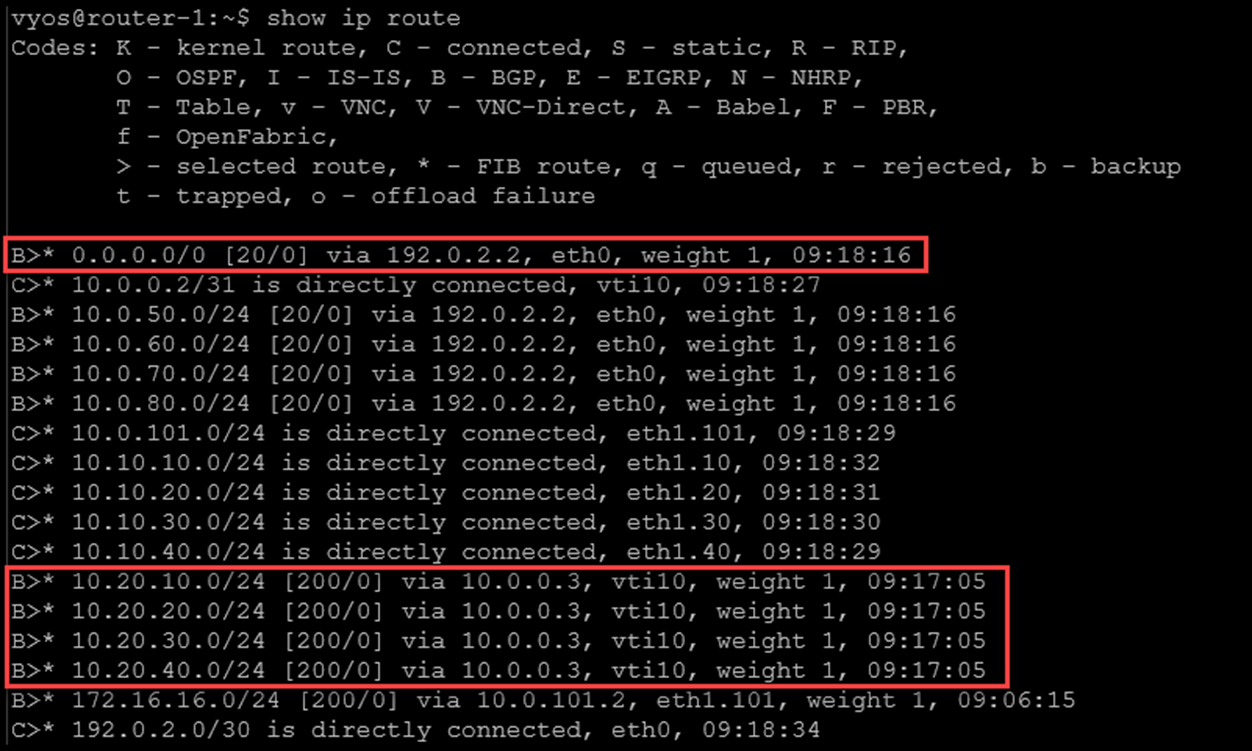
So, the VyOS on the Main Site is learning the default route from the ISP router and learning routes to the DR networks through the iBGP session:
The same idea occurs on the DR site, as we can see in the following picture:
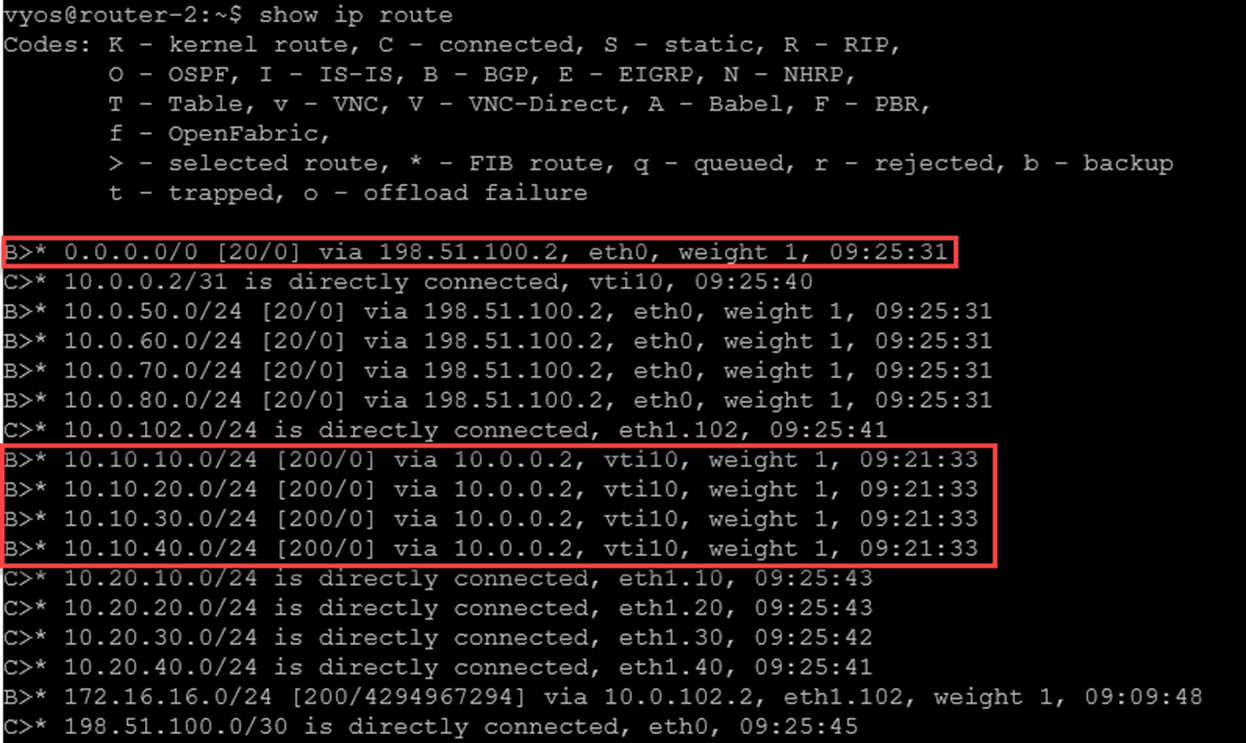
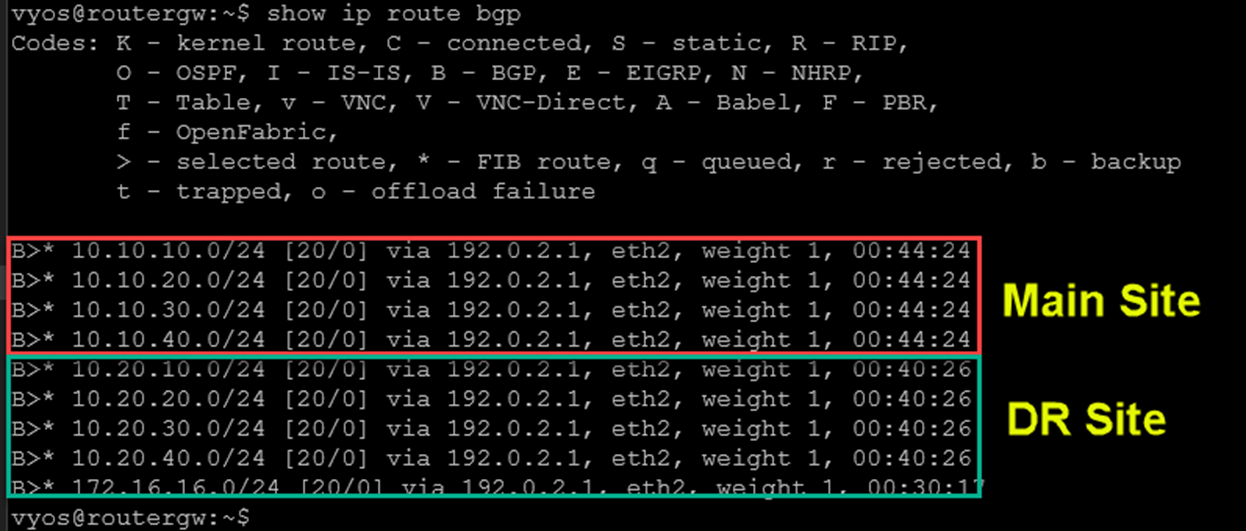
From the ISP router, we can check the BGP routers. As we can see in the following picture, the “main site” is used to reach all internal networks on both sites:
That’s it for now 😉
If you have any comments or questions, please don’t hesitate to contact me.
