

vSAN is a software-defined storage solution used a lot in modern data centers. It’s a police-driven technology that provides us the flexibility to apply different policies for each virtual machine (VM) and different policies for each virtual disk (vmdk level). This article aims to provide a basic understanding of the vSAN Durability Components.
We have written some articles about vSAN. You can access those by the following link:
First and Foremost, What is a vSAN Storage Policy?
As we know, vSAN is an Object-Based storage. It means that all VMs stored in the vSAN datastore are formed by the following objects (5 Objects):
- VM Home namespace Object
- VMDK Object
- VM Swap Object
- VM Snapshot Object
- VM Memory Snapshot Object
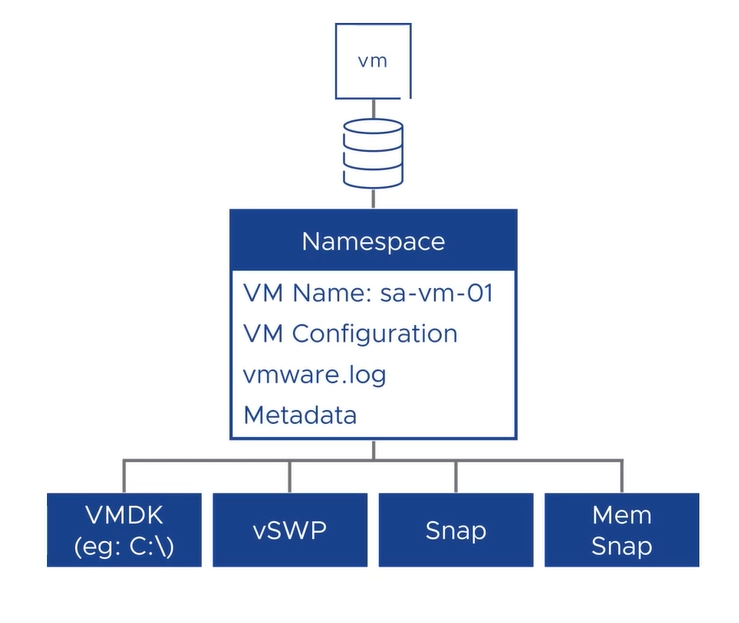
So, each object is split into Components, based on the applied vSAN Storage Policy. vSAN components are the actual pieces of data residing on the vSAN Datastore.
vSAN Storage Policies determine how data is placed across hosts in a vSAN cluster. They also determine the performance and capacity characteristics of the data.
In the vSAN Datastore:
- Storage policies are applied to objects
- Components are created following the specified storage policy
- Components are stored on physical storage devices located on vSAN nodes
In the following figure, we have an example of that. A VM is running on an ESXi host and is split into some objects. Each object is split into some components, based on the storage policy applied to the VM’s objects:
- C1 = Component 1
- C2 = Component 2
- W = Witness Component
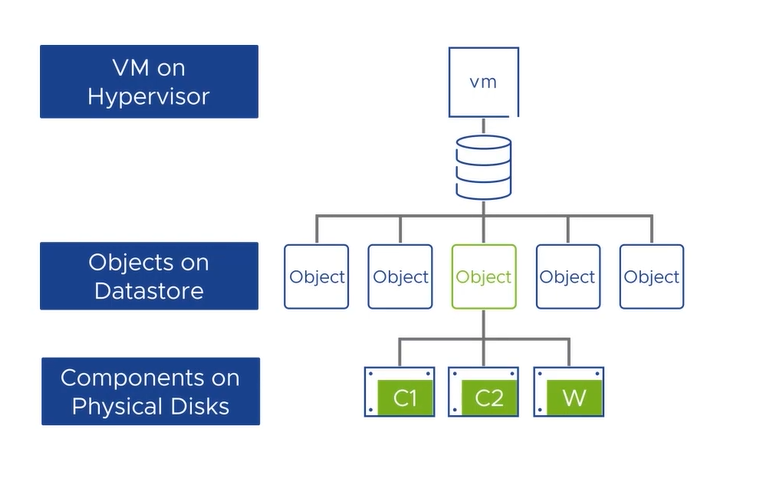
Note: In this case, for instance, RAID1/FTT1 is the policy applied to the VM’s objects. The level of failures to tolerate and other advanced parameters are defined in the vSAN Storage Policy!
What is a vSAN Durability Component?
Durability Components in vSAN are a feature that helps maintain the required availability for VMs during maintenance or in the event of host failures.
When a host is placed into maintenance mode or a host failure occurs, new “durability components” are created for the components stored on that host. These durability components will be created somewhere in the cluster. These components allow all new I/O to be committed to the existing component, as well as the durability component.
In summary, durability components further reduce the time needed to perform a resynchronization, by creating a temporary component to capture new writes.
Look at the following figure:
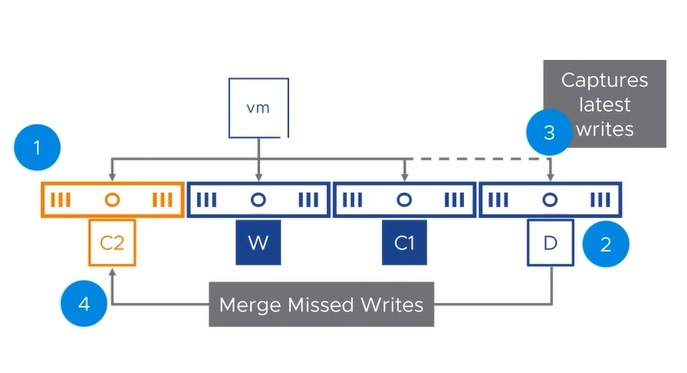
In this case, for instance, we have a cluster with four ESXi hosts. All hosts are contributing to creating the vSAN Datastore (each ESXi host provides a couple of disks). Just to remember, each ESXi host has a couple of physical disks. These disks are used by creating the vSAN Disk Group (DG).
Eventually, failures can happen. Imagine that the first ESXi host failed. So, based on this, let’s get started to understand in a deep more how is the function of the durability component:
1- After the first ESXi host failed, a durability component is created on host four (in the figure above, the durability component is represented by the capital letter D);

2- This durability component captures all new and incremental writes;

3- If the Absent component returns within the Object Repair Time (60 minutes by default), it is unsynchronized from the durability component and becomes active again;

4- After the vSAN sync process, the durability component is deleted.
All vSAN Versions Supported the Durability Component Feature?
The Durability Components feature was introduced in vSAN 7.0 Update 1. Starting with vSAN 7.0 Update 2, vSAN can also use these durability components in situations where a host failure has occurred (supporting only for RAID-1).
in vSAN 8 Update 1, durability components were introduced for planned maintenance when using RAID-5/RAID-6.
How can I see the Durability Components?
So, let’s look at a VM as an example. The VM name in this example is “VM 01 CL Validation”.
The first step is to confirm what vSAN Storage Policy this VM is using. To do that:
1- Access the vCenter Server by vSphere Client;
2- Under the vCenter Server Inventory, click on the VM;
3- Go to the Configure tab –> Policies. As we can see in the following figure, all VM objects are using the “vSAN Default Storage Policy”:
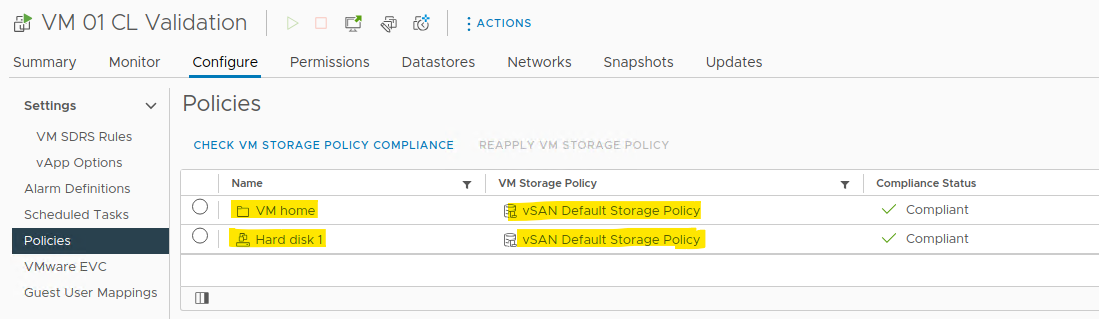
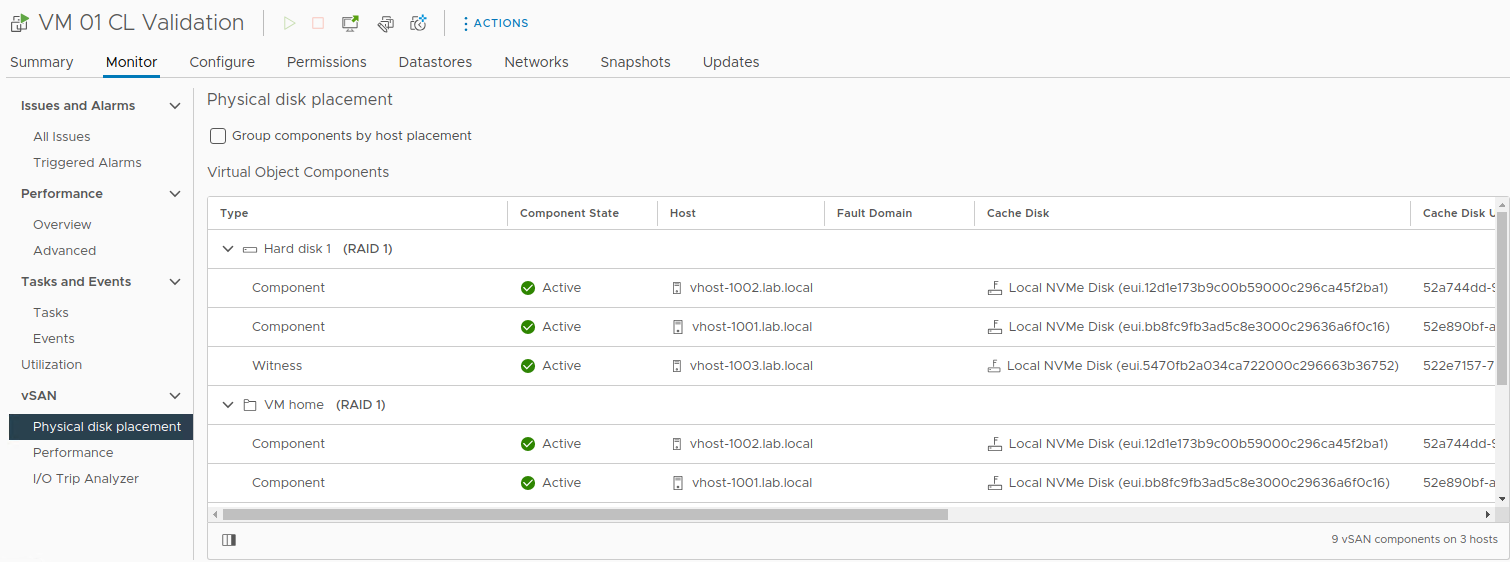
4- It means that all the VM objects are in RAID1/FTT1 (Failures To Tolerate = 1). Under the VM, select the Monitor Tab –> vSAN –> Physical disk placement. In this menu, we can see how the VM components are stored in the physical disks.
As we can see in the following figure, looks like the first object “Hard disk 1” and its components:
-- The vSAN object "Hard disk 1" was split into three components, based on its vSAN Storage Policy (RAID1/FTT1);

-- RAID1/FTT1 splits the object into three components. As a result, we have two data components and one witness component;

-- The witness component in this case is just used by a "tier-break" or like a "quorum" (practically, the witness component will indicate what part of the component is still available during a failure scenario or something like that).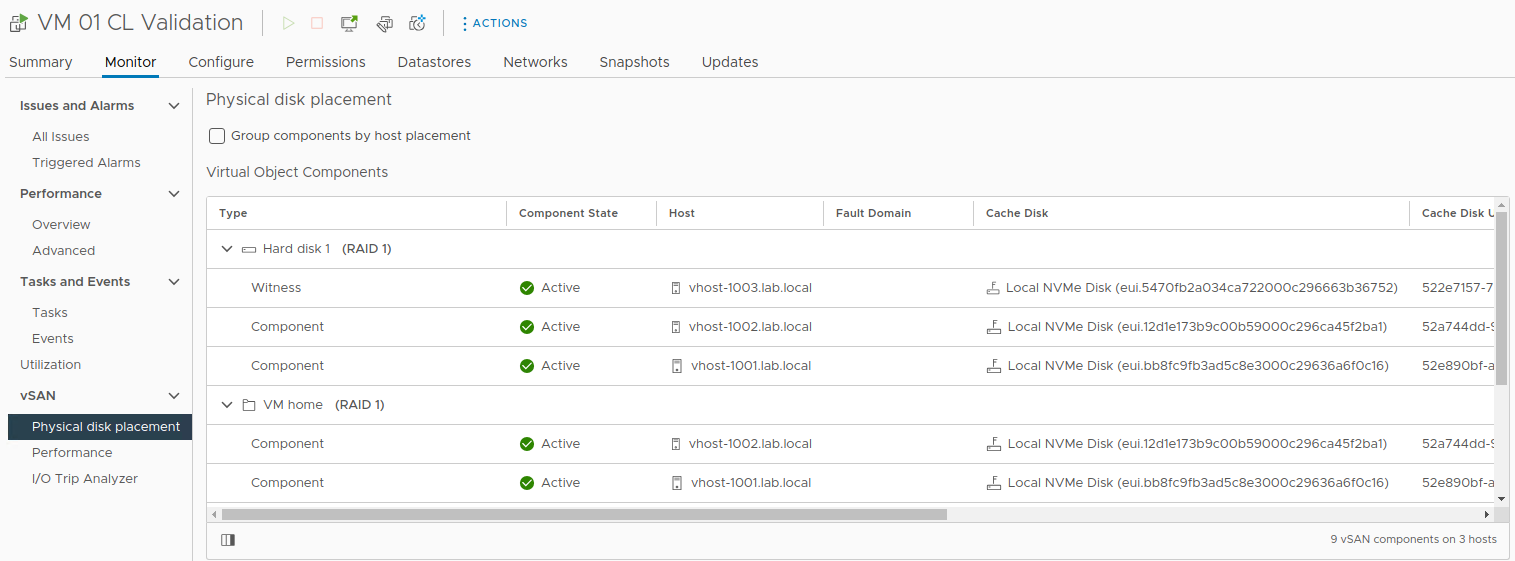
5- Each object has its UUID. This is a unique value for each vSAN object. For our example VM, we can access the Virtual Objects menu and see all UUIDs for all VMs.
Select the Cluster –> Monitor –> vSAN –> Virtual Objects, and expand our virtual machine to see all the details of it, as we can see in the following figure. Look that each object has its UUID:
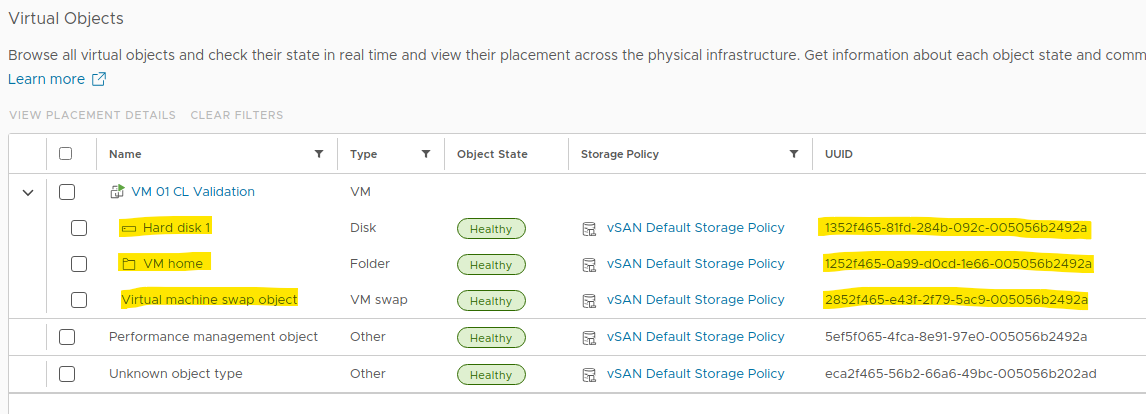
6- Using the command line, for instance, we can see object details like version, size, SPBM Profile, and so on. Based on the above figure, the “Hard disk 1” object has the UUID “1352f465-81fd-284b-092c-005056b2492a”. We can open an SSH session for any ESXi host in the cluster and type the following command (in this case, replace the UUID in red for your UUID):
esxcli vsan debug object overview | grep -i -E "Object UUID|1352f465-81fd-284b-092c-005056b2492a"The command output is:

At this moment, we learned how to see the VM objects and its components. Good!
7- The next step here is provoking a host failure just to see the Durability Components in play. To do that, we will put one ESXi host in maintenance mode:
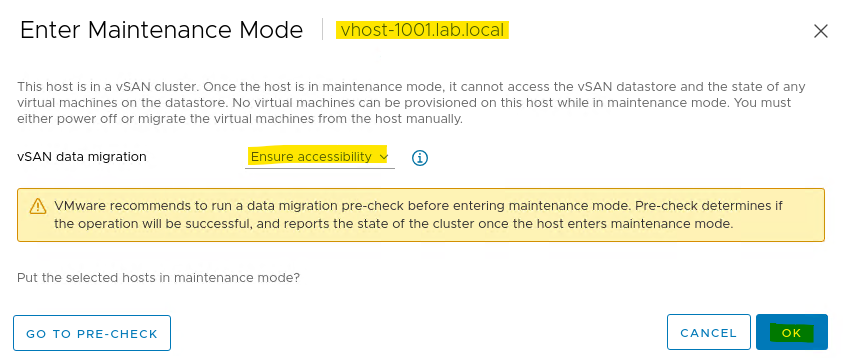
As we can see in the following figure, the ESXi host is in maintenance mode:
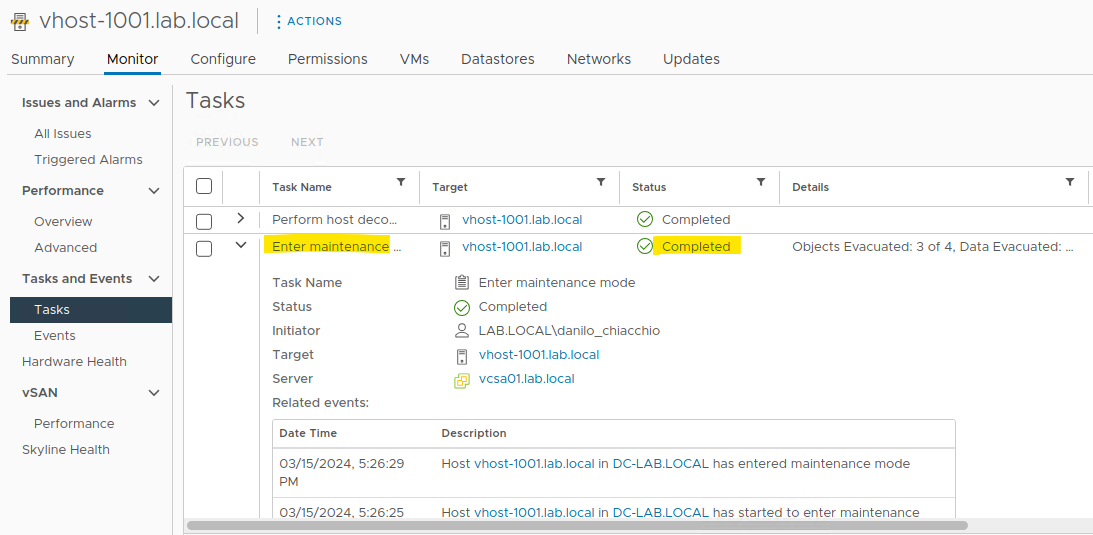
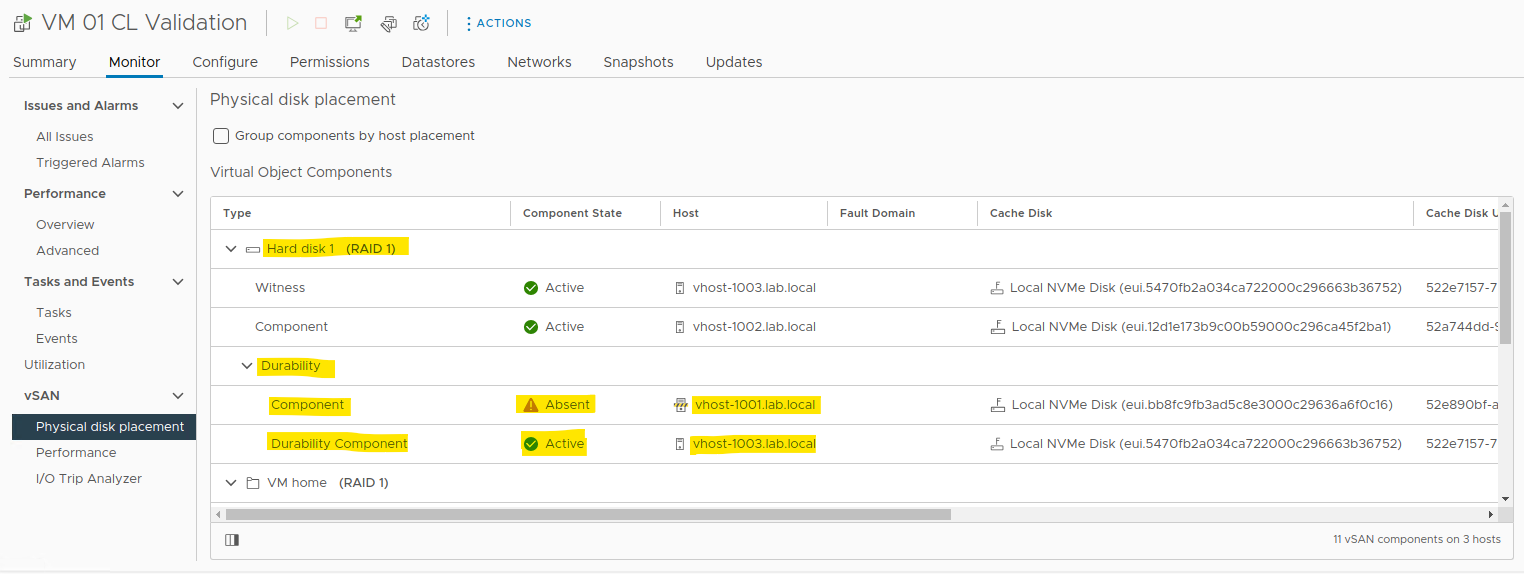
8- After that, accessing the virtual machine’s physical disk placement details, we can see the Durability Components 🙂
Look that the object placed in the ESXi host entered into maintenance mode is “Absent” and a new object was created somewhere in the cluster. This object is the Durability Component.
In this case, for instance, the Durability Component is on another ESXi host in the vSAN cluster:
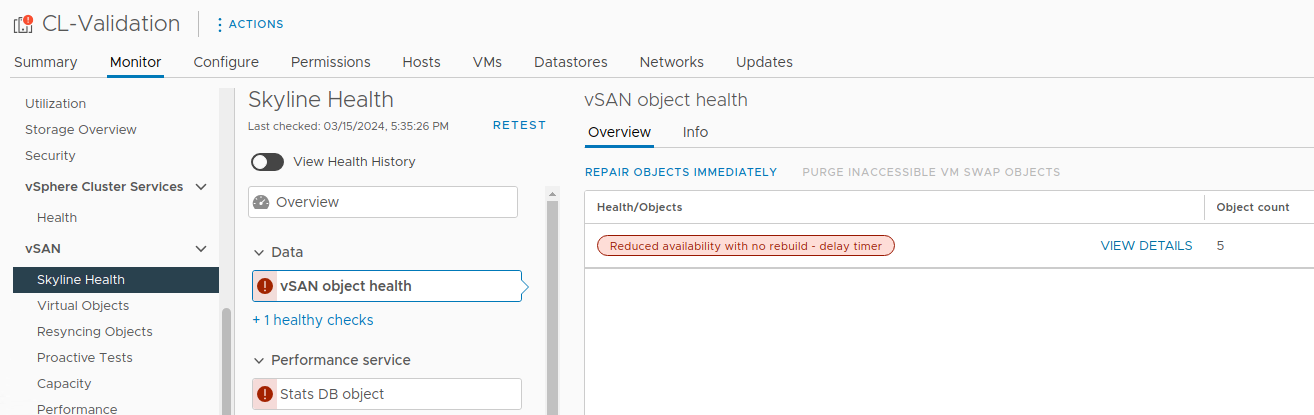
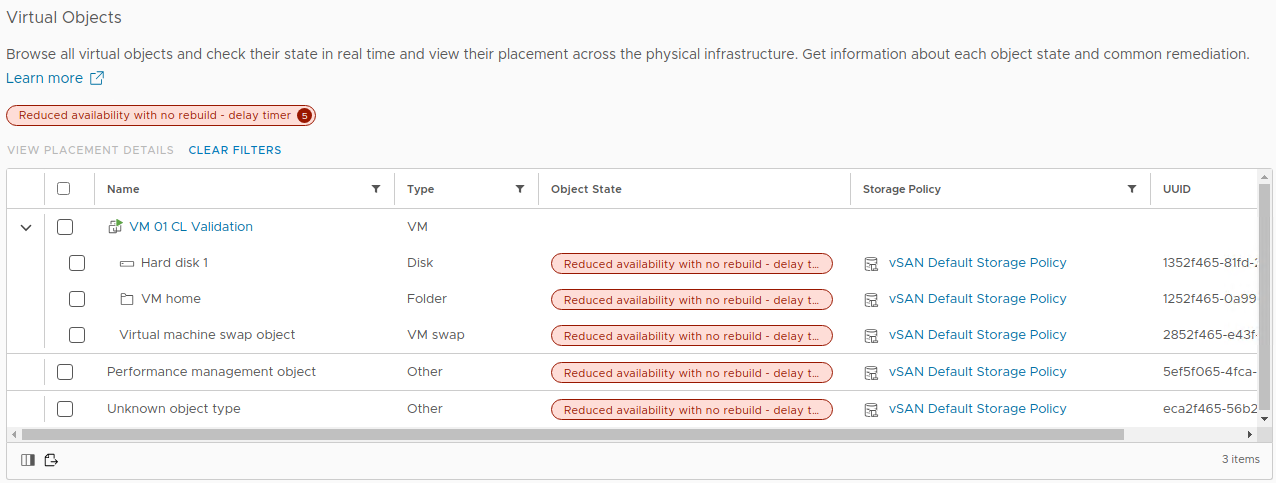
9- Running the vSAN Skyline Health, we can see five objects with their availability reduced – This is expected due to the fact the first ESXi host is in maintenance mode.
The vSAN will wait for the Object Repair Time (60 minutes by default) before starting the reconstruction of the missing objects. While that, the Durirability Components take place and are handling the new writes as a normal component:
Clicking on “View Details”, we can see the Virtual Objects view:
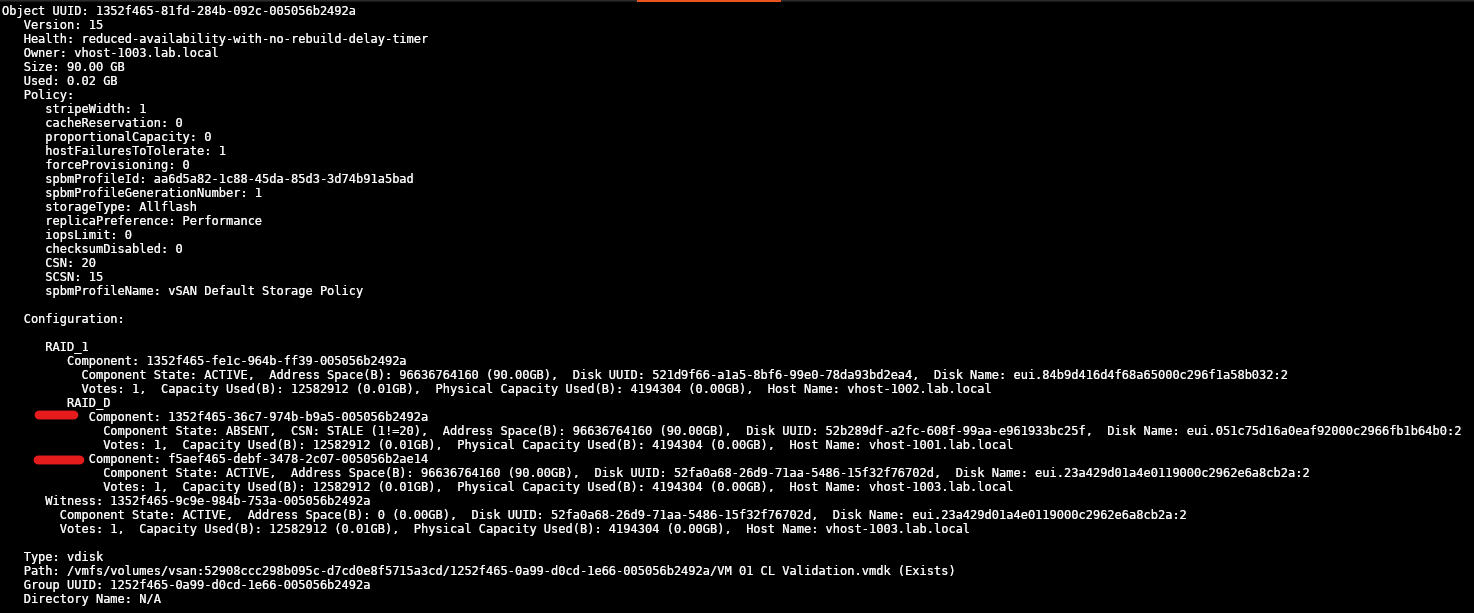
10- In the ESXi host command line, we can see details of the durability components:
esxcli vsan debug object list | lessThe UUID of the “Hard disk 1” for our VM is “1352f465-81fd-284b-092c-005056b2492a”.
So, seeing the object details, we can see a “RAID_D” – It means that we have a durability component.
Under the “RAID_D”, we have two components:
- The failed or absent component;
- The durability component.
Look that we can see each component state and which votes the component represents to make the object accessible or not:
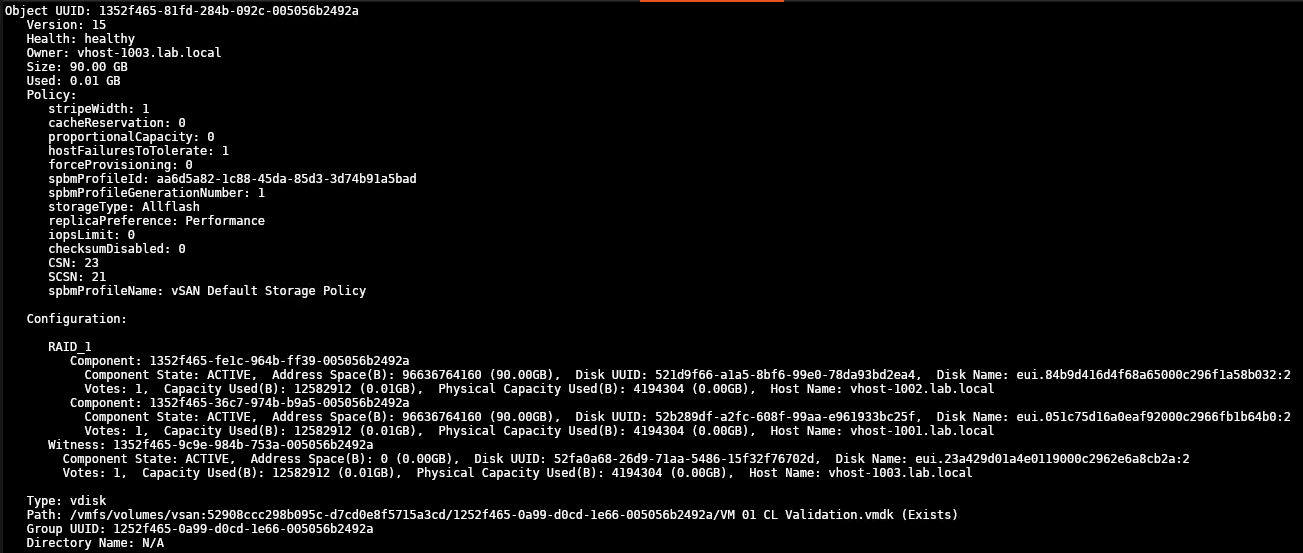
11- After removing the ESXi host from maintenance mode within the Object Repair Time, the absent component will be resynchronized from the durability component and become active again.
Note: The durability component only will be deleted after the sync is finished!
The vSAN Durability Components Feature is Enabled by Default?
Yes!
If you are using the vSAN 7 Update 2 or higher the vSAN Durability Components feature takes place automatically.
To Wrapping This Up
The Durability Components feature in vSAN provides an additional layer of data protection by creating temporary components to store new writes when a host failure or maintenance event occurs. These components ensure that the latest written data is saved redundantly and reduce the time it takes for data to be unsynchronized to a slate component on recovered nodes.
Additionally, I would like to share some external links related to this subject:
- vSAN 7.0 U2 Durability Components? | Yellow Bricks (yellow-bricks.com)
- https://blogs.vmware.com/virtualblocks/2021/03/18/enhanced-data-durability-vsan-7-update-2/
- https://core.vmware.com/blog/durability-components-raid-56-using-vsan-esa-vsan-8-u1
- https://docs.vmware.com/en/VMware-vSphere/7.0/vsan-703-administration-guide.pdf
