Close Menu
DPC Virtual Tips
    Read More

    Linux ss, lsof, and fuser Commands: A Practical Guide

    August 4, 2026

    Linux Commands to Investigate High Disk Partition Usage

    July 20, 2026

    Essential Slurm Administration Commands Every HPC Administrator Should Know

    July 15, 2026
    • Home
    • About Us
    • Contact
    • Cookie Policy
    • Comment Policy
    • Privacy Policy
    • Terms of Use
    • Disclaimer
    Tuesday, August 4
    DPC Virtual Tips
    • Home
    • Operating Systems
    • CLI
    • PowerFlex
    • HPC
    • Virtualization
    • About Us
    • Contact
    DPC Virtual Tips
    Home » Prep a vLCM Cluster to be part of NSX-T
    Virtualization

    Prep a vLCM Cluster to be part of NSX-T

    DaniloBy DaniloSeptember 25, 2023Updated:July 30, 2026No Comments3 Mins Read
    Facebook Twitter Pinterest LinkedIn Tumblr Email
    vLCM NSX-T
    Share
    Facebook Twitter LinkedIn Pinterest Email

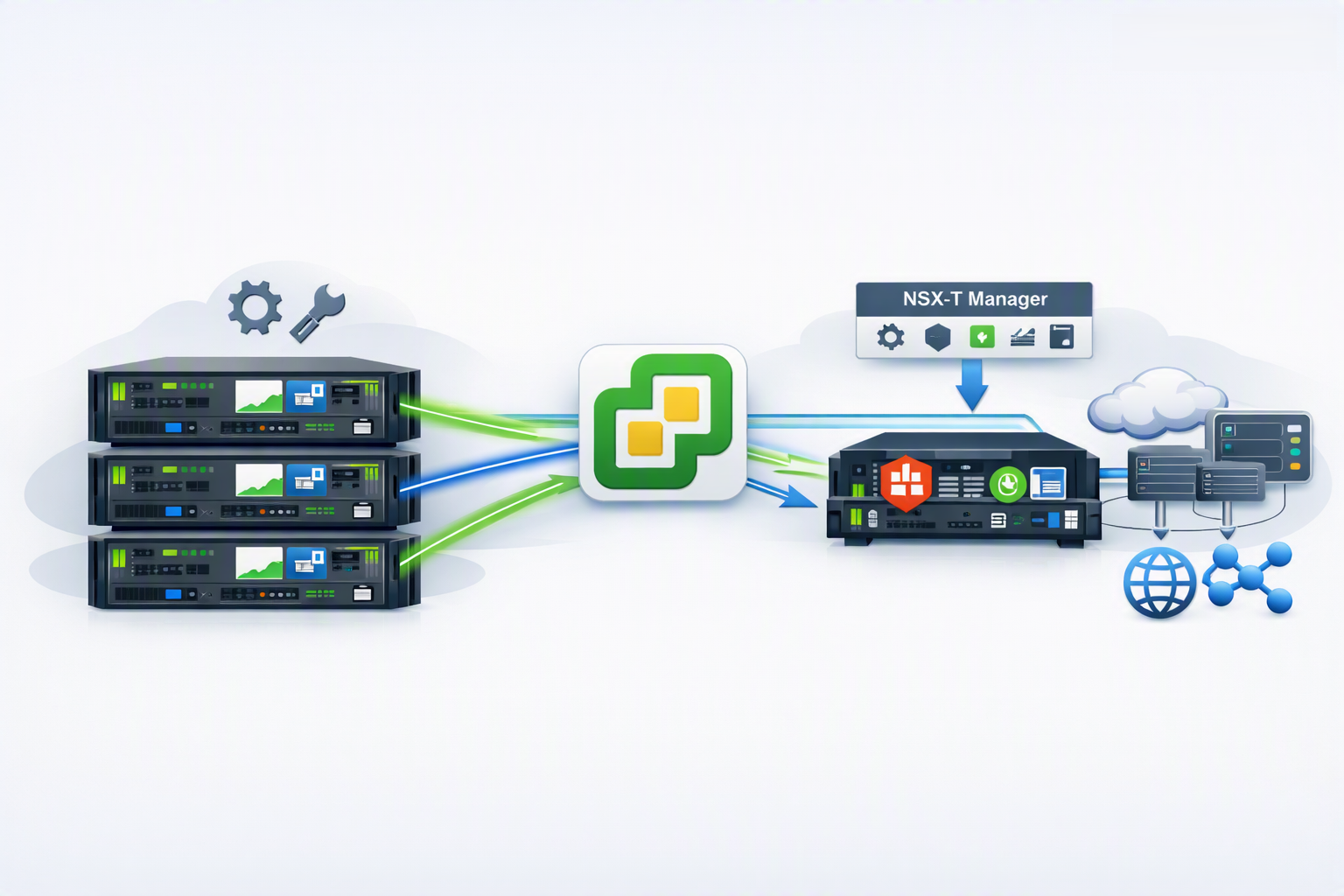
    Prep a vLCM Cluster to be part of NSX-T is an article that shows all configurations necessary to prep hosts inside a vLCM cluster for working in an NSX-T infrastructure.

    We have written a short article explaining how the vLCM works in a practical way. Click on the below link to check this article:

    • https://dpcvirtualtips.com/applying-esxi-patch-with-vlcm/

    Also, we have written another article explaining a short introduction to NSX-T:

    • https://dpcvirtualtips.com/introduction-to-nsx-t/

    About our environment

    In this example:

    • NSX-T version 4.0.1.1.0.20598957.
    • vCenter Server is 7.0.3 build 21958406
    • ESXi hosts have version 7.0.3 build 21930508.

    Note: You need to guarantee that the vCenter Server and all NSX Manager Appliances have the same time configured. Our recommendation is to use the same NTP server for all devices – below are some interesting links about it:

    • https://kb.vmware.com/s/article/57146
    • https://docs.vmware.com/en/VMware-NSX-T-Data-Center/3.2/administration/GUID-5B91BE88-FEA7-4DAA-A819-66800C3B00E6.html#GUID-5B91BE88-FEA7-4DAA-A819-66800C3B00E6

    NSX Installation Error

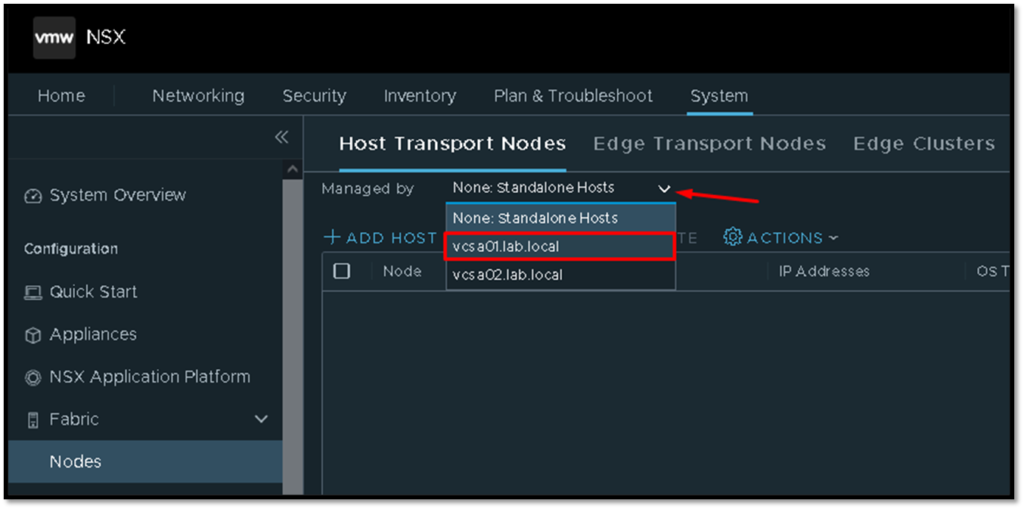
    Firstly, we need to log in to the NSX Manager Web Interface.
    After that, access the menu System –> Fabric –> Nodes –> Host Transport Nodes and select your vCenter Server (that you previously added as a Compute Manager):
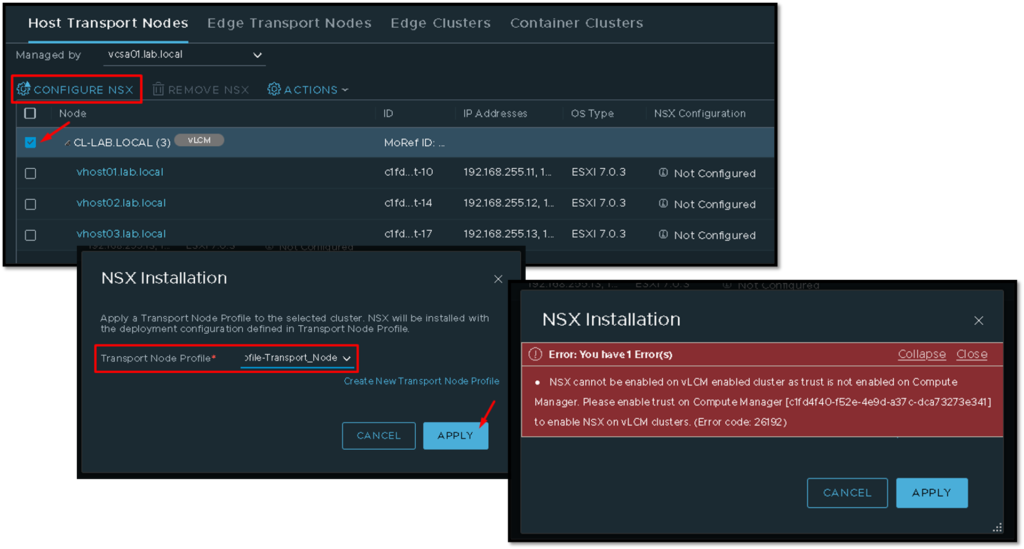
    After that, if we select an ESXi host, the option “CONFIGURE NSX” is unavailable (gray-out) and if we click under the hostname’s ESXi host, we receive an alert about the NSX Installation, as we can see in the picture below:
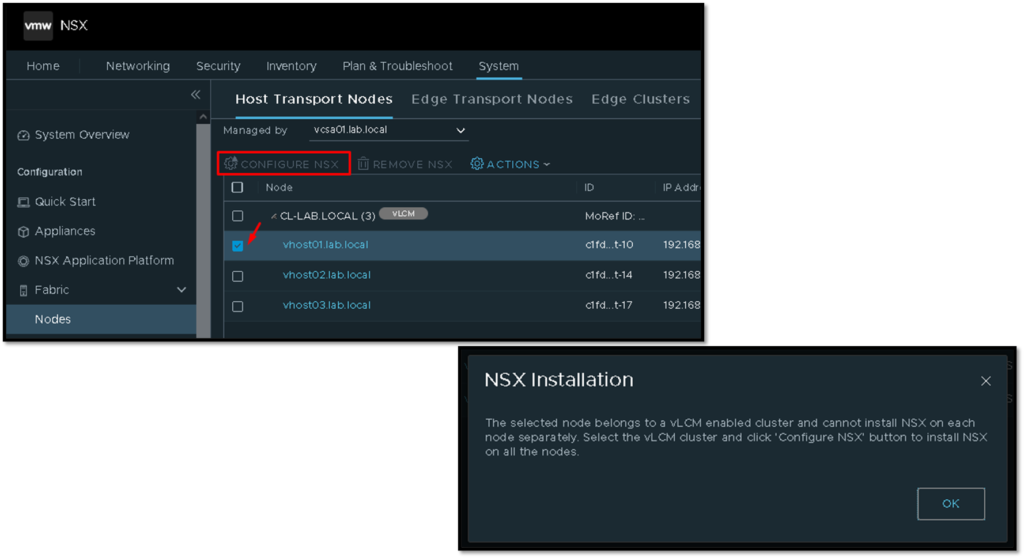
    So, by selecting the cluster “CL-LAB.LOCAL” we can click on the “CONFIGURE NSX” option.
    We can select the Transport Node Profile and click on APPLY to follow the process. But, in this stage, we receive an error:

    NSX cannot ne enabled on vLCM cluster as trust is not enabled on Compute Manager. Please enable trust on Compute Manager.....
    Enabling Trust on Compute Manager

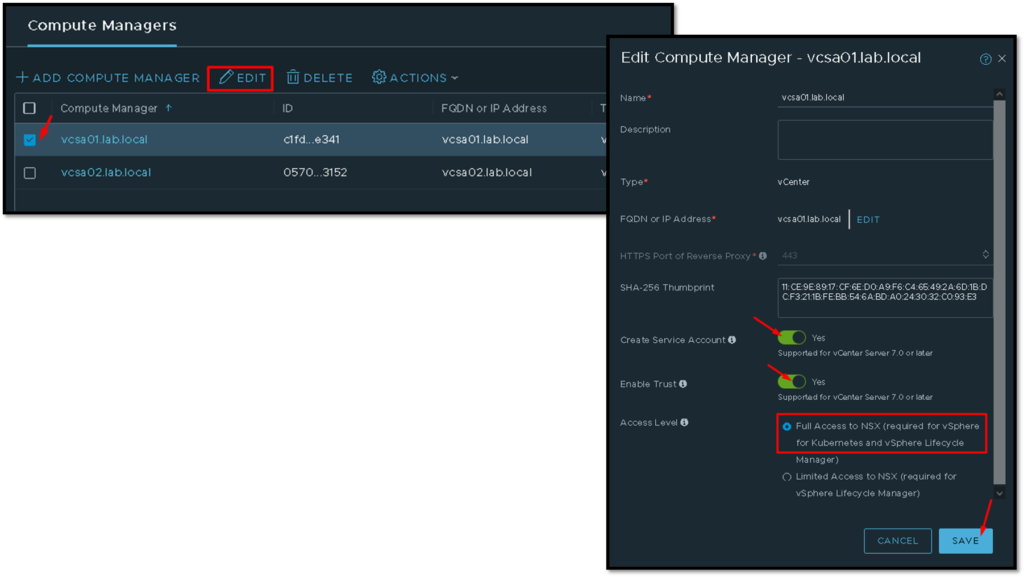
    To fix the error shown in the past step, we need to edit the Compute Manager where our Cluster resides.
    To do that, access the menu System –> Fabric –> Compute Managers –> Select the desired vCenter and click on Edit. Under this page:

    • Enable the option “Create Service Account”
    • Enable the option “Enable Trust”
    • Select the option “Full Access to NSX”
    • and click on SAVE to finish

    Configure NSX

    So, now we can select the cluster again and start the configure NSX process. It is possible to see that the process started with success:
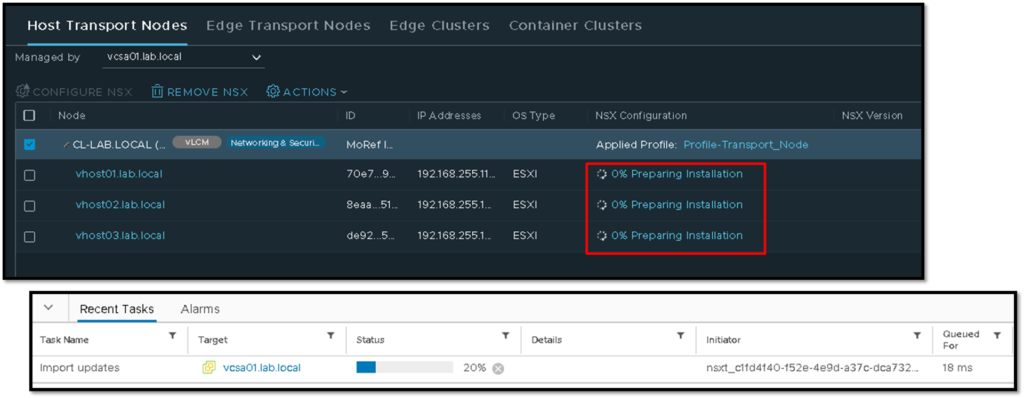
    Look under the vCenter Server recent tasks. We can see the task started by the NSX Manager appliance:
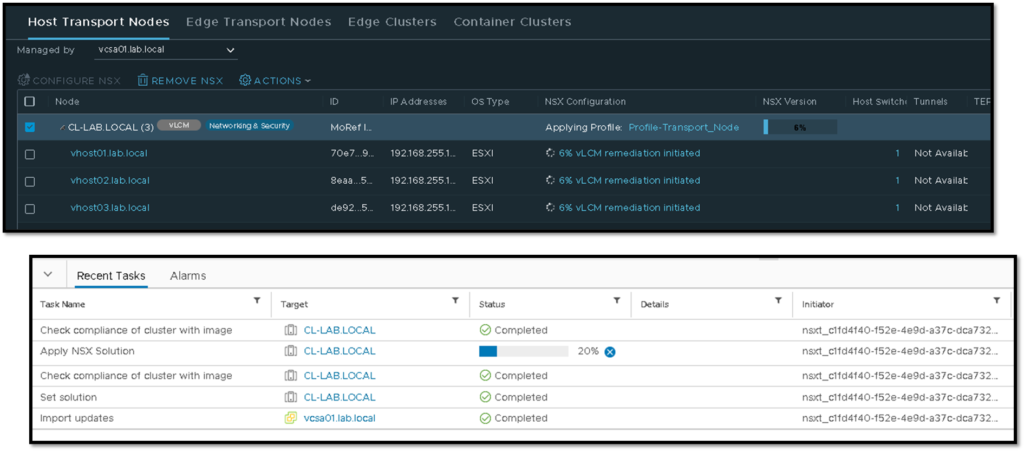
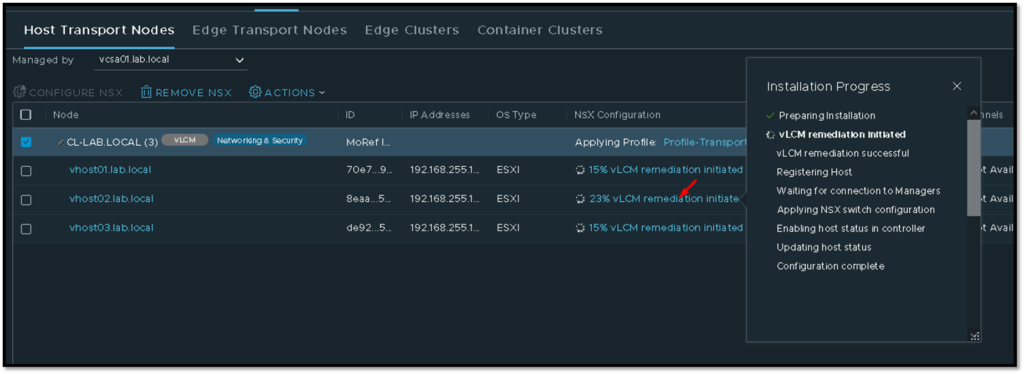
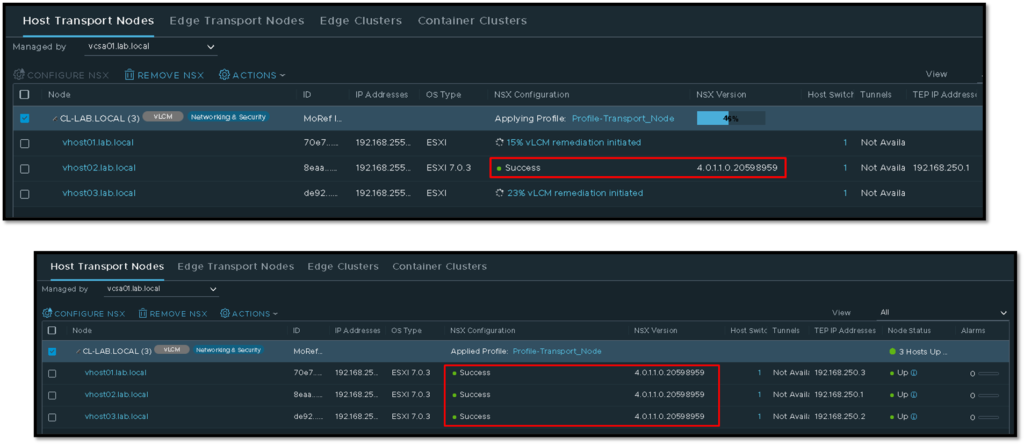
    Under the column NSX Configuration, we can click on some host to check the installation progress, as we can see in the picture below:
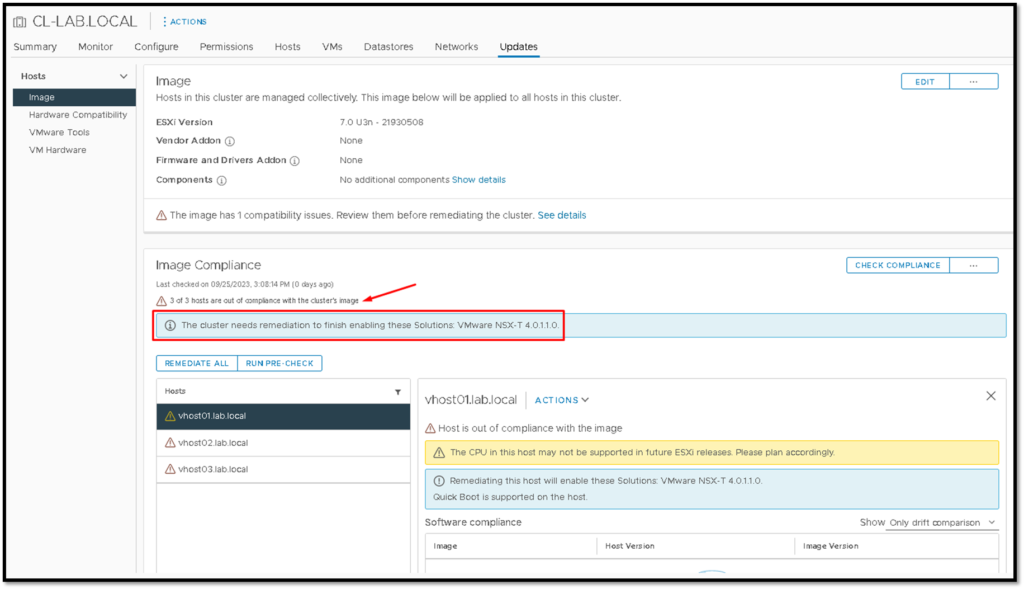
    Just out of curiosity, in parallel, if we click on the Updates tab on the vCenter Server, we can see that all ESXi hosts inside the cluster are out of compliance. Just because the NSX-T vibs installation process is running – this is normal here (please, do not click on anything on this page):
    After some minutes, the preparation process will be finished on each ESXi host inside the cluster:
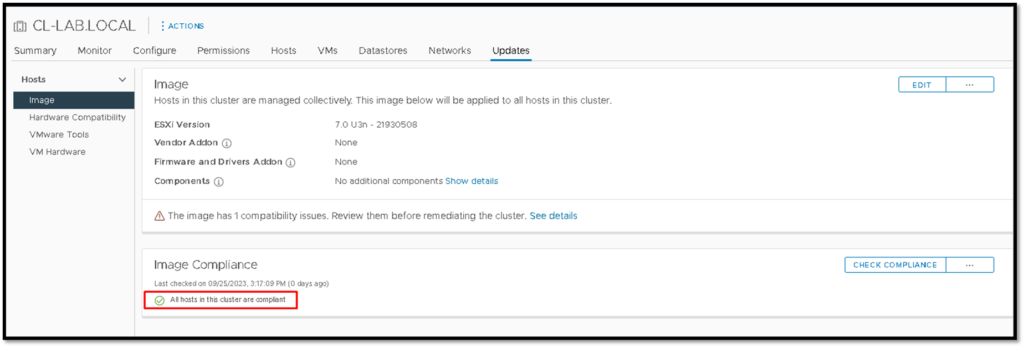
    And all ESXI hosts will be compliance with the vLCM optic:
    Checking the ESXi prepped Host

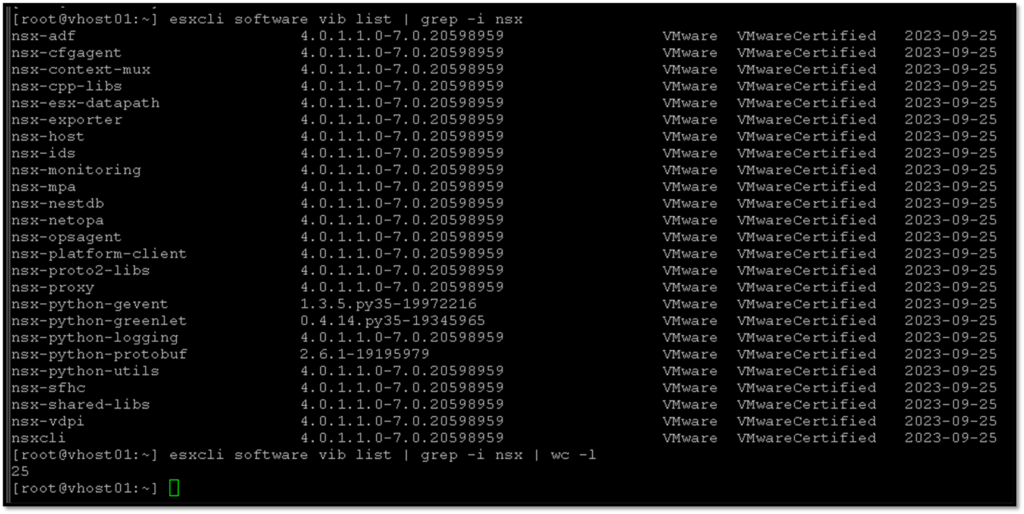
    Here, we can access one ESXi host that has been prepared for the NSX-T and check all NSX-T vibs that have been installed:
    Also, we can access the “nsxcli” shell and check the connection to the NSX Management Cluster:
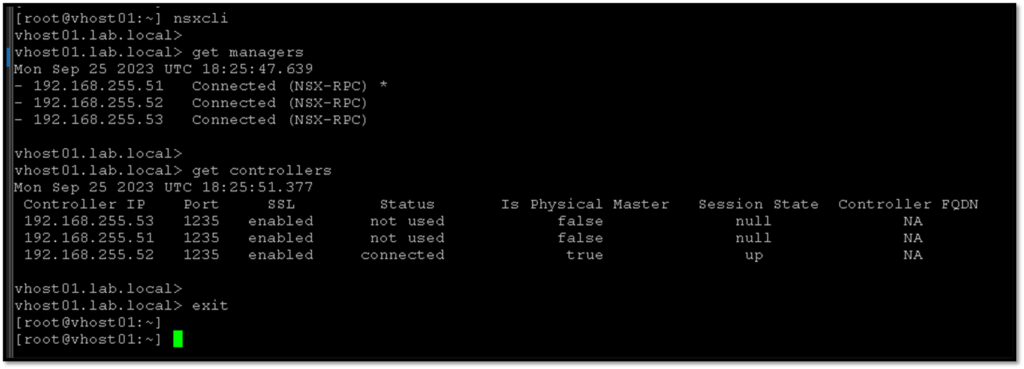
    At this point, our hosts are prepared to work on the NSX-T environment 🙂

    Share. Facebook Twitter Pinterest LinkedIn Tumblr Email
    Previous ArticleCreating a vCenter Enhanced Linked Mode Group
    Next Article Accessing vCenter with MFA
    Danilo

    Infrastructure Engineer with experience in Virtualization, Linux, Windows Server and learning automation using Python. DPC Virtual Tips was created to share practical tutorials, lab experiences and troubleshooting guides focused on enterprise infrastructure technologies.

    Related Posts

    VM Replication with vSphere Replication and Site Recovery Manager

    June 16, 2025

    vCenter Reduced Downtime Upgrade

    April 8, 2025

    How can I use NAT on NSX-T?

    April 2, 2025

    Comments are closed.

    Search
    Categories
    • CLI (7)
    • HPC (7)
    • Operating Systems (81)
    • PowerFlex (22)
    • Virtualization (122)
    Read More
    Operating Systems

    Linux ss, lsof, and fuser Commands: A Practical Guide

    By DaniloAugust 4, 20260
    Operating Systems

    Linux Commands to Investigate High Disk Partition Usage

    By DaniloJuly 20, 20260
    HPC

    Essential Slurm Administration Commands Every HPC Administrator Should Know

    By DaniloJuly 15, 20260
    Operating Systems

    How to Install, Configure, and Use tmux on Linux

    By DaniloJuly 14, 20260
    HPC

    Getting Started with Lustre File System

    By DaniloJuly 13, 20260
    Latest Posts

    Linux ss, lsof, and fuser Commands: A Practical Guide

    August 4, 2026

    Linux Commands to Investigate High Disk Partition Usage

    July 20, 2026

    Essential Slurm Administration Commands Every HPC Administrator Should Know

    July 15, 2026
    Images from Gallery
    hpc main commands
    linux commands
    install rock linux
    lustre fs
    shell scripting
    vSAN Trace Files
    Categories
    • CLI
    • HPC
    • Operating Systems
    • PowerFlex
    • Virtualization
    • Home
    • About Us
    • Contact
    • Cookie Policy
    • Comment Policy
    • Privacy Policy
    • Terms of Use
    • Disclaimer
    Copyright © 2026, DPC Virtual Tips. All rights reserved.

    Type above and press Enter to search. Press Esc to cancel.

    We use cookies to ensure your best experience on our website. If you continue using our website, we'll assume you agree to our cookie policy