

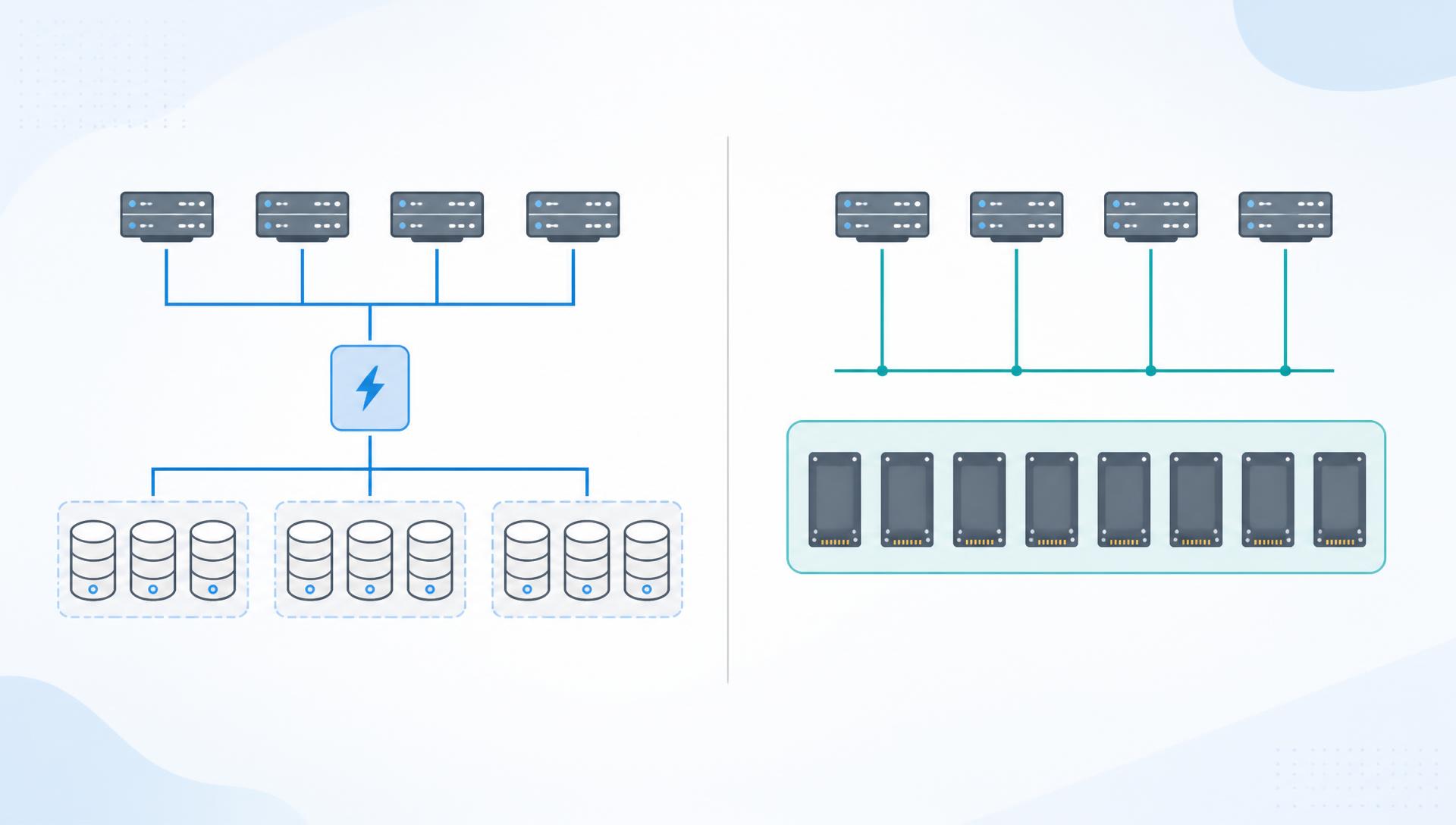
Understand the vSAN ESA storage pool: how it groups NVMe SSDs, differences from OSA disk groups, and current ReadyNodes support.
First and Foremost, What is the vSAN ESA?
vSAN ESA is an acronym for Express Storage Architecture.
vSAN Express Storage Architecture, or ESA, is a new vSAN architecture to process and store data. It is an optional or alternative architecture for vSAN. You can already use the Original Storage Architecture (OSA).
vSAN ESA is optimized to exploit the full potential of the latest hardware and unlock new capabilities. At this moment, vSAN ESA is only supported on ReadyNodes servers.
Before talking about some aspects of the storage pool in the vSAN ESA, let’s remember how the vSAN disk group works in the vSAN OSA.
vSAN OSA – Hybrid Disk Group
vSAN hybrid disk group is based on a two-tier architecture: cache tier and capacity tier.
Cache Tier: SSD disks
- 70% used for reads
- 30% used for writes
Capacity Tier: HDD disks
All reads are served from the cache tier and all write operations are acknowledged when they arrive at the cache tier.
Generally, when the write buffer is almost used (~ 30% of usage), the destage process is started moving the data from the cache tier to the capacity tier.
This type of vSAN cluster (Hybrid) requires at least 1 Gbps for network bandwidth (it means that each ESXi host needs to have at least 1 Gbps network connection for the vSAN network).
In the following figure, we can see how a vSAN hybrid disk group works:
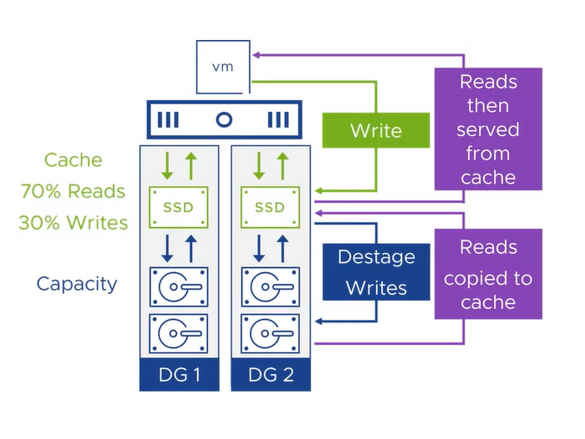
Each ESXi host can have a maximum of 5 disk groups. Each disk group has 1 disk for cache and 1 to 7 disks for capacity.
vSAN OSA – All-Flash Disk Group
In a vSAN All-Flash cluster, we already have the two-tier architecture. However, both tiers are made by SSD devices (SSD or NVMe):
- Cache Tier: SSD
- Capacity Tier: SSD
With an all-flash disk group, all reads are served directly from the capacity tier. The cache tier is allocated 100% for write operations.
This type of vSAN cluster (All-Flash) requires at least 10 Gbps for network bandwidth (each ESXi host must have at least 10 Gbps connection for the vSAN network).
In the following figure, we can see how a vSAN all-flash disk group works:
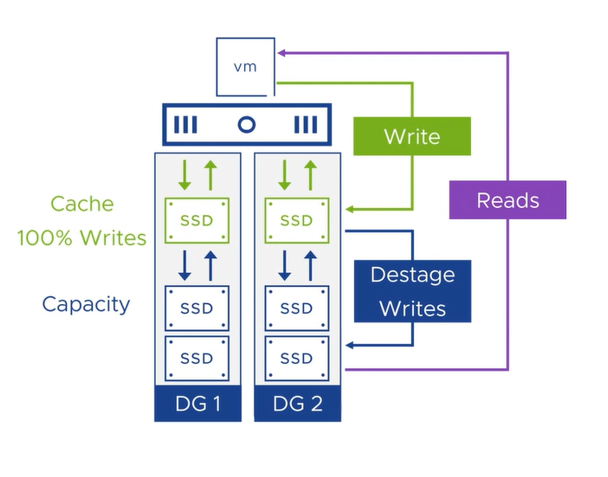
Each ESXi host can have a maximum of 5 disk groups. Each disk group has 1 disk for cache and 1 to 7 disks for capacity.
vSAN ESA – Storage Pool
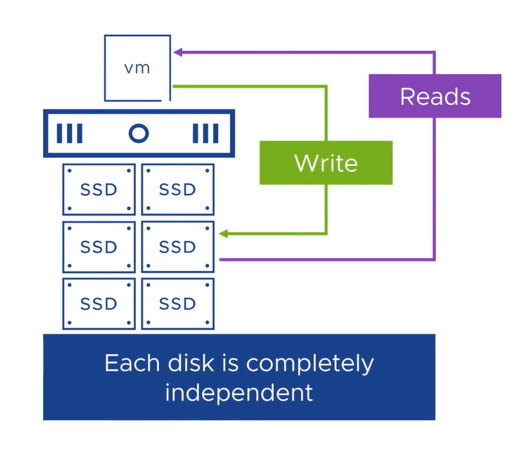
With the vSAN ESA, we did not have the vSAN disk group. All disks are grouped in an entity called a storage pool.
Only all-flash devices (NVMe SSD devices) are supported. The recommendation is to use NVMe TLC devices. In the context of NVMe disks, TLC stands for Triple-Level Cell:
- TLC SSDs write three bits to each cell, allowing for higher storage capacity compared to Single-Level Cell (SLC) and Multi-Level Cell (MLC) SSDs;
- Due to their higher storage density, TLC SSDs generally have a lower cost per bit, making them more affordable than SLC and MLC SSDs;
- When combined with the NVMe protocol, TLC SSDs can offer fast data transfer speeds and reduced latency compared to traditional SSDs using the SATA interface.
Since the storage pool does not have two tiers, each disk in the storage pool is independent.
The number of disk slots defines the maximum number of disks (we have ReadyNodes profiles to select the type of hardware supported by vSAN ESA).
In the following figure we can see how a storage pool works:
Storage Pool Failure Handling
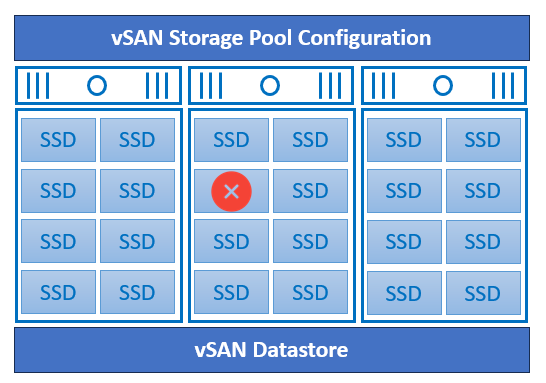
When a disk failure occurs, vSAN ESA uses the defined storage policy to rebuild the missing components on another NVMe SSD disk (failed disk components are rebuilt on other disks automatically, based on their vSAN Storage Policy).
As each disk is independent in a vSAN ESA storage pool, a failure of one disk does not impact other disks in the cluster).
To Wrapping This Up
As we can see, with vSAN ESA we do not have the disk group anymore. However, with the vSAN OSA, the disk group concept continues working normally. With vSAN ESA the storage pool is introduced, only supporting NMVe devices. Because of that, it’s important to understand all vSAN ESA hardware requirements before building your cluster – and not forget – vSAN ESA is currently supported only in vSAN ReadyNodes.
