

Close Menu
DPC Virtual Tips
    Read More

    How to Troubleshoot Packet Drops on an ESXi Host

    August 16, 2026

    SlurmDBD Is Down: What Continues Working and What Does Not

    August 15, 2026

    How to Investigate Jobs Stuck in COMPLETING State on Slurm

    August 14, 2026
    • Home
    • About Us
    • Contact
    • Cookie Policy
    • Comment Policy
    • Privacy Policy
    • Terms of Use
    • Disclaimer
    Tuesday, August 25
    DPC Virtual Tips
    • Home
    • Operating Systems
    • PowerFlex
    • HPC
    • Virtualization
    • About the Author
    • About Us
    • Contact
    DPC Virtual Tips
    Home » Comparing vSAN Architectures OSA x ESA
    Virtualization

    Comparing vSAN Architectures OSA x ESA

    DaniloBy DaniloApril 17, 2024Updated:July 31, 2026No Comments3 Mins Read
    Facebook Twitter Pinterest LinkedIn Tumblr Email
    Share
    Facebook Twitter LinkedIn Pinterest Email

    Comparing vSAN Architectures OSA x ESA is an article comparing both vSAN architectures OSA and ESA.

    First and Foremost, What is vSAN ESA?

    OSA is an acronym for Original Storage Architecture. It is the original vSAN architecture released when vSAN was made. ESA is an acronym for Express Storage Architecture. It is a new vSAN architecture released in November 2022 and introduces many improvements compared with the OSA architecture. However, the ESA will not replace the OSA. Both architectures are available (you can choose what architecture to use):
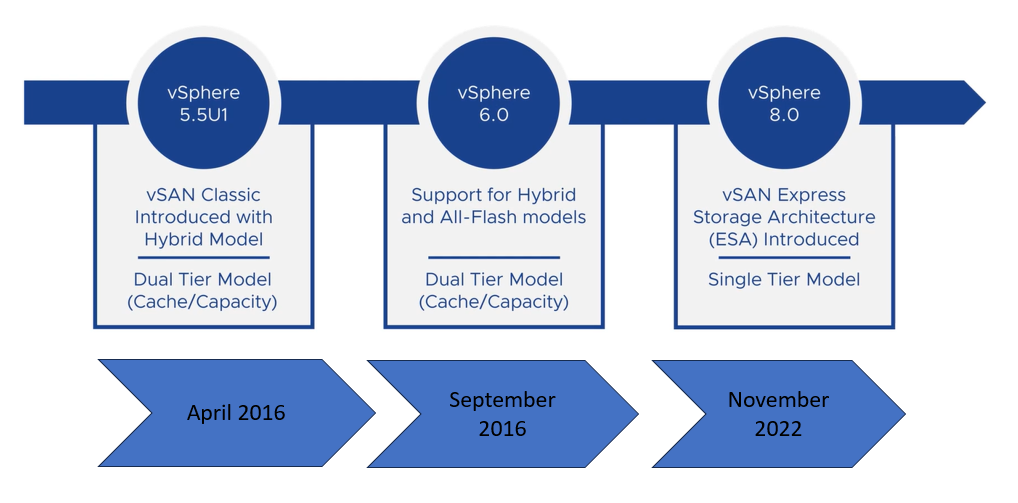
    vSAN Express Storage Architecture, or ESA for short, is a new vSAN architecture to process and store data. It is an optional alternative designed to achieve new levels related to efficiency, scalability, and performance.

    vSAN ESA is optimized to exploit the full potential of the latest hardware and unlock new capabilities. At this moment, vSAN ESA is only supported on ReadyNodes servers. To learn more about vSAN ReadyNodes, please, check the following link:
    https://www.vmware.com/resources/compatibility/vsanesa_profile.php

    Consolidated Comparison Between vSAN Architectures

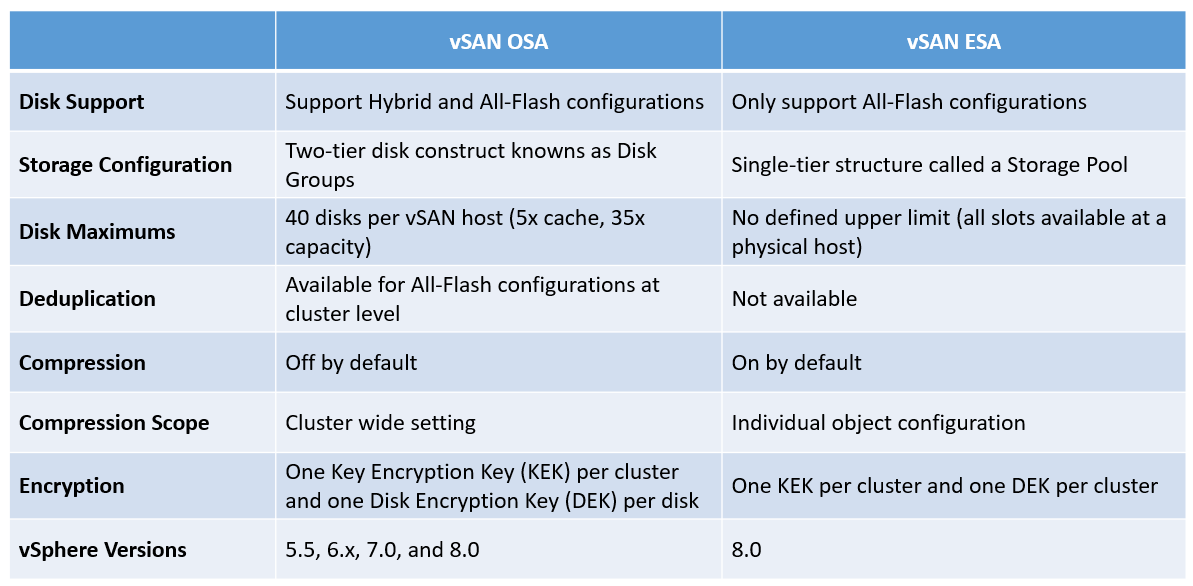
    So, I have created a figure to show a comparison between vSAN OSA and vSAN ESA in a practical way. I want to be clear that we can talk about in a deep way each item described in the following figure, however, the aim here is just to provide a consolidated view for both vSAN architectures:
    The vSAN OSA uses disk groups and vSAN ESA uses a storage pool configuration to manage its devices. In the following figure, we have a vSAN OSA cluster on the left and a vSAN ESA on the right:
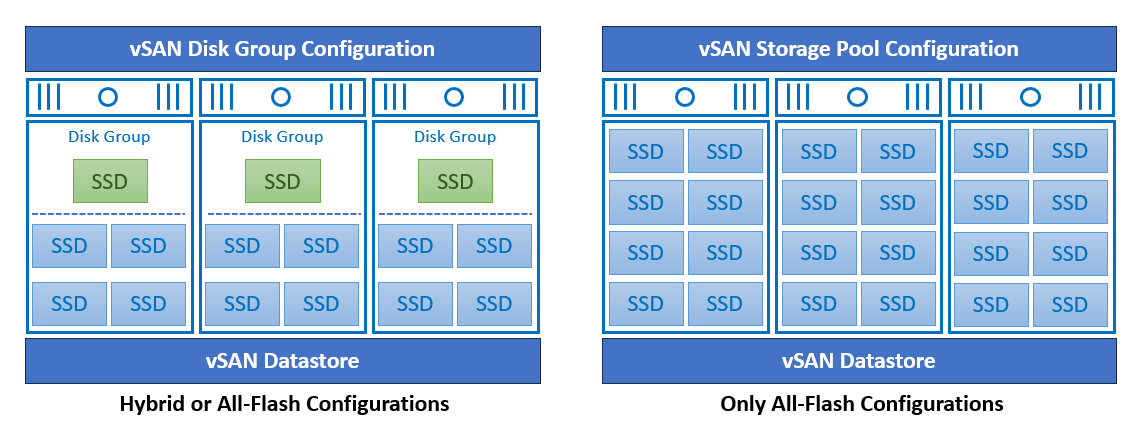
    With a vSAN Original Storage Architecture (OSA) cluster, the disk group is an integrated part of this architecture. Independent of the cluster type (Hybrid or All-Flash), the disk group is part of its architecture. All disk groups work together to create the vSAN datastore.

    Instead of using a disk group, a storage pool is used with a vSAN Express Storage Architecture (ESA) cluster. It is a logical group of disks, working together to create a pool. All hosts in a vSAN ESA cluster can contribute with their storage pool to create the vSAN datastore.

    To Wrapping This Up

    Both vSAN architectures can be used (you can choose OSA or ESA). However, you need to check the hardware requirements for each architecture. A vSAN ESA cluster has specific hardware requirements, so, based on this, you need to check deep it before building your vSAN ESA cluster.

    Share. Facebook Twitter Pinterest LinkedIn Tumblr Email
    Previous ArticleFixing the Stats Primary Election alert on the vSAN ESA Cluster
    Next Article What is a vSAN ESA Storage Pool?
    Danilo

    Infrastructure Engineer with experience in Virtualization, Linux, Windows Server and learning automation using Python. DPC Virtual Tips was created to share practical tutorials, lab experiences and troubleshooting guides focused on enterprise infrastructure technologies.

    Related Posts

    How to Troubleshoot Packet Drops on an ESXi Host

    August 16, 2026

    VM Replication with vSphere Replication and Site Recovery Manager

    June 16, 2025

    Changing DNS Settings on ESXi Hosts

    May 20, 2025

    Comments are closed.

    Search
    Categories
    • HPC (12)
    • Operating Systems (85)
    • PowerFlex (22)
    • Virtualization (130)
    Read More
    Virtualization

    How to Troubleshoot Packet Drops on an ESXi Host

    By DaniloAugust 16, 20260
    HPC

    SlurmDBD Is Down: What Continues Working and What Does Not

    By DaniloAugust 15, 20260
    HPC

    How to Investigate Jobs Stuck in COMPLETING State on Slurm

    By DaniloAugust 14, 20260
    Operating Systems

    Linux Server Has Free Memory but Is Swapping: Why?

    By DaniloAugust 13, 20260
    Operating Systems

    How to Determine Whether Packet Loss Is Local or Network Related on Linux

    By DaniloAugust 12, 20260
    Latest Posts

    How to Troubleshoot Packet Drops on an ESXi Host

    August 16, 2026

    SlurmDBD Is Down: What Continues Working and What Does Not

    August 15, 2026

    How to Investigate Jobs Stuck in COMPLETING State on Slurm

    August 14, 2026
    Images from Gallery
    hpc main commands
    linux commands
    install rock linux
    lustre fs
    shell scripting
    vSAN Trace Files
    Categories
    • HPC
    • Operating Systems
    • PowerFlex
    • Virtualization
    • Home
    • About Us
    • Contact
    • Cookie Policy
    • Comment Policy
    • Privacy Policy
    • Terms of Use
    • Disclaimer
    Copyright © 2026, DPC Virtual Tips. All rights reserved.

    Type above and press Enter to search. Press Esc to cancel.

    We use cookies to ensure your best experience on our website. If you continue using our website, we'll assume you agree to our cookie policy