


The Host Acropolis Command-Line Interface (aCLI) Overview is an article that demonstrates some useful commands for managing Hypervisors in a Nutanix Cluster.
Acropolis includes a command-line interface that allows administrators to manage different Nutanix components, including hosts, networks, snapshots, and virtual machines. Using aCLI can simplify troubleshooting and daily administration tasks in Nutanix environments.
First and foremost, How can I access the Acropolis Command Line?
To access the Acropolis CLI, log on to a Controller VM (CVM). You can choose to log in to any controller VM.
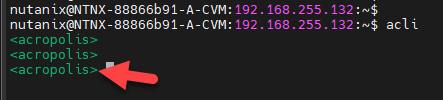
Access it by SSH and type “acli” at the shell command line. You will notice that the command line will be changed to “acropolis” mode, as we can see in the following picture:
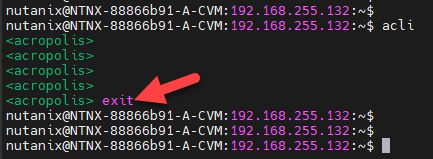
To exit the “acli” mode, type “exit”:
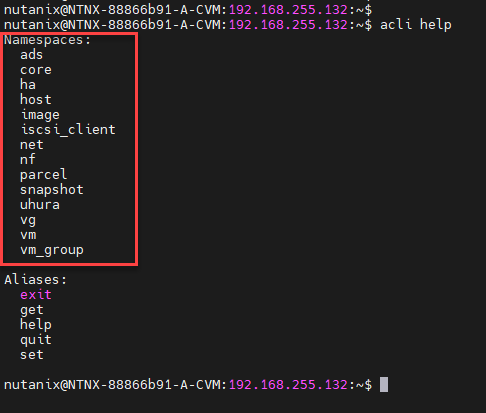
In the “acli” command, there are several “namespaces”. We can understand the “namespaces” as cluster properties or functions to explore. To see all available namespace, we can type “acli help,” as we can see in the following picture:
To get details of each namespace, we highly recommend to the check the following documentation:
Note: This article will show some namespaces with examples. To check the full namespaces and their operations, access the above link!
acli host
The first recommended command is the command to list all hosts in the Nutanix Cluster:
acli host.listIn this case, for instance, our Nutanix Cluster has three AHV hosts. In the command output, we can see many details such as Hypervisor IP, Hypervisor DNS Name, Node state, CVM IP, etc:

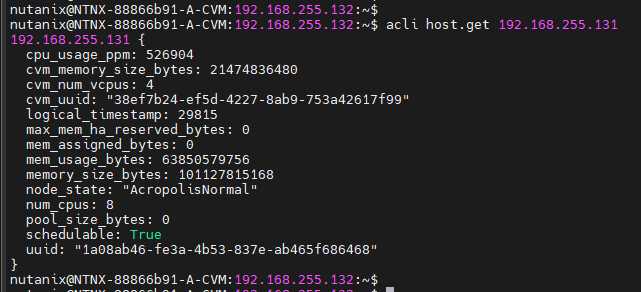
To get details of a specific host:
acli host.get 192.168.255.131Where:
– 192.168.255.131: Hypervisor IP address
After powering on some “Webservers” VMs, we will list all VMs running on each host:
#List all VMs running on the host 192.168.255.131:
acli host.list_vms 192.168.255.131

#List all VMs running on the host 192.168.255.133:
acli host.list_vms 192.168.255.133

#List all VMs running on the host 192.168.255.135:
acli host.list_vms 192.168.255.135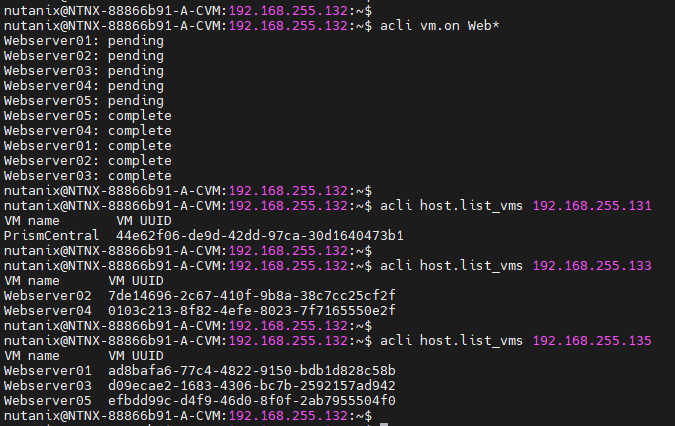
If any maintenance activity on a host is necessary, it is recommended that the specific host be put in maintenance mode first. When a host is in maintenance mode, no VMs will be instantiated.
So, there is a command to check (test only) if a specific host can be put in maintenance mode:
#Testing if the host 192.168.255.131 can be put in maintenance mode:
acli host.enter_maintenance_mode_check 192.168.255.131

#Testing if the host 192.168.255.133 can be put in maintenance mode:
acli host.enter_maintenance_mode_check 192.168.255.133

#Testing if the host 192.168.255.135 can be put in maintenance mode:
acli host.enter_maintenance_mode_check 192.168.255.135
In this case, for instance, each host can be put in maintenance mode because each command gave us the following output:
Ok to enter maintenance mode.
If you have a different output, analyze it before putting the host in maintenance mode:

To put a specific host in maintenance mode – This task can take several times depending on the number of VMs that are running on this host (when we put a host in maintenance mode, the Acropolis Dynamic Scheduling will try to migrate (“live migration”) all running VMs from this host to anywhere in the cluster):
acli host.enter_maintenance_mode 192.168.255.133
The namespace “host.get” can be executed to confirm the host is not able to schedule VMs:
acli host.get 192.168.255.133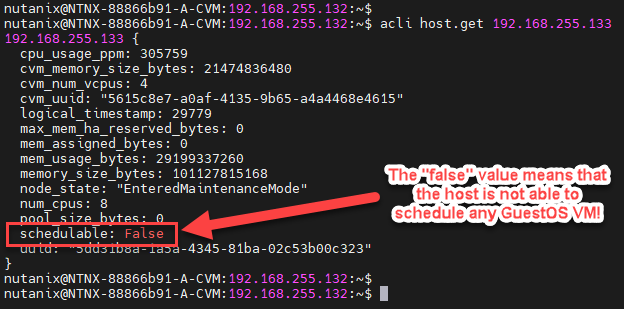
We can see the same detail with “host.list” namespace:

To remove the host from maintenance mode:
acli host.exit_maintenance_mode 192.168.255.133
To Wrapping This Up
So, the Acropolis Command Line is an essential tool that all Nutanix administrators must know. As we told us before, several “acli” namespaces exist beyond the “host” namespace. As we have been writing this article, we have been using the following link (you can check more operations from the “host” namespace and other namespaces):
